

Key insights:
- Video’s real payoff has no fixed number: independent research (Google-commissioned BCG study, Baymard usability testing) confirms real influence on purchase decisions, not a universal conversion-rate lift you can bank on for your own store.
- Google now gives you three ways to add product video, only one scales: direct upload and the Video assets page are manual, per-product actions. The
video_linkfeed attribute (submission opened April 14, 2026, eligible to serve from June 30, 2026) is the one that plugs into a feed you already automate. - The real risk is mapping, not filming: a video showing the wrong variant, bundle, or discontinued model does more damage to trust than no video at all.
- WP Product Feed Manager already sends
video_link: mapped under “Optional attributes,” it writes straight into your generated feed. - Treat it as a pilot, not a rollout: three to five products, a four-week baseline, judged on incremental profit, not view count.
“Add product video and watch conversions jump 80 percent.” You’ll find that claim, or something close to it, on a dozen ecommerce blogs this year. It usually traces back to a vendor survey dressed up as a fact, and it survives because everyone wants a simple yes.
The honest answer is less exciting and more useful. Product video works when it answers a question your images and copy cannot, and it does nothing when it doesn’t. There is no fixed percentage lift you can bank on for your store.
What actually happened in Google Merchant Center this year deserves the same honesty. In September 2026, Google was reported to have added a direct upload option for product video. That sits alongside two things that already existed: a video aggregation tool called Video assets, and an optional feed attribute called [video_link] that lets you submit video URLs the same way you submit price or GTIN. Almost everything written about the update covers the new upload button. Almost nothing covers the feed attribute, and that’s the one that matters once your catalog is bigger than a handful of products.
What changed in Merchant Center this year
Three separate ways now exist to attach video to a product listing.
The first is a direct upload interface, reported by Search Engine Roundtable on September 11, 2026, after being spotted in the Merchant Center UI. Google hasn’t published an official dated announcement for it, and it isn’t confirmed to be live on every account yet. It lets you upload a video straight to one product at a time.
The second is the Video assets page, which Google already had running. It pulls in video from a connected website, YouTube, Instagram, TikTok, and Product Studio, Google’s AI video generator. You review what it finds and confirm or reject the matched product.
The third is [video_link], an optional attribute in the product feed itself. You can submit up to 10 video URLs per product, the same way you submit any other attribute. Google opened submissions on April 14, 2026, and began technical validation that day. Serving and quality validation didn’t start until June 30, 2026, so a video submitted in April sat in the system for over two months before Google made it eligible to actually show.
That gap matters for a simple reason. The first two options are manual, one product at a time. The third is the only one that plugs into a feed you already generate automatically. Upload a handful of videos by hand if that’s all you have. Past that, [video_link] is what you actually want.

Is video worth it for your store
Before you touch any of this, ask the more basic question: does product video help your store, specifically?
Google-commissioned research from BCG surveyed just over 10,000 US shoppers about how digital video shaped what they bought. Among shoppers who said digital video played a role in their purchase journey, a YouTube ad, a social clip, or a product page video, all counted together, 43 percent said it created interest in a product, 45 percent said it helped them choose between products or brands, and 34 percent said it prompted them to buy a specific item. That study measures digital video broadly, not on-page product demonstration video specifically, so treat it as evidence that video shapes buying decisions in general, not as proof for your own product page. It’s real influence. It isn’t a conversion-rate benchmark you can apply directly.
Baymard’s usability testing found that 41 percent of test participants watched a product video when one was available on the page. Most of the rest skipped it, and separately, Baymard’s benchmarking found that roughly a third of major ecommerce sites place their videos poorly enough that many shoppers won’t even find them.
The numbers quoted elsewhere, 65 percent higher conversion, 80 percent lift, twice as likely to buy, mostly trace back to vendor surveys or case studies on a handful of best-selling products. Stores tend to film video for their strongest sellers first, and those already convert better than average. That’s selection bias, not proof the video did the work.
Video earns its cost fastest on products with a real information gap: clothing and footwear where fit matters, furniture where scale and texture are hard to judge from a photo, tools and appliances with moving parts, anything with assembly, anything customers return because it wasn’t what they expected. It earns its cost slowest on simple, familiar products that one or two good photos already explain.
A rough example. A product doing 1,000 page visits a month at a 2 percent conversion rate and a 40 euro margin per order generates 800 euros a month in contribution margin. A 200 euro video that lifts conversion by a relative 10 percent adds roughly 80 euros a month, so it pays for itself in about two and a half months. The same video on a page getting 100 visits a month barely moves the needle. Traffic and margin decide the answer before the video does.
The real risk is mapping, not filming
If the numbers work for a product, the operational risk isn’t shooting the video. A phone is enough if the footage is stable, well lit, in focus, and actually answers a buying question. The risk is keeping the right video attached to the right product as your catalog moves.
None of the current coverage of this Merchant Center update mentions it, but it’s the mistake that actually costs money: a video showing the black version submitted for the white variant, a 500ml bottle shown against a listing for the 250ml size, an included accessory demonstrated on a bundle that doesn’t include it, a video of last year’s model still live after the product changed. A video that misrepresents what a customer is buying does more damage than no video at all, to conversion and to trust.
Before you submit a video, check that it shows the exact model, the exact color, the exact size or bundle, and that it’s tied to the correct product ID, not just the parent product if you’re selling variations. That’s the same discipline that keeps a feed from quietly going stale as your catalog changes.
Getting video into your feed
If you decide video is worth it and you want it to scale past a handful of products, it needs to live in your feed, not in a separate upload workflow.
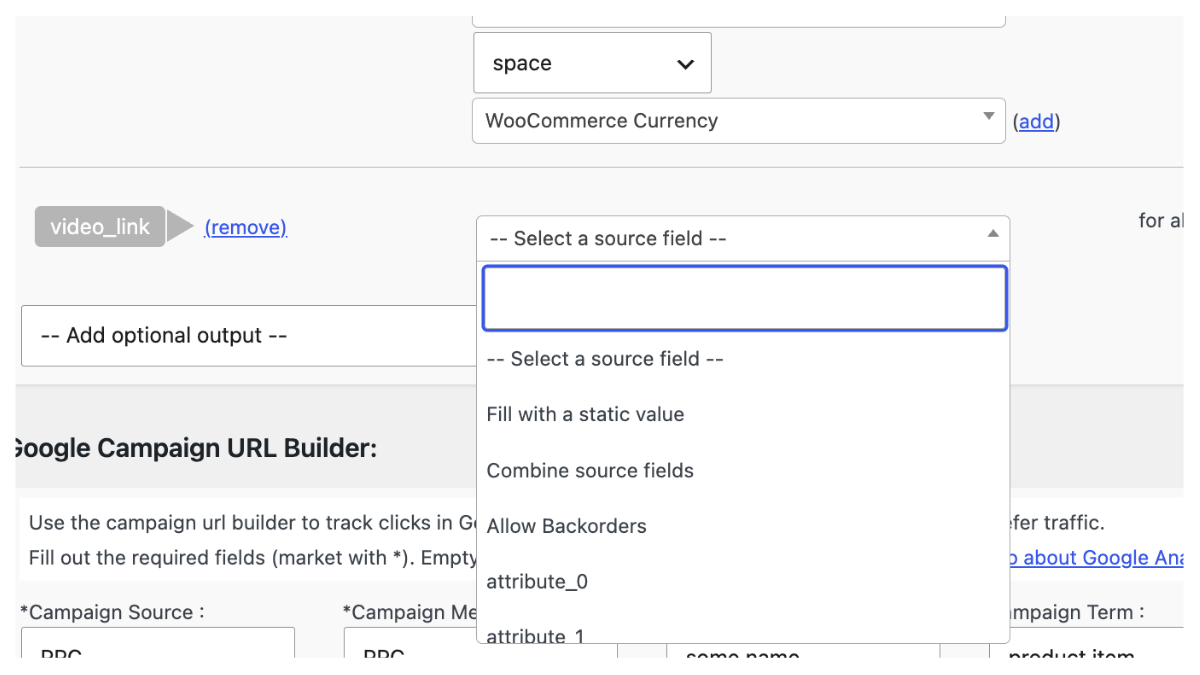
[video_link] is straightforward. The URL has to start with http:// or https://. YouTube links work. Any other host has to point straight to the video file itself, not to a page with an embedded player. You can attach up to 10 videos per product, though submitting them doesn’t guarantee Google will display all 10 anywhere, submission and eligibility to show are two different things, as the timeline above shows.
In WP Product Feed Manager, the attribute sits under “Optional attributes” and, once mapped, writes straight into the feed as:
<g:video_link>https://example.com/video1.mp4</g:video_link>That’s the mechanism, confirmed and working today. Exactly how you get a video URL onto a WooCommerce product in the first place, a dedicated field, a custom field, or ACF, depends on your setup, and that’s worth its own follow-up guide rather than a guess here.
Run it as a pilot, not a catalog rollout
Treat this as an experiment on a handful of products, not a rollout across your catalog.
Pick three to five products with real traffic, healthy margin, and a genuine reason video would help. Film 15 to 30 seconds that answers one actual buying question per product. Get at least four weeks of baseline data before you add anything, the same discipline behind testing anything else in your feed.
Once the videos are live, track engagement (play rate, completion rate), commerce (add-to-cart, conversion rate, revenue per visitor, returns), and cost (production time, feed management, cost per additional order). Judge the result by incremental profit, additional margin minus what the video cost to make and maintain, the same way you’d measure ROI anywhere else in your feed, not by how many people watched it. A video with a low play rate can still be worth it if the people who watch it convert. A heavily watched video that changes nothing commercially isn’t.
Expand only once a product has actually earned it.
Where this leaves you
There’s no universal answer to whether your store should add product video. There is a clear answer to how you’d do it properly if you decide to: a handful of well-chosen products, filmed to answer a real question, measured honestly, and submitted through your feed once uploading one video at a time by hand stops making sense.
That’s the real shift in Google’s 2026 update. Not “upload more video.” More options to raise the quality of what’s already in your feed and help a shopper decide faster. If you already have product video, get it working in your feed. If you don’t, check whether the right three or four products would pay it back before you film anything.
If you haven’t set up product feeds for Google yet, that’s the place to start. Our pricing page walks through the tiers, so you can add video and everything else your feed needs from one place.
Frequently asked questions
Are Google Merchant Center product videos actually worth it, or just hype?
It depends on the product. Independent research shows video genuinely influences purchase decisions, but no study supports a fixed conversion-rate lift you can expect on every product page. Test it on a handful of products with a real information gap before rolling it out further.
Do I have to use video_link if I want product video on Google Shopping?
No, it’s optional. You can also let Google find video through the Video assets page if you’ve connected your site or social accounts, or use the manual upload interface. video_link is the option that fits an automated feed.
How many videos can I submit per product?
Up to 10 through video_link. Submitting more doesn’t guarantee Google will show all of them.
Will a video I submit automatically show up in Google Shopping?
No. Submitting a video makes it eligible to show. It doesn’t guarantee placement, impressions, or a specific spot. Google decides what gets shown and where.
Does a product video replace my product images?
No. Usability research recommends showing video alongside your existing images, not instead of them. Most shoppers still check the photos too.
Can I use a YouTube video for video_link?
Yes. If you use another host, the URL has to point straight to the video file, not a page with an embedded player.
Does WP Product Feed Manager support sending video in my feed?
Yes, under “Optional attributes,” mapped to the video_link attribute in your generated feed.