Email marketing is a strategic cornerstone of digital communication and a proven method for fostering business growth. This approach involves sending targeted messages to a specific group of recipients via email and has gained immense popularity across industries due to its ability to promote products, build meaningful customer relationships, and drive both engagement and conversions.
What is Email Marketing and Why is it Crucial?
Email marketing refers to the process of using email as a direct communication tool to connect with an audience, whether to promote products, share updates, or nurture long-term relationships with customers. Unlike many other forms of marketing, email marketing targets individuals who have already shown interest in a brand, ensuring more receptivity and higher engagement.
The importance of email marketing lies in its unique benefits:
Outstanding ROI: Studies consistently show email marketing as one of the most cost-effective strategies, yielding an average return of $36–$42 for every $1 spent. No other method matches this efficiency.
Personalized Communication: By targeting an opt-in audience, businesses can deliver relevant messages—resulting in higher click-through rates and loyalty.
Quantifiable Metrics: Data from email analytics offer businesses insights into audience behavior, enabling precise campaign adjustments.
Website Traffic Generation: Compelling email content can drive significant traffic to websites while encouraging repeat visits from current customers.
Scalability Across Industries: Whether in healthcare, retail, technology, education, or e-commerce, email marketing adapts equally well to varied business needs.
By prioritizing this channel, organizations can establish direct and meaningful interactions with their audience while maximizing their marketing dollar.
Types of Email Marketing Campaigns to Leverage
Understanding various email marketing campaigns can help tailor strategies to audience needs. Different situations call for specific types of campaigns, such as:
Newsletter Campaigns: A periodic delivery of company news, insightful articles, and educational resources to maintain regular communication.
Welcome Emails: First impressions matter, and these initial interactions lay the foundation for future engagement by introducing your brand’s offerings in a personal, welcoming tone.
Lead Nurturing Emails: Strategically designed messages guide potential customers through the sales funnel, offering valuable content, tips, and actionable incentives.
Promotional Emails: Highlight deals, discounts, product launches, or free trials to encourage immediate action.
Transactional Emails: Automated responses to customer actions—such as order confirmations, shipping notifications, and receipt emails—build trust and improve the customer experience.
Re-Engagement Campaigns: Designed to win back subscribers who haven’t interacted with your emails, these campaigns reignite interest through special offers or relevant content.
Seasonal Campaigns: Timely campaigns that align with holidays, seasons, or events—offering exclusive deals or festive greetings.
Survey or Feedback Emails: A direct line to your customers’ opinions, providing invaluable input to refine products or enhance services.
These campaign types can be used across diverse industries. For example, in retail, promotional emails showcasing seasonal trends can boost sales; in education, newsletters can deliver updates about upcoming courses.
Best Practices to Maximize Email Marketing Success
To stand out in crowded inboxes, your campaigns must prioritize precision, creativity, and user-centric design. Adhering to these best practices ensures impactful email marketing:
Focus on Building a Quality Email List: Resist the temptation to purchase email lists. Use clear opt-ins, lead magnets, or valuable gated content to grow an engaged database.
Segment Your Audience: By categorizing your audience based on location, age, preferences, or purchase history, you increase relevancy and create higher-conversion campaigns.
Infuse Personalization into Every Email: Beyond including their names, use what you know about each customer—like past purchases or browsing habits—to craft tailored messages.
Design Catchy and Concise Subject Lines: Catch attention with short, intriguing subject lines under 50 characters. Phrases that inspire curiosity or urgency often perform best.
Ensure Mobile Optimization: With over 60% of emails opened on mobile devices, responsive designs and simple layouts are essential.
Incorporate Strong, Engaging CTAs: Clear and visually striking call-to-action buttons guide consumers toward the desired action.
Experiment with A/B Testing: Test variables like timing, visuals, and phrasing to discover what resonates most with your audience.
Use Analytics for Continuous Improvement: Regularly evaluate metrics—like conversions or engagement rates—to identify strengths and weaknesses in your strategy.
Keep Your List Clean and Systematic: Remove unengaged subscribers periodically to maintain a high sender reputation.
Stay Compliant with Email Marketing Laws: Laws like GDPR, CAN-SPAM, and others protect consumer rights. Respect these regulations to avoid penalties and build trust.
By integrating these practices into healthcare, legal services, or even nonprofits, businesses of all sizes can see long-term results.
Key Metrics Every Campaign Should Track
To evaluate campaign performance objectively, track these essential metrics:
Open Rate: Indicates the effectiveness of your subject line and sender reputation. Aim for a benchmark between 20% and 30%.
Click-Through Rate (CTR): Measures how many recipients clicked on links within the email. Average CTRs hover around 2%–5%, depending on the industry.
Conversion Rate: Tracks recipients who completed a specific goal, be it signing up, purchasing, or downloading; successful rates are often in the 10%–20% range.
Bounce Rate: Reflects the percentage of emails undelivered—keeping this under 2% is critical for sender health.
Unsubscribe Rate: Signals dissatisfaction, so keeping this percentage under 0.5% is ideal.
Consistently monitoring these indicators allows e-commerce brands, finance institutions, and even educational establishments to refine campaigns based on factual trends.
Email Marketing Tools and Platforms for Efficiency
Choosing the right software equips you with the tools necessary for automation, design, and analysis. Popular platforms include:
Mailchimp: Renowned for versatility, it offers intuitive templates, audience segmentation, and automation workflows ideal for small businesses.
Constant Contact: Highly user-friendly with tools specifically built for beginners and small organizations.
HubSpot: Provides seamless CRM integration and advanced personalization options, making it invaluable for B2B marketers.
Salesforce Marketing Cloud: A powerhouse for scaling global email campaigns, it emphasizes enterprise-level analytics.
Campaign Monitor: Specializes in customizable email templates and detailed reporting, often used by creatives and small agencies.
SendGrid: Perfectly suited for developers, it offers robust APIs and scalability for transactional messages.
These tools cater to varied industries, from startups to multinational corporations, ensuring any business can enhance its strategy.
The Emerging Future of Email Marketing
Email marketing continues to evolve at the intersection of creativity and technology. Keeping pace with these trends ensures sustained impact:
AI-Driven Personalization: With advancements in artificial intelligence, emails increasingly adapt content based on recipient behavior in real-time. AI-driven recommendations are particularly transforming industries like retail and hospitality.
Interactive Design Features: From embedded quizzes to virtual try-ons, emails are becoming more engaging and experiential, creating memorable user interactions.
Enhanced Privacy Practices: With data privacy concerns rising, marketers must focus on transparent policies to reassure consumers and remain legislatively compliant.
Omnichannel Marketing Integration: Email no longer operates in isolation; modern campaigns integrate with SMS, social media, and website data for holistic outreach.
As these innovations redefine possibilities, email marketing remains an indispensable tool for marketers in education, healthcare, e-commerce, and beyond.
Organizations that embrace cutting-edge platforms, analytical rigor, and user-first personalization will thrive in a landscape that increasingly values authenticity and precision. The path forward is clear—those who adapt now will shape the future of email marketing. The question isn’t whether email marketing is worth it, but how creatively and effectively businesses can leverage it to stay ahead.
A call-to-action (CTA) serves as a crucial component of online marketing, acting as a powerful prompt designed to encourage users to take specific actions—whether on websites, emails, social media, or digital advertisements. Common examples of CTAs include directives like “Buy Now,” “Subscribe,” “Download,” “Sign Up,” and “Learn More.” These compact yet influential elements offer strategic guidance, leading potential customers through the sales funnel and ultimately enhancing conversion rates. Effective CTAs are not only about asking users to act; they are about inspiring action by fostering engagement and delivering clear value.
Why Are CTAs Important For Conversion Optimization?
CTAs do far more than simply direct traffic—they play an integral role in optimizing user experience and maximizing conversions. Businesses across various industries can leverage CTAs to bolster engagement and business growth. Here’s a closer look at their key functions:
Encourage Action: CTAs motivate users to perform desired actions, whether it’s completing a purchase in e-commerce, booking an appointment in healthcare, or registering for an event in education.
Promote Interaction: They facilitate meaningful interactions, keeping users connected to your website or content by providing clear next steps, such as downloading a whitepaper or scheduling a consultation.
Guide the User Journey: CTAs serve as signposts in the user’s journey, directing potential customers logically through the conversion funnel—whether navigating a subscription model or exploring service tiers.
Communicate Value: A great CTA explicitly highlights the value users gain, such as exclusive discounts, free trials, or expert insights, ensuring the benefit of acting is always clear.
Impact Conversion Rates: Businesses that invest in CTA optimization often see dramatic improvements in conversion metrics—from filling out forms to boosting e-commerce transactions.
Across industries like retail, finance, legal services, and technology, CTAs remain essential tools for driving sales and scaling growth, offering measurable returns when crafted effectively.
Best Practices for Crafting High-Performing CTAs
To unlock the full potential of CTAs, follow these core principles for design, messaging, and placement.
1. Use Action-Oriented Language
Strong, actionable language sets the tone for urgency and purpose. Verbs like “Download,” “Start,” “Discover,” and “Join” are clear and compelling. For example:
“Download Your Free Report”
“Discover How We Can Help”
“Join Our Community Today”
2. Create a Sense of Urgency
Encourage immediate action by incorporating time-sensitive phrasing. Adding words like “Now” or “Limited Time” can create psychological motivation:
“Shop the Sale—Limited Time Only!”
“Claim Your Offer Before It’s Gone”
Urgency-specific CTAs are especially impactful for industries such as retail, travel, or event management, where timing can drive significant results.
3. Highlight Value Propositions
An effective CTA communicates “what’s in it for the user.” Make the payoff enticing and specific:
“Save 20% Instantly”
“Get Exclusive Content for Free”
“Unlock Premium Features Today”
Healthcare providers, for example, can entice users with free consultations, while educational institutions may highlight free learning resources to pique interest.
4. Make CTAs Visually Prominent
Design is just as important as the message when it comes to ensuring CTAs get noticed. Use these visual cues to make CTAs stand out:
Vibrant, contrasting button colors (e.g., orange on a blue background)
Ample padding and white space for readability
Clear, bold fonts that grab attention
Ensure the button size is large enough for easy clicking, especially for mobile users.
5. Place CTAs Strategically
Position is everything. Effective CTA placement depends on user behavior and content structure:
Place core CTAs above the fold to capture immediate attention.
Include secondary CTAs mid-content for engaged audiences.
Use exit-intent popups as visitors navigate away.
For e-commerce websites, positioning “Add to Cart” near product descriptions ensures high visibility. Similarly, SaaS platforms might highlight CTAs such as “Start Free Trial” on landing pages.
6. Avoid Overloading with CTAs
While multiple CTAs can improve visibility on long pages, oversaturating users with choices can overwhelm them. Maintain a balance by limiting key CTAs to one clear action per page section.
7. Personalize and Segment CTAs
Personalized CTAs drive higher engagement by catering to the user’s preferences, demographics, location, or buying journey.
E.g., “Continue Where You Left Off” for returning users.
Whether in retail or education, segmenting CTAs for existing vs. new users enhances relevance.
8. Leverage A/B Testing
CTA performance is deeply tied to factors like text, colors, or placement—and A/B testing helps refine these elements. Test variations such as:
“Sign Up Today” vs. “Join Us for Free”
Button placement at the header vs. footer
Red buttons vs. green buttons
Marketing teams across industries, from finance to entertainment, can leverage A/B tests to boost user engagement metrics.
Advanced CTA Optimization Strategies
Going beyond basic practices, businesses can unlock additional performance improvements through these advanced tactics:
Prioritize button CTAs over hyperlinked text for visibility and ease of use.
Optimize for mobile-first users by simplifying design and increasing button tap size.
Use supporting text to provide context (e.g., “No credit card required”).
Incorporate emotional triggers like exclusivity (“Only for Members”) to appeal to audience sentiments.
Align CTA wording with the visitor’s intent and stage in the buyer’s journey for a tailored user experience.
Sectors like healthcare and environmental science, for example, could deploy “Learn More About Our Impact” as an informative, trust-building CTA, while B2B websites may opt for “Request a Free Quote Today.”
Measuring CTA Effectiveness: Key Metrics to Track
Effective CTA performance isn’t just intuitive; it’s measurable. Monitor these metrics to fine-tune your strategies:
Click-Through Rate (CTR): Percentage of users who click a CTA out of those who see it, providing direct insight into its appeal.
Conversion Rate: Measures how often clicks lead to the desired action, such as a sale or sign-up.
Engagement Metrics: Tools like heatmaps can reveal user interaction with CTAs, including scroll patterns and click areas.
A/B Testing Data: Testing multiple variants helps identify which design, text, or placement works best.
Platforms like Google Analytics or specialized tools such as Crazy Egg and Hotjar empower businesses to track and optimize CTA performance effectively. In finance, for instance, tracking user clicks on “Get a Free Consultation” provides actionable data for targeted marketing campaigns.
Real-World Examples of Winning CTAs
Take inspiration from some of the most effective CTAs in real-world campaigns:
Netflix: “Join Free for a Month” immediately communicates zero risk and high value.
Spotify: “Get Spotify Free” emphasizes affordability while removing barriers to entry.
Dropbox: “Sign up for Free” appeals directly to users seeking convenience.
Amazon: “Add to Cart” is prominently positioned to streamline purchases.
HubSpot: “Get Started” eliminates hesitation by making the first action accessible and engaging.
From tech giants to retail platforms, these examples demonstrate how clear and enticing CTAs can be game-changing for customer acquisition.
Conclusion: The Role of CTAs in a Competitive Landscape
Call-to-actions are more than just clickable phrases—they are strategic tools that influence decisions, improve engagement, and drive growth. By applying actionable best practices, crafting visually compelling designs, and tracking performance rigorously, organizations can unlock new levels of success in today’s competitive digital landscape.
Looking ahead, the future calls for dynamic, AI-driven CTA personalizations and instant responsiveness across all digital touchpoints. Businesses that continuously evolve their CTA strategies will not simply adapt but thrive. The challenge is clear: How will you empower your CTAs to transform user engagement into meaningful results? The first step starts now—refine your CTAs and propel your business forward.
For e-commerce entrepreneurs and digital marketers, mastering the 4 Ps of Marketing—Product, Price, Place, and Promotion—can be a game-changer in building a robust marketing strategy. Initially conceptualized by E. Jerome McCarthy in the 1960s, this timeless framework remains a cornerstone of effective marketing strategies across various industries. Understanding and applying these elements to your online business can enhance your ability to attract, engage, and retain customers. Let’s delve into each component and its practical applications in today’s dynamic e-commerce landscape.
Product: What Are You Offering?
At the heart of any marketing strategy lies your product. It is more than the physical item or service you sell—it includes the overall customer experience, functionality, aesthetic appeal, and the value it provides to your audience. How effectively your product meets the needs of your customers can make or break your business. To ensure success, consider these critical aspects:
Features and Innovation: What sets your product apart? Focus on unique features, design innovation, and differentiation that can captivate your target customers.
Addressing Needs: Identify how your product alleviates pain points, fulfills desires, or provides tangible benefits to your audience.
Value Proposition: Clearly communicate what makes your offering superior—be it quality, innovation, functionality, or service.
User Experience (UX): A streamlined and engaging user experience can significantly enhance customer satisfaction, fostering positive reviews and repeat purchases.
Example in Action:
Apple’s iconic iPhone epitomizes stellar product strategy. By integrating cutting-edge technology, sleek design, and intuitive usability, it creates a product that resonates deeply with consumers seeking premium communication and multimedia solutions.
Price: How Much Will Customers Pay?
Price is more than just a number—it reflects your product’s value and greatly influences its market positioning. Employing a strategic pricing approach ensures profitability while simultaneously appealing to your audience. Here are essential considerations:
Costing and Margins: Determine a price that accounts for production costs, operational expenses, and profitability without alienating your audience.
Competitive Benchmarking: Study similar products in the market. Will you compete on affordability, premium quality, or niche positioning?
Perceived Value: Align your pricing strategy with how customers view your offering. Premium pricing can complement high-quality, unique products.
Flexible Pricing Models: Utilize innovative pricing structures such as tiered pricing, subscription services, or bundled offers to cater to diverse customer preferences.
Example in Action:
Netflix showcases flexibility through its tiered subscription plans, enabling users to choose options that align with their viewing habits and budgets. This pricing model accommodates a diverse audience while maximizing revenue.
Place: Where Will Customers Find You?
Place pertains to your distribution strategy—how and where customers can purchase your product. A well-optimized placement strategy ensures your product is readily available to your audience, both online and offline. Key factors include:
Distribution Channels: Decide on selling directly through your website, leveraging marketplaces like Amazon, or partnering with physical retailers.
Geographic Reach: E-commerce allows businesses to transcend borders, but geographic considerations such as shipping costs and delivery timelines still matter.
Logistics and Supply Chain: Efficient logistics for inventory management and timely delivery play a crucial role in maintaining a seamless customer experience.
Example in Action:
Amazon’s dominance stems from its impeccable distribution network. By combining global accessibility through its platform with efficient inventory management and optimized delivery services, Amazon caters to customers worldwide with convenience and reliability.
Promotion: How Will You Reach Your Customers?
Promotion is the vehicle through which you communicate with potential customers, build awareness, and drive conversions. From compelling storytelling to data-driven campaigns, effective promotion ensures your product reaches the right target audience. Consider these strategies:
Advertising Channels: Leverage digital methods like search engine optimization (SEO), pay-per-click (PPC) campaigns, and social media ads, alongside traditional advertising as needed.
Influencer Partnerships: Collaborate with influencers who align with your brand values to increase exposure and credibility.
Content Marketing: Deliver meaningful content—blog posts, videos, infographics, or newsletters—that educates and engages your audience.
Social Media Engagement: Use platforms such as Instagram, TikTok, or Facebook to showcase products, interact with customers, and nurture relationships.
Sales Incentives: Offers like discounts, flash sales, and loyalty programs can convert skeptical prospects into loyal customers while boosting immediate revenue.
Example in Action:
Nike’s promotional success lies in its ability to merge storytelling with strategic endorsements. By connecting emotionally through compelling advertising campaigns and partnering with globally recognized athletes, Nike amplifies brand awareness while fostering long-term loyalty.
Adapting the 4 Ps for Modern Marketing
While the foundational 4 Ps remain a trusted framework, evolving marketplaces have led to enhanced models to account for changing demands:
The 7 Ps include additional elements like People (customer service), Process (efficient operations), and Physical Evidence (visual or tangible proof of quality), broadening the scope for service-oriented industries.
The 4 Cs, on the other hand, shift the focus to Customer, Cost, Convenience, and Communication, emphasizing a customer-centric approach that captures buyer preferences and behaviors.
Applying the 4 Ps to Your Business Strategy
Integrating the 4 Ps into your marketing plan requires precision, analysis, and consistent refinement. Follow these steps to maximize impact:
Deeply Understand Your Audience: Conduct market research to define customer preferences, needs, and behaviors. Knowledge of your target demographic is crucial for tailoring every element of the 4 Ps effectively.
Achieve Cohesion Across the 4 Ps: Ensure your product, pricing strategy, distribution methods, and promotional activities align to form a unified brand narrative.
Monitor and Adapt: The landscape of e-commerce is continuously evolving, so periodically review and refine each P in response to market trends, customer feedback, and technological advancements.
Interconnect Key Elements: Recognize how changes in one aspect can ripple across others. Adjusting pricing, for instance, might demand an accompanying change in promotional messaging to maintain customer trust and engagement.
Strategic Insights for the Future
Looking ahead, businesses must anticipate the integration of data analytics and technology into traditional marketing frameworks. Advanced customer insights powered by machine learning, AI-driven personalization, and agile adaptation to market trends will define the success of e-commerce ventures in the years to come. Companies that align their 4 Ps strategy with emerging tools and customer-centric innovation will not just survive but dominate in competitive markets.
The 4 Ps of Marketing remain as relevant today as when first introduced. By continuously refining each element and strategically aligning them for your e-commerce business, you can foster resilience, boost profitability, and build a loyal customer base. It’s time to evaluate where you stand, embrace the potential of this evergreen framework, and execute with excellence for sustained success.
https://www.wpmarketingrobot.com/system/wp-content/uploads/2025/03/pexels-fauxels-3184292-scaled.jpg14402560Aukehttps://www.wpmarketingrobot.com/system/wp-content/uploads/2024/12/wpmr-logo-website-1.svgAuke2025-03-05 09:11:272025-03-06 17:24:574 Ps of Marketing
A value proposition is a cornerstone of any effective marketing strategy, especially in the dynamic arenas of e-commerce and online marketing. It succinctly communicates why customers should choose a particular product or service over competitors’ offerings. When crafted skillfully, a strong value proposition not only differentiates a brand in a competitive market but also establishes a unique position that resonates with target audiences.
What is a Value Proposition?
A value proposition is a concise, clear statement that highlights the core benefits and distinct features of a product or service. Its primary function is to address a customer’s specific needs or solve their pain points, offering a compelling reason to engage with a business. Beyond attracting potential customers, an effective value proposition also reinforces customer loyalty by reminding them why their choice was the right one.
When crafted correctly, a value proposition becomes central to a company’s marketing, sales, and branding—acting as the foundation upon which engagement with customers is built.
Why is it Important?
A powerful value proposition is essential for businesses aiming to succeed in today’s fast-paced digital economy. Its importance extends across multiple areas:
Attracting Customers: A well-articulated value proposition piques interest and draws customers by clearly addressing their needs or desires.
Market Differentiation: By showcasing what makes the offering unique, it helps the brand stand out in a saturated marketplace.
Driving Conversions and Sales: A compelling value proposition can increase conversion rates by addressing why a product or service is the most suitable solution.
Enhancing Brand Perception: It positions the business as customer-focused, demonstrating an understanding of and commitment to solving specific pain points.
Whether you’re a tech startup, an educational institution, or an e-commerce retailer, your value proposition determines the initial impression and persuasive power of your brand.
Key Components of a Value Proposition
Developing an impactful value proposition requires careful consideration of the following foundational elements:
Target Audience: Clearly define the specific group of customers your product or service serves. Understanding their demographics, behaviors, and preferences ensures your message resonates effectively.
Problem Solved: Identify the challenges or pain points your customers face and show how your offering provides a solution. Customers are more likely to connect with brands that understand their needs.
Unique Benefits: Highlight the distinct advantages of your product or service, focusing on the tangible benefits that enhance your customers’ lives.
Differentiation: Explain how your offering stands out from competitors, whether through innovation, better service, or unmatched quality.
These components collectively create a narrative that communicates your value proposition in a way customers can instantly understand and trust.
Steps to Create an Effective Value Proposition
Crafting a value proposition that resonates deeply with your audience requires a structured approach:
Research and Understand Your Audience
Delve into your target market to gain a deep understanding of their needs, desires, and challenges. Utilize surveys, interviews, and analytics tools to gather insights.
Analyze Your Product or Service
Pinpoint the key features and benefits of your offering. Ask yourself what problems it solves, what makes it valuable, and how it improves the customer’s life or work experience.
Evaluate the Competitors
Conduct a competitive analysis to understand how similar products are positioned. Identify gaps or opportunities within your industry that your product can capitalize on.
Craft a Concise and Clear Statement
Use simple, straightforward language to create a compelling message. In 2–3 sentences, summarize why your product or service is ideal for your target audience.
Ensure Visibility
Prominently feature your value proposition on high-impact areas such as your website homepage, product pages, advertisement campaigns, and email marketing. Visibility ensures it reaches the intended audience at critical touchpoints in their decision-making journey.
Frameworks for Crafting a Value Proposition
There are structured frameworks available to help businesses formulate value propositions effectively. These frameworks simplify the process and ensure all key aspects are addressed:
Geoffrey Moore’s Method
“For [target customer] who [needs or wants X], our [product/service] is [category of industry] that [benefits or solves the need].”
Example: For small business owners who struggle with digital marketing, our easy-to-use marketing platform provides affordable, automated tools that drive business growth.
Harvard Business School Approach
Reflect on key questions such as:
What problem does my brand solve?
What job is the customer hiring my brand to do?
Who are my competitors, and what distinguishes us from them?
What value do we bring that competitors cannot?
Answering these questions can provide clarity and precision for your value proposition.
Value Proposition Canvas
A graphical tool that aligns the customer profile (jobs, gains, and pains) with the product’s value map (features, pain relievers, and gain creators). This ensures the proposition addresses real customer concerns effectively.
Examples of Strong Value Propositions
A great value proposition speaks directly to customer needs while remaining simple and memorable. Below are examples from notable companies:
Stripe: “Financial infrastructure to grow your revenue.” (Focuses on growth and ease of managing finances for businesses.)
Skillshare: “Become a pro with thousands of creative classes.” (Highlights self-growth and accessibility to learning.)
Trello: “Trello brings all your tasks, teammates, and tools together.” (Communicates simplicity and team collaboration.)
Wix: “Create a website without limits.” (Centers on empowerment and creative freedom.)
Slack: “Make work life simpler, more pleasant, and more productive.” (Combines ease of use with tangible productivity improvements.)
These statements offer concise, actionable insights about the direct value customers receive—providing clear examples for businesses to emulate.
Best Practices for a Compelling Value Proposition
To maximize the effectiveness of your value proposition, consider the following strategies:
Focus on Benefits, Not Just Features: Customers care more about how a product improves their lives than the technical details behind it.
Use Clear, Jargon-Free Language: Simplicity is key—avoid industry-specific terms that may confuse or alienate your audience.
Quantify the Value: Add specific metrics such as time saved, money earned, or efficiency gained to make the value more tangible and credible.
Iterate Based on Feedback: Use customer insights to continually refine your value proposition. Keep testing what resonates most.
Ensure Alignment with Brand Positioning: Your value proposition must align with your overall messaging and brand identity to maintain consistency and trust.
Beyond E-commerce: Adapting Value Propositions Across Industries
Value propositions are not just restricted to e-commerce or marketing but are critical across various industries:
Healthcare: “Streamline patient care with our advanced diagnostic tools.” (Focuses on improving healthcare outcomes.)
Finance: “Secure, automated tools to simplify portfolio management.” (Offers improved efficiency and reliability.)
Education: “Personalized learning paths to help every student thrive.” (Targets diverse learning needs.)
Legal: “Simplify compliance with automated contract monitoring.” (Promotes workflow efficiency in legal operations.)
Environmental Science: “Reducing carbon footprints through innovative renewable solutions.” (Emphasizes sustainability and long-term impact.)
By tailoring the value proposition to the nuances of your industry, you can enhance its effectiveness.
Final Thoughts
In the fiercely competitive digital landscape, a well-crafted value proposition is a critical differentiator. It not only communicates what your brand stands for but also directly addresses why customers should choose you. Moving forward, businesses must embrace customer-centric approaches to fine-tune their value propositions continually. As industries evolve, those who successfully anticipate customer needs and deliver clear, impactful messaging will lead the way.
Success lies not in merely adopting these principles, but in executing them consistently with innovation and empathy. The future belongs to businesses that value their audiences’ preferences and position their offerings as meaningful solutions in an ever-changing world. Now, the question is—how will your value proposition set you apart?
Curious about how you can grow your WooCommerce store without relying on constant ad spend? Let’s talk about content marketing—a proven strategy that helps you attract, engage, and convert your audience by offering value first. In this guide, we’ll break down what content marketing is, why it’s essential, and how you can start using it today to build trust, drive traffic, and boost sales.
What Is Content Marketing?
Content marketing is the art of creating and sharing valuable content to connect with your audience and guide them toward becoming loyal customers. Unlike traditional advertising that focuses on direct sales pitches, content marketing emphasizes solving problems, answering questions, and delivering value. It’s about building trust and credibility while subtly encouraging your audience to take action.
Key Elements of Content Marketing
To truly understand how content marketing works, let’s break it down into its core components:
Educational or Entertaining Content
Content marketing thrives on creating materials that inform or inspire. Examples include blog posts, videos, podcasts, infographics, and social media updates. For instance, a WooCommerce store selling eco-friendly products might publish blog posts about sustainable living or create tutorials on reducing waste at home.
Consistent Distribution
Producing great content isn’t enough—it needs to reach your audience where they spend their time. This could mean publishing articles on your website, sharing videos on YouTube, or engaging with followers on Instagram. Regularly posting keeps your brand top of mind and builds familiarity.
Audience-First Approach
The most successful content marketing strategies prioritize the needs of the audience over the immediate desire to sell. By addressing their pain points and providing solutions, you earn their trust. For example, brands like Dove create empowering YouTube videos and blog posts that resonate with their audience’s values while subtly reinforcing their brand identity.
How Does Content Marketing Work for E-commerce?
For WooCommerce store owners—whether you’re just starting out or scaling up—content marketing can be a game-changer. Here’s how it fits into your business:
Attracting Traffic
High-quality content optimized for search engines (SEO) brings potential customers to your website organically. For example, a blog post titled “Top 10 Benefits of Organic Skincare” could attract readers who are also potential buyers.
Building Trust
When you consistently provide valuable information, your audience begins to see you as an expert in your niche. This trust translates into higher conversion rates when they’re ready to make a purchase.
Encouraging Repeat Engagement
Engaging content keeps your customers coming back for more. A WooCommerce store could use email newsletters to share new blog posts or product updates, keeping their audience engaged long after the first purchase.
By focusing on these elements, content marketing becomes a powerful strategy to grow your WooCommerce store sustainably while fostering stronger relationships with your audience.
Why Does Your WooCommerce Store Need It?
Running a WooCommerce store can be challenging, especially when you’re trying to stand out in a competitive market. That’s where content marketing steps in—it’s not just a strategy; it’s a lifeline for growing your store sustainably. Whether you’re just starting out or looking to scale, content marketing helps you build trust, improve your online visibility, and drive organic traffic over time. Let’s break down why it’s essential for your success. 1. Build Trust with Potential Customers
Trust is the foundation of any successful e-commerce business. When customers trust your brand, they’re more likely to buy from you—and even better, return for future purchases. Content marketing helps you establish that trust by providing valuable information and showcasing your expertise.
Share blog posts that address common customer questions or concerns. For example, if you sell fitness equipment, write about “How to Choose the Right Home Gym Setup.”
Use video tutorials or how-to guides to demonstrate your products in action. This makes your brand more relatable and credible.
Highlight customer reviews or success stories to show social proof.
By consistently delivering helpful content, you position yourself as an authority in your field and create a connection with your audience.
2. Improve SEO Rankings
Search engine optimization (SEO) is critical for getting your WooCommerce store noticed online. Quality content plays a massive role in improving your rankings on search engines like Google. The higher you rank, the more likely potential customers will find you.
Here’s how content marketing boosts SEO:
Keyword Optimization: Writing blogs or product descriptions with relevant keywords helps search engines understand what your site is about. For example, if you sell handmade candles, using keywords like “eco-friendly soy candles” can attract niche buyers.
Backlinks: Valuable content encourages other websites to link back to yours, which signals credibility to search engines.
Fresh Content: Regularly updating your blog or website keeps it active and signals relevance to search engines.
SEO isn’t just about technical tweaks—it’s about creating meaningful content that aligns with what your audience is searching for.
3. Drive Organic Traffic Over Time
Unlike paid ads that stop working the moment you stop spending, content marketing has long-term benefits. A well-written blog post or an engaging video can continue driving traffic to your store months—or even years—after it’s published.
How does this work?
Evergreen Content: Focus on topics that remain relevant over time, like “Top 10 Tips for Maintaining Leather Shoes” if you sell footwear.
Social Sharing: Great content gets shared on social media platforms, expanding your reach without additional costs.
Email Marketing: Repurpose blog posts or guides into email newsletters to keep driving traffic back to your site.
For example, imagine writing an article titled “The Ultimate Guide to Choosing Organic Skincare Products.” With proper SEO and promotion, this single piece of content could bring consistent traffic from search engines and social shares for months.
Top Benefits of Content Marketing
Content marketing isn’t just a buzzword—it’s a proven strategy that delivers real results for WooCommerce store owners. Whether you’re just starting out or looking to scale your business, content marketing offers powerful benefits that can transform your store’s performance. Let’s explore the top three reasons why it’s worth investing your time and effort.
1. Increases Brand Visibility
In the crowded world of e-commerce, standing out is essential. Content marketing helps your WooCommerce store gain visibility by showcasing your expertise and unique value across multiple platforms. When done right, it ensures your brand is seen by the right people at the right time.
How does it work?
SEO Optimization: Blog posts and product descriptions enriched with relevant keywords help your store rank higher on search engines like Google.
Social Media Sharing: Engaging content gets shared, amplifying your reach and attracting new audiences.
Consistent Presence: Regularly publishing content keeps your brand top of mind for customers.
For example, if you sell handmade jewelry, writing a blog post like “5 Tips for Caring for Your Silver Jewelry” can attract potential buyers while positioning you as an expert in your niche.
2. Boosts Customer Loyalty
Building loyalty isn’t just about offering great products—it’s about creating meaningful connections with your audience. Content marketing helps you nurture these relationships by consistently delivering value.
Here’s how it fosters loyalty:
Educational Resources: Tutorials, guides, and FAQs show customers you care about their needs beyond the sale.
Engagement: Interactive content like polls or Q&A sessions on social media keeps customers involved with your brand.
Personalization: Tailored email newsletters featuring helpful tips or product recommendations make customers feel valued.
For instance, a WooCommerce store selling fitness equipment could create video tutorials on effective workout routines using their products. This not only boosts customer satisfaction but also encourages repeat purchases.
3. Generates Leads Without Heavy Ad Spend
One of the best things about content marketing? It’s cost-effective! Unlike paid ads that require constant investment, high-quality content continues to generate leads long after it’s published.
Why is it so effective?
Evergreen Content: Articles or videos on timeless topics keep attracting traffic over time.
Lead Magnets: Offering free resources like eBooks or checklists in exchange for email addresses helps grow your subscriber list.
Organic Traffic: SEO-friendly content drives visitors to your site without requiring a big advertising budget.
For example, a WooCommerce store selling eco-friendly cleaning products could create a downloadable guide titled “10 Ways to Make Your Home More Sustainable.” This not only attracts environmentally conscious buyers but also builds a database of potential customers for future campaigns.
Examples of Successful E-commerce Strategies
Content marketing isn’t just about theory—it’s about putting ideas into action and seeing real results. Whether you’re writing blog posts, creating videos, or running social media campaigns, there are countless ways to engage your audience and drive sales. Let’s look at some standout examples of how e-commerce brands are using content marketing effectively.
Blog Posts Explaining Product Benefits
Blogs are a fantastic way to educate your audience while subtly promoting your products. By answering common questions or addressing pain points, you can attract organic traffic and build trust.
Examples:
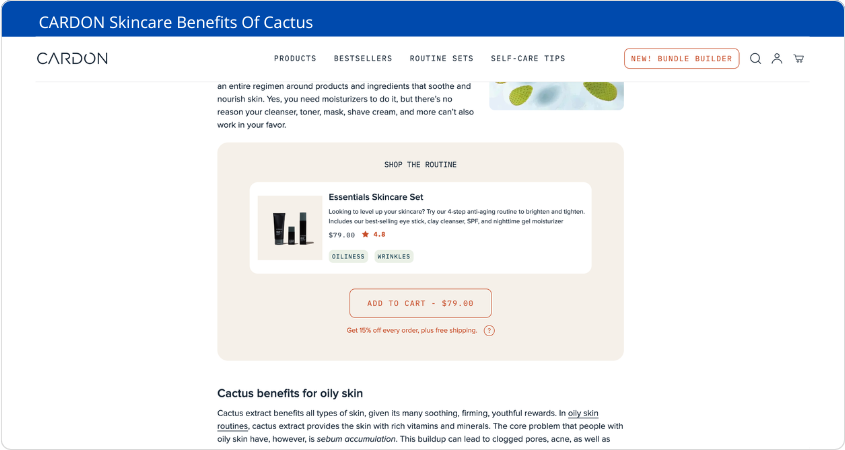
Cardon: This skincare brand uses blog posts like “Skincare Benefits Of Cactus” to educate readers about cactus-based skincare routines while linking directly to their products. Each post includes relevant products, making it simple for readers to take the next step.
Popsmith: Specializing in niche food products, Popsmith shares recipes that incorporate their items. These posts not only inspire customers but also demonstrate how their products can be used in everyday life.
Ned: A supplement brand that publishes health-related blogs, Ned ensures their articles highlight the benefits of their products. By embedding product links throughout the content, they make it easy for readers to shop while learning.
Takeaway: Blogs don’t just inform—they guide potential customers toward a purchase decision by seamlessly integrating product recommendations.
Video Tutorials Showcasing Product Usage
Videos remain one of the most engaging ways to showcase your products, helping customers visualize how they can use them in real life. Tutorials, in particular, are highly effective for educating your audience and addressing their needs. Let’s explore some real-world examples of brands using video tutorials to boost engagement and sales.
Examples:
Dr. Squatch: This men’s skincare brand uses tutorial-style videos to demonstrate how their natural soaps and shampoos are used. Their videos not only highlight the benefits of their products but also provide tips on proper usage, making them relatable and informative for their target audience.
Smart Nora: A brand specializing in anti-snoring devices, Smart Nora creates how-to videos that walk customers through the setup and usage of their product. By clearly explaining features like the snoring sensor and inflatable pillow insert, they make it easy for customers to see the value and functionality of their purchase
Dr. Dennis Gross: A skincare brand that uses customer-centric tutorial videos to explain how to apply their facial serums and other products effectively. These videos are featured on product pages and include before-and-after visuals, helping customers understand the results they can expect.
Video tutorials do more than demonstrate product features—they build trust by showing your audience exactly how your products solve their problems or fit into their lives. By creating clear, engaging tutorials like these brands, you can educate your customers while driving conversions at the same time.
Social Media Campaigns Sharing User-Generated Content (UGC)
User-generated content (UGC) is a goldmine for building trust and engagement. By featuring real customers using your products, you create authenticity that resonates with potential buyers.
Real-Life Examples:
Sephora’s Beauty Insider Community: Sephora’s platform allows users to share beauty tips and photos featuring their favorite products. This UGC is shoppable, making it easy for visitors to explore and purchase items directly from the gallery.
Crocs’ #MyCrocsEra Campaign: Crocs invited fans to share their personal Crocs style on social media. The campaign showcased unique ways customers wear their products, boosting visibility and fostering community engagement.
Lulus Fan Photos: Lulus integrates UGC directly into product pages, displaying customer photos alongside product details. This helps shoppers see how items look in real life, increasing conversions.
UGC not only builds credibility but also turns happy customers into brand advocates who amplify your message.
These examples show how content marketing can be tailored to fit any e-commerce business. Whether through informative blogs, engaging videos, or authentic user-generated content, these strategies prove that connecting with your audience on a deeper level drives both trust and sales. Ready to implement these ideas in your WooCommerce store? The possibilities are endless!
How To Get Started With Your Strategy
Getting started with content marketing may feel overwhelming, but don’t worry—you don’t need to tackle everything at once. The key is to start small, stay consistent, and focus on strategies that align with your WooCommerce store’s goals. In this chapter, we’ll walk you through three essential steps to lay the foundation for a successful content marketing strategy: defining your target audience, creating a content calendar, and optimizing for SEO.
1. Define Your Target Audience Clearly
Before creating any content, you need to know who you’re speaking to. Understanding your target audience ensures your content resonates with the right people and drives meaningful engagement.
How to Define Your Audience:
Demographics: Identify basic details like age, location, gender, and income level. For example, if you sell eco-friendly baby products, your audience might be parents in their 30s looking for sustainable options.
Pain Points: What challenges do your customers face? If you sell fitness gear, they might struggle with finding affordable, high-quality equipment.
Buying Behavior: Are they budget-conscious beginners or experienced shoppers willing to invest in premium products?
Tools You Can Use:
Google Analytics: Analyze visitor data to uncover audience insights.
Customer Surveys: Ask existing customers what they value most about your products.
Social Media Insights: Platforms like Instagram and Facebook provide data on follower demographics and behaviors.
2. Create a Content Calendar with Consistent Posting Schedules
Consistency is key when it comes to content marketing. A content calendar helps you plan ahead, stay organized, and ensure you’re delivering value regularly.
Steps to Build Your Content Calendar:
Choose Your Channels: Decide where you’ll publish your content—blog posts, YouTube videos, Instagram reels, or email newsletters.
Set a Schedule: Start with a realistic frequency. For example:
Weekly blog posts
Bi-weekly email newsletters
Daily Instagram stories or posts
Plan Seasonal Content: Align your topics with holidays or trends relevant to your niche. For instance, if you sell winter apparel, focus on “Top Winter Fashion Trends” during the colder months.
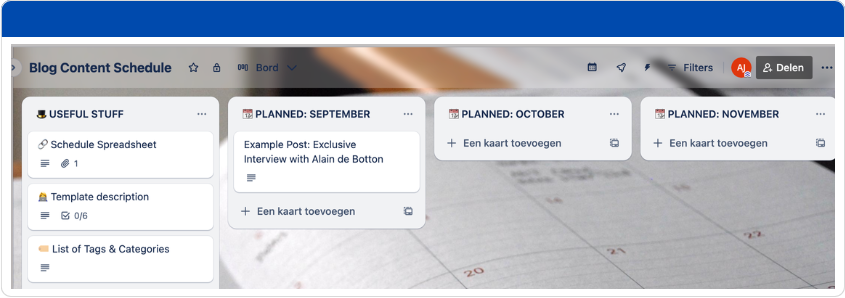
Pro Tip: Use tools like Trello or Google Sheets to organize your calendar. You can also repurpose one piece of content across multiple platforms—for example, turning a blog post into an Instagram carousel or an email newsletter.
A well-maintained calendar ensures you’re consistently engaging your audience without scrambling for ideas at the last minute.
3. Focus on SEO-Friendly Blog Posts and Product Pages
SEO (Search Engine Optimization) is the backbone of content marketing—it helps potential customers find your WooCommerce store organically through search engines like Google. By focusing on SEO-friendly practices, you can drive traffic without relying heavily on paid ads.
SEO Tips for Blog Posts:
Keyword Research: Use tools like SEMrush or Google Keyword Planner to find relevant keywords for your niche. For example, if you sell handmade candles, target phrases like “best soy candles” or “eco-friendly candles.”
Optimize Headlines and Meta Descriptions: Write compelling titles that include keywords and entice readers to click.
Internal Linking: Link blog posts to relevant product pages or other articles on your site to keep visitors engaged longer.
SEO Tips for Product Pages:
Write detailed product descriptions that highlight benefits and include keywords naturally.
Add high-quality images with descriptive alt text for better visibility in image searches.
Use structured data (schema markup) to enhance how your products appear in search results.
For example, if you sell organic skincare products, a blog post titled “5 Benefits of Organic Skincare” can link directly to product pages for specific items mentioned in the article. This not only improves SEO but also guides readers toward making a purchase.
By defining your audience clearly, sticking to a consistent posting schedule, and focusing on SEO-friendly practices, you’ll set yourself up for success in content marketing. Remember—start small and build momentum as you go! Each piece of content is an opportunity to connect with potential customers and grow your WooCommerce store over time.
Key Takeaways
Content marketing is a game-changer for WooCommerce store owners, offering a sustainable way to grow your business while building meaningful connections with your audience. Let’s recap the key lessons from this guide to ensure you’re ready to put these strategies into action.
1. Understand What Content Marketing Means and Its Importance
Content marketing is all about creating valuable, relevant content that solves problems, answers questions, and builds trust with your audience. By focusing on their needs first, you position your brand as a helpful resource rather than just another store trying to sell something. This approach not only attracts potential customers but also fosters loyalty over time.
2. Learn How It Drives Traffic, Trust, and Sales Over Time
Unlike paid ads that stop working the moment you stop spending, content marketing delivers long-term benefits.
Traffic: SEO-optimized blog posts and product pages drive organic traffic to your site.
Trust: Educational content builds credibility and positions you as an expert in your niche.
Sales: By addressing customer pain points and showcasing how your products solve their problems, content naturally leads to conversions.
For example, a blog post explaining the benefits of your products can rank on Google for months, consistently bringing in new visitors who are already interested in what you offer.
3. Start Small by Creating Blogs or Videos Tailored to Your Audience
You don’t need to do everything at once! Begin by focusing on one type of content that resonates most with your target audience.
Write blogs that answer common questions or highlight product benefits.
Create short video tutorials demonstrating how to use your products.
Share user-generated content on social media to build authenticity and engagement.
For instance, if you sell kitchen gadgets, start with a blog post like “5 Must-Have Tools for Every Home Chef” or a quick video showing how to use your best-selling item.
By understanding the basics of content marketing, recognizing its long-term value, and starting small with focused efforts, you’ll be well on your way to creating a strategy that grows your WooCommerce store sustainably. Remember—every piece of content is an opportunity to connect with your audience and move closer to success!
Looking Ahead
This guide has covered the basics of content marketing, but there’s always more to explore. In upcoming articles, we’ll dive into advanced tactics like building email funnels to nurture leads and using influencer partnerships to improve your brand’s reach. These strategies will take your WooCommerce store’s growth to the next level—so stay tuned for actionable insights you can implement right away.
Final Thoughts
Content marketing is more than just a strategy—it’s a mindset focused on delivering value and building relationships with your audience. By starting small and staying consistent, you’re setting the foundation for long-term success in your WooCommerce store. Remember, every blog post, video, or social media campaign is a step toward creating a brand that people trust and love. Keep going—you’ve got this!
https://www.wpmarketingrobot.com/system/wp-content/uploads/2025/02/what-is-content-marketing.png298845Aukehttps://www.wpmarketingrobot.com/system/wp-content/uploads/2024/12/wpmr-logo-website-1.svgAuke2025-02-26 16:53:092025-03-12 09:12:54What is Content Marketing A Beginner’s Guide to Success
Running an eCommerce store is exciting, but maintaining consistent sales growth can be challenging. Success hinges on understanding core marketing principles, such as identifying your target audience, developing a compelling value proposition, and positioning your products strategically.
In this guide, we share 25 powerful strategies to help you increase traffic, optimize conversions, and grow your revenue. Whether you’re launching a new store or looking to scale, these tactics will enhance your success by leveraging essential marketing strategies effectively.
1. Define Your Niche and Target Audience
Defining your niche and identifying your target audience is crucial for building a successful eCommerce store. A well-defined niche allows you to stand out from competitors, attract the right customers, and tailor your marketing efforts for maximum effectiveness.
Why It Matters:
Increases Relevance: Targeting a specific audience enables you to craft messages and products that strongly resonate with potential buyers.
Enhances Marketing Efficiency: Focused marketing efforts reduce wasted ad spend and improve conversion rates.
Builds Customer Loyalty: A clearly defined audience fosters stronger relationships, leading to repeat purchases and long-term trust.
Improves Competitive Advantage: Understanding your niche positions your brand uniquely in the market and helps differentiate you from competitors.
Refer to steps 1 and 2 of 16 Strategic Questions to refine your niche and target audience. By narrowing your focus and gaining deeper insights into your customers, you can create a compelling brand, develop tailored products, and drive higher sales in your webshop.
2. Value Proposition
Your value proposition is the foundation of your brand’s success. It defines why customers should choose your product over competitors. A strong value proposition clearly communicates the benefits, unique features, and the problems your product solves.
How to Uncover Your Value Proposition:
Identify Key Benefits: What core problems does your product solve for your customers?
Differentiate from Competitors: What makes your brand unique in the marketplace?
Connect Emotionally: How does your product enhance your customers’ lives?
Test and Refine: Gather feedback, conduct surveys, and analyze customer behavior to sharpen your messaging.
Communicating Your Value Everywhere:
Your value proposition should be consistently showcased across all platforms, including:
Homepage and Landing Pages: Make it the first thing visitors see.
Product Descriptions: Reinforce your unique selling points.
Marketing Campaigns: Ensure messaging is aligned across email, social media, and ads.
Customer Service Interactions: Train support teams to emphasize key benefits when assisting customers.
A well-defined value proposition builds trust, strengthens brand identity, and drives conversions.
3. Use High-Quality Product Images and Descriptions
Use high-resolution photos from multiple angles to showcase product details, texture, and quality. High-quality images build trust and credibility, reducing uncertainty for potential buyers. Consider using lifestyle images to demonstrate the product in real-world scenarios, helping customers visualize how it fits into their lives. Providing zoom-in features and 360-degree views can further enhance customer confidence, ultimately increasing conversion rates and lowering return rates.
4. Offer Discounts and Special Promotions
Offering discounts and special promotions is an effective way to boost sales by attracting new customers and encouraging repeat purchases. Create limited-time offers to drive urgency and prompt hesitant buyers to take action. Implement a loyalty rewards program to incentivize repeat purchases and build customer loyalty. Use abandoned cart discounts to recover lost sales by reminding customers of their interest and giving them a reason to complete their purchase. Additionally, consider bundling products at a discount, running seasonal sales, and leveraging exclusive deals for newsletter subscribers to maintain customer engagement and increase overall revenue.
5. Implement an Effective SEO Strategy
Implementing an effective SEO strategy is crucial for increasing visibility and driving organic traffic to your webshop. Conduct thorough keyword research for product pages to ensure you are targeting the terms your potential customers are searching for. Optimize meta descriptions and alt text with relevant keywords to improve search rankings and enhance user experience. Build backlinks through guest blogging and collaborations to establish credibility and improve domain authority. Regularly update and optimize your website’s content, including blog posts and product descriptions, to stay relevant in search results. A well-executed SEO strategy helps drive consistent traffic, reduces reliance on paid ads, and ultimately increases sales.
6. Use Paid Advertising to Drive Targeted Traffic
Run Facebook and Instagram ads for high-converting audiences by using detailed audience targeting, compelling ad creatives, and engaging copy that highlights product benefits. A/B testing different ad formats can help determine what resonates most with your audience.
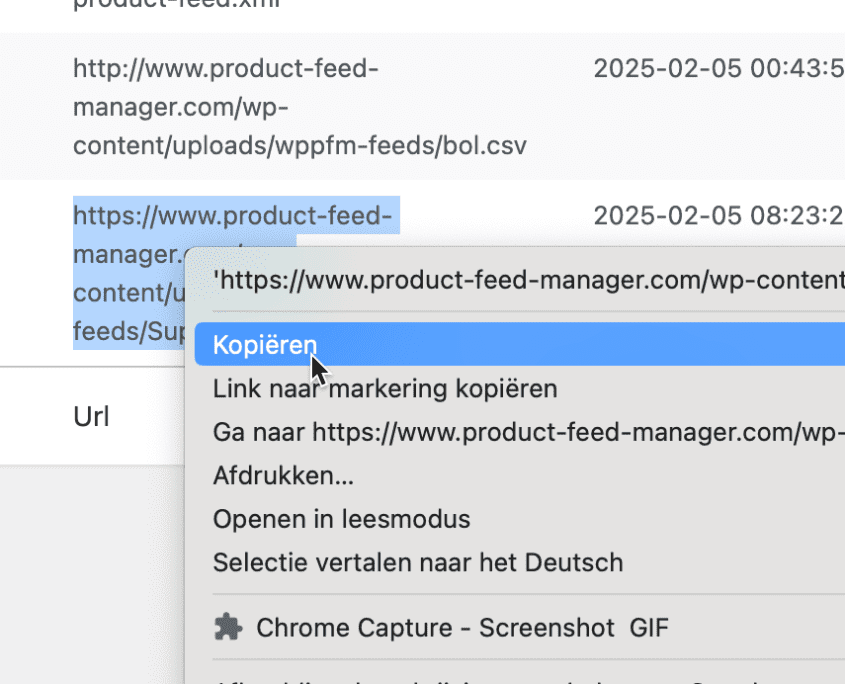
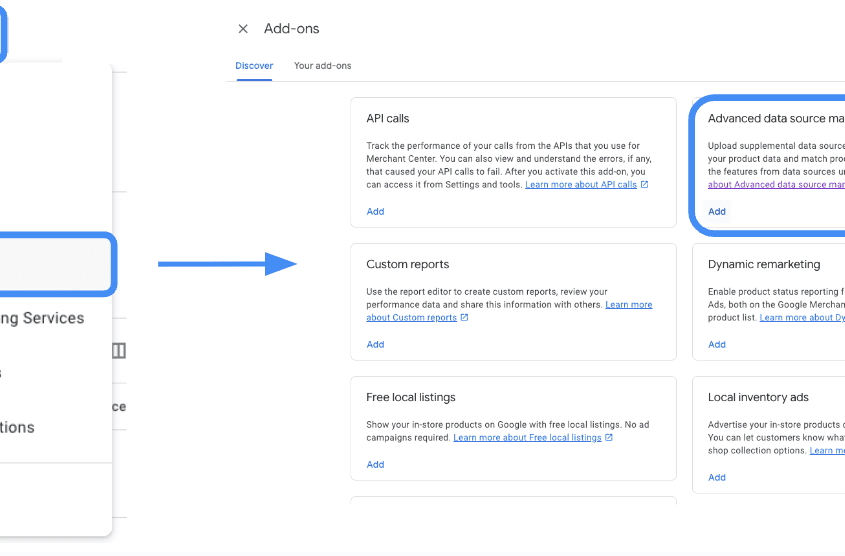
Utilize Google Shopping Ads for product visibility by optimizing product feeds, ensuring accurate data, and using dynamic remarketing to bring back interested shoppers. Structuring your product feed in the Product Feed Manager, with rich descriptions and high-quality images increases click-through rates and conversions.
Implement feed marketing by distributing product listings across multiple platforms, such as Google Shopping, Facebook Marketplace, Amazon, and third-party marketplaces, to expand reach. product feed manager tools ensure your product listings remain up-to-date and accurate across all channels.
Retarget website visitors with personalized ads that remind them of products they viewed, offer exclusive discounts, and use urgency-driven messaging to encourage conversions. Dynamic retargeting helps keep your brand top-of-mind for potential buyers, reducing cart abandonment rates and increasing overall sales.
7. Improve Email Marketing Campaigns
Email marketing is a powerful earned traffic strategy that allows businesses to nurture relationships and drive repeat sales.
Create segmented email lists for personalized messaging that targets different customer needs and behaviors. Tailor your emails based on past purchases, browsing history, and engagement levels to increase relevance.
Send abandoned cart recovery emails to remind shoppers about their incomplete purchases, provide incentives, and minimize lost sales. Studies indicate that well-timed recovery emails can significantly enhance conversion rates. According to a Klaviyo report, businesses utilizing cart recovery emails recover 3.33% of lost sales.
Use promotional emails to highlight new products and exclusive offers, ensuring your audience stays engaged. A/B test subject lines, email layouts, and call-to-actions to optimize open and click-through rates, ultimately boosting webshop revenue.
8. Utilize Influencer Marketing
Partner with industry influencers for authentic recommendations. Influencers have built trust with their audiences, and their endorsements can significantly impact purchasing decisions. By collaborating with influencers who align with your brand values, you can tap into new customer segments and enhance brand credibility.
Use micro-influencers for cost-effective reach. Micro-influencers can be a cost-effective way to reach niche audiences and drive targeted traffic to your online store. These influencers typically have between 10,000 and 100,000 followers and often achieve higher engagement rates compared to those with larger followings
Encourage user-generated content to build social proof. Influencers and customers sharing real-life experiences with your products help create trust and authenticity. Feature influencer collaborations and customer-generated photos and reviews across your marketing channels to increase engagement and credibility.
9. Enhance Customer Support and Engagement
Improving customer support and engagement is an effective way to boost sales and enhance customer satisfaction in your webshop. Offering live chat support allows you to assist customers in real time, answering questions instantly and resolving issues before they lead to abandoned carts.
AI chatbots are increasingly sophisticated, providing 24/7 support for immediate assistance, product recommendations, and guidance throughout the shopping process. Engage actively with customers through follow-up emails, personalized messages, and social media interactions to foster a sense of community and brand loyalty.
10. Streamline Checkout Process
Streamlining the checkout process can significantly reduce cart abandonment and increase sales. Offering multiple payment options, such as credit cards, PayPal, Apple Pay, and buy-now-pay-later services, ensures that customers can choose their preferred method, ultimately improving conversion rates.
Enabling guest checkout reduces friction and creates a seamless buying experience. Requiring account creation can deter potential buyers from completing their purchases, so providing a quick and easy checkout option encourages more transactions.
Displaying trust badges for security reassurance and highlighting secure payment gateways, SSL encryption, and buyer protection policies help build trust with customers, increasing their confidence in completing a purchase.
Optimizing form fields by removing unnecessary steps and incorporating auto-fill options speeds up the checkout process, enhancing convenience and reducing frustration.
Providing clear shipping costs and estimated delivery times upfront prevents last-minute surprises that might lead to abandoned carts. Transparency in pricing and delivery expectations fosters trust and ensures a smoother customer journey.
11. Optimize for Mobile Shopping
Mobile commerce is experiencing tremendous growth. Sales are projected to reach $710 billion by 2025, making it essential to optimize for mobile shopping, as more consumers are purchasing via their smartphones and tablets.
Ensure a fast-loading mobile experience by minimizing large image files, enabling browser caching, and using a responsive design to fit various screen sizes. A slow website can drive away potential buyers and impact sales.
Use a mobile-friendly navigation structure with intuitive menus, clear product categories, and easy-to-click buttons. Simplified navigation ensures a seamless shopping experience, reducing frustration and increasing conversions.
Enable one-click checkout for convenience, allowing users to complete their purchase with minimal steps. Mobile-friendly payment options like Apple Pay, Google Pay, and PayPal streamline the process, reducing cart abandonment rates and boosting overall sales.
12. Use Social Proof and Reviews
Display user-generated photos and testimonials to build trust and credibility. Seeing real customers using your products reassures potential buyers and encourages them to make a purchase.
Encourage satisfied customers to leave reviews by sending follow-up emails, offering small incentives, or featuring top reviewers on your site. Genuine, positive reviews help new customers feel confident in their decision.
Highlight best-selling and top-rated products prominently on your homepage and product pages. Showcasing these items provides social proof and guides hesitant shoppers toward popular choices, increasing conversion rates.
13. Implement Upselling and Cross-Selling Techniques
Implementing upselling and cross-selling techniques is a proven way to increase the average order value and boost sales in your webshop.
Recommend related products on checkout pages to encourage customers to add complementary items to their carts. This can be done through dynamic product suggestions based on their browsing and purchase history.
Offer bundle discounts for higher order value by creating package deals that provide added value to the customer while increasing revenue. Customers are more likely to purchase when they perceive a greater deal.
Use AI-based product recommendations to personalize the shopping experience and make intelligent suggestions that align with customer preferences. Leveraging AI helps improve engagement, increases sales, and enhances the overall shopping experience.
14. Use Video Marketing for Engagement
Create product demo videos to showcase key features, demonstrate usability, and help potential buyers make informed decisions. Videos provide a more engaging way to display product benefits compared to static images or text.
Feature customer testimonials in video format to add authenticity and build trust. Seeing real people share positive experiences with your products can be highly persuasive for hesitant shoppers.
Use live streams to interact with your audience, answer questions in real-time, and demonstrate products in action. Live videos create a sense of urgency and exclusivity, encouraging viewers to make immediate purchasing decisions.
15. Improve Customer Retention Strategies
Introduce a subscription model for recurring purchases to create consistent revenue streams and increase customer retention. Subscription services encourage long-term loyalty and provide customers with convenience.
Send personalized post-purchase emails to maintain engagement, express gratitude, and suggest complementary products. Follow-up emails with exclusive discounts or valuable content can turn one-time buyers into repeat customers.
Launch a referral program with incentives to encourage customers to spread the word about your brand. Offering discounts or rewards for successful referrals can significantly boost customer acquisition and create a community of loyal buyers.
16. Expand to Marketplaces
Expanding to marketplaces like Amazon, eBay, and Etsy can significantly boost sales by reaching a larger audience beyond your webshop. Listing your products on these platforms increases visibility and allows you to tap into an existing customer base that is actively looking for products like yours.
Optimize listings for better discoverability by using relevant keywords, high-quality images, and detailed product descriptions to improve search rankings within each marketplace.
Manage multi-channel inventory efficiently by utilizing inventory management tools like our product feed manager. These tools sync stock levels across all platforms, reducing overselling risks and ensuring seamless order fulfillment.
Use marketplace-specific promotions and advertising options to enhance product exposure and drive targeted traffic to your listings.
17. Offer Free and Fast Shipping
Offering free and fast shipping is a great strategy to increase conversions and customer satisfaction. Set a minimum order value for free shipping to encourage larger purchases while maintaining profitability.
Partner with logistics providers for faster delivery to enhance customer experience and reduce cart abandonment rates.
Clearly communicate shipping timelines on product pages and checkout to set accurate expectations and build trust with shoppers.
Utilize expedited shipping options and display estimated delivery times prominently to increase buyer confidence and drive more sales.
18. Using Data Analytics for Decision-Making
Use data analytics to make informed decisions and boost sales growth in your online store. Track sales trends with Google Analytics to identify peak shopping times, popular products, and seasonal demand shifts. Analyze customer behavior, such as browsing patterns and abandoned carts, to optimize marketing strategies and improve user experience. Use A/B testing to refine website elements like call-to-actions, landing pages, and checkout flows, ensuring they maximize conversions. Implementing a data-driven approach allows for continual optimization and better targeting, ultimately increasing revenue and customer satisfaction.
19. Engage in Community Building
Building a community around your brand is an effective way to increase engagement, trust, and ultimately sales in your webshop.
Create a Facebook or Discord group for loyal customers where they can share experiences, ask questions, and engage with your brand. A strong community fosters brand advocacy and encourages repeat purchases.
Run exclusive offers for members to make them feel valued and incentivize participation. Providing special discounts, early access to new products, or limited-time promotions can drive sales and deepen customer relationships.
Foster engagement with polls, discussions, and interactive content to keep your community active. Encouraging conversations and user-generated content helps create a sense of belonging, increasing brand loyalty and word-of-mouth marketing.
20. Personalize Shopping Experience
Personalizing the shopping experience is a key strategy to increase engagement and boost sales in your webshop.
Use AI-driven personalization engines to analyze customer behavior and deliver customized shopping experiences. By leveraging artificial intelligence, businesses can offer tailored product suggestions, improving the likelihood of conversion.
Recommend products based on browsing history to show relevant items that align with customer preferences. Personalized recommendations increase the chance of repeat purchases and enhance customer satisfaction.
Display dynamic pricing for personalized deals to create incentives for customers to complete purchases. Offering special discounts based on past purchases, cart behavior, or browsing patterns can help drive conversions and customer loyalty.
21. Partner with Other Businesses
Partnering with other businesses can be a powerful strategy to expand your reach and boost sales. Collaborate with complementary brands for co-promotions, leveraging each other’s audiences to gain new customers.
Offer package deals featuring multiple brands to create value-added bundles that encourage higher purchase rates.
Cross-promote on email lists and social media to maximize exposure, drive engagement, and build a stronger brand presence across different customer segments.
22. Leverage Affiliate Marketing
Affiliate marketing is a performance-based strategy where businesses reward individuals or partners (affiliates) for driving traffic or sales through their referral efforts. This can significantly boost sales in your webshop by leveraging the audience and credibility of affiliates.
Set up an affiliate program with competitive commissions to attract motivated marketers who will promote your products effectively. Offering higher commissions for top-performing affiliates can further encourage engagement.
Provide affiliates with marketing materials such as banners, social media posts, and email templates to make it easier for them to promote your products and drive conversions.
Track performance and reward top affiliates by using analytics tools to monitor clicks, conversions, and revenue generated. Regularly optimizing your affiliate strategy ensures long-term success and a steady increase in webshop sales.
23. Improve Site Navigation and User Experience
Improving user experience and site navigation is essential for reducing bounce rates and increasing conversions in your webshop. Use a clear category structure for easy browsing to ensure customers can quickly find what they need without frustration. Implement a powerful search function with autocomplete and filtering options to help shoppers locate specific products faster. Optimize product filtering options by allowing users to refine searches based on price, brand, ratings, and other key attributes. This enhances the shopping experience and encourages higher purchase rates.
24. Test and Optimize Pricing Strategies
Optimizing pricing strategies is essential for maximizing profitability and encouraging customer purchases. Experiment with tiered pricing models to offer different value propositions that appeal to various customer segments, increasing overall sales. Use psychological pricing techniques, such as charm pricing (e.g., $9.99 instead of $10) and bundling, to create perceived value and drive conversions. Monitor competitor pricing and adjust accordingly to remain competitive while maintaining healthy profit margins.
The latest development in pricing optimization involves AI-driven pricing strategies. AI tools analyze customer behavior, competitor prices, and market trends in real-time to recommend optimal pricing. Dynamic pricing powered by AI helps businesses automatically adjust prices based on demand, stock levels, and customer preferences, ensuring maximum profitability. Regularly testing and refining pricing strategies, including AI-driven insights, ensures sustainable growth and increased revenue.
25. Prepare for Seasonal Sales and Trends
Maximize seasonal sales and trends by proactively planning promotions, ensuring adequate inventory, and aligning marketing efforts with key shopping periods. Analyze past sales data to identify best-selling products and effective promotional strategies, allowing you to prepare for Black Friday, Cyber Monday, and holiday sales effectively. Stock up on high-demand products in advance to prevent shortages and capitalize on increased customer interest. Drive urgency through limited-time promotions, countdown timers, exclusive discounts, and special bundles that encourage quick purchasing decisions. Additionally, fine-tune your ad campaigns and email marketing to reflect seasonal trends, ensuring maximum engagement and boosting sales during peak shopping periods.
Key Takeaways
Understand why customers choose your brand first.
Optimize your store for a seamless user experience.
Invest in multi-channel marketing strategies.
Leverage personalization and automation tools.
Prioritize customer retention and engagement.
Continuously analyze and optimize for better performance.
Looking Ahead
The eCommerce landscape is constantly evolving. Stay updated with the latest trends, tools, and strategies to keep your store competitive. Implement these tactics, track your results, and adapt to changes for long-term success.
Final Thoughts
Boosting eCommerce sales requires a mix of strategic planning, marketing efforts, and continuous optimization. Apply these 25 strategies to create a sustainable and profitable online business.
https://www.wpmarketingrobot.com/system/wp-content/uploads/2025/02/boost-ecommerce-sales.png298845Aukehttps://www.wpmarketingrobot.com/system/wp-content/uploads/2024/12/wpmr-logo-website-1.svgAuke2025-02-10 19:06:142025-02-10 19:44:0525 Strategies on How to Boost eCommerce Sales
Google Merchant Center is a powerful tool for managing product feeds, but errors and missing attributes can hurt your Google Shopping performance. The good news? You can easily fix these issues with supplemental feeds. This guide will walk you through setting up and optimizing a supplemental feed to ensure your product listings are complete, accurate, and optimized for Google Shopping ads.
What is a Supplemental Feed?
A supplemental feed in Google Merchant Center allows you to modify or enhance your existing product data without changing your main feed. It acts as an overlay, where Google pulls missing or updated information from the supplemental feed before resorting to the main feed.
Benefits of Supplemental Feeds
Supplemental feeds offer several advantages that make managing your Google Shopping listings more efficient and effective:
Faster Processing & Bulk Updates
Unlike primary feeds, supplemental feeds process much faster. This allows for frequent updates without reprocessing the entire product catalog, making adjusting prices, availability, or temporary promotions for thousands of SKUs in minutes easier.
Customization for Campaigns
They provide the flexibility to add campaign-specific attributes that may not exist in the main feed. For example, you can use custom labels to categorize products based on seasonality, performance, or promotional strategies.
Ease of Use & Maintenance
Once set up, a supplemental feed allows you to manage product updates outside of Google Merchant Center, making it easier to maintain data integrity and adjust listings without logging in to GMC every time a change is needed.
Better Ad Targeting & Lower CPC
More detailed product data allows Google to serve more relevant ads, improving click-through rates (CTR) and potentially reducing cost-per-click (CPC) by increasing ad relevance.
Scalability for Multi-Channel Expansion
Supplemental feeds make it easier to manage and repurpose product data for additional marketing channels beyond Google, streamlining feed management for multiple advertising platforms.
Potential Challenges to Consider
While supplemental feeds offer flexibility and efficiency, they do require careful implementation:
If you only need to tweak a couple of products, setting up a supplemental feed may be more effort than necessary.
Data integrity is critical—errors such as case-sensitive mismatches in product IDs can prevent Google from correctly applying the updates.
Overrides the Primary Feed—if your listings aren’t updating as expected, check whether the supplemental feed is replacing primary feed values unintentionally.
By enabling real-time updates, better customization, and easier data management, supplemental feeds are an indispensable tool for optimizing e-commerce performance on Google Merchant Center.
How Google Merchant Center Uses Supplemental Feeds
Step 1: Copy the URL of the supplemental feed from the Product Feed Manager – Feed list.
Step 2: Log in to your Merchant Center account and verify that you have activated the necessary add-on to include the supplemental feed. To check, go to Settings > Add-ons > Advanced Data Source Management and click on ‘Add’. If you already have a supplemental feed set up in your Merchant Center, you can skip this step. Once you click on ‘Add’, you will see ‘Advanced Data Source Management’ listed under the ‘Your Add-ons’ tab.
Step 3: Navigate to ‘Data Sources’ in your account settings. Here, you will find the ‘Supplemental Sources’ tab. Click on ‘Add Supplemental Product Data’.
Step 4: Now you will add the supplemental feed. Select ‘Add Product Data from File’ and paste the supplemental feed link that you copied from the Producthero Platform in Step 1. Then, click ‘Continue’ to proceed to the next step.
Step 5: Ensure that you add the same feed label/language combination you chose in Step 1. In this case, it should be GB/en. It is also essential to select the primary feed to which you want to link the supplemental feed URL. Finally, click on ‘Create Data Source’ to complete the process, and your supplemental feed will be ready!
Step 6: Verify Changes in Google Merchant Center:
Wait a few minutes for processing.
Check your product listings to confirm the updates.
Look under “Final Attributes” to see the applied changes.
Common Issues & Fixes
1. Feed Not Updating?
Make sure the id matches the primary feed exactly
Ensure the fetch schedule is enabled
Manually click “Fetch Now” to force updates
2. Attributes Not Applying?
Ensure your column headers use Google’s standard attributes (e.g., color, material, title)
Make sure values are formatted correctly (e.g., use Red instead of Dark Crimson)
3. Error Warnings Still Showing?
Check Diagnostics in Google Merchant Center
Use Feed Rules to map missing data
If persistent, review Google’s Product Data Specificationhere
Key Takeaways
✅ Supplemental feeds help fix errors and missing attributes quickly
✅ Google prioritizes supplemental feed values over primary feed data
✅ Use Google Sheets for an easy, flexible solution
✅ Optimize product titles for better ad performance
✅ Enable automatic fetch schedules to keep data updated
✅ Improve campaign performance with enhanced product listings
✅ Reduce time spent on manual feed updates with bulk modifications
Final Thoughts
Supplemental feeds are a game-changer for managing and optimizing Google Shopping listings. Whether you’re fixing errors, adding missing attributes, or improving product titles, this method saves time and improves your ad performance.
Need more help? Check out Google’s Merchant Center Help or subscribe to our updates for more e-commerce optimization tips!
https://www.wpmarketingrobot.com/system/wp-content/uploads/2025/02/fix-missing-attributes-errors-845.png298845Aukehttps://www.wpmarketingrobot.com/system/wp-content/uploads/2024/12/wpmr-logo-website-1.svgAuke2025-02-05 10:29:462025-02-05 10:29:46How to Fix Missing Attributes & Errors in Google Shopping (Easy Guide)
Woocommerce product feed manager v2.0.5 is now available via automatic update and the downloads page.
Version 2.0 of our WooCommerce Product Feed Manager plugin is a major upgrade from its previous version in which the feed generation process has been overhauled and converted from a real-time process to a background process. The main reason for this important update was that the old versions had difficulties handling feeds with very large product quantities. Switching to a background process also has the advantage that you can continue to work on your feeds whilst the selected feed is being updated in the background.
We recommend users update as soon as possible in order to keep your product feeds up to date with the latest bug fixes, security enhancements, and feed requirements.
Improved performance
The feed generation process has been overhauled and remodeled from a real-time process to a background process. As soon as you start your manual feed update, the correct product ids are stored in a queue and the feed update process will start updating the feed file in the background so you can close the Edit Feed page and work on other feeds or even select other feeds to be added to the feed queue. Whilst in the previous version you had to wait until the feed generation was finished, you now can work on your other feeds as the feed generation work is done in the background. In the feeds list, you can see what feed is being processed and what feeds are in the queue to be processed.
Added new WordPress filters
We added the “wppfm_category_mapping_exclude”, “wppfm_category_mapping_exclude_tree” and “wppfm_category_mapping_max_categories” filters. You can use these filters to limit the number of categories in the Category Mapping list on the Edit Feed page. Shops with very large numbers of categories can have issues with this Category Mapping list. By using one or more of the mentioned filters you can limit the number of categories and thus prevent issues with the Category Mapping list.
Read more about using filters on wpbeginner.com. To use the first two filters you can return an array or a comma-separated string with category id’s that you want to be removed from the Category Mapping list. The “wppfm_category_mapping_exclude” filter will only remove the categories with the given ids, the “wppfm_category_mapping_exclude_tree” filter will also remove the children categories from the list. With the “wppfm_category_mapping_max_categories” filter you can return a number to the filter that will limit the number of categories in the Category Mapping list.
Eg. If you want to remove the categories with ids 10, 12, 14 and 16 from the Category Mapping, including their children categories, you could use the following code in your functions.php file:
Third party attributes
We also fixed an issue where attributes from third-party plugins, with a name that started with an underscore, would show up in the WooCommerce Source list as an empty line.
In connection with the previous fix, we changed the way third-party attributes show up in the WooCommerce Source list. In the previous version the name of this attribute would be cleaned from underscores, but as of version 2.0, the name will not be cleaned anymore.
Changelog
Fixed an issue where when the user had not selected the “include variations” option, the non-product specific variation data like min_variation_price or max_variation_price would not be included in the main version of the variation product.
Changed the feed processing process so it can handle feeds with large number of products
Fixed an error that would cause the feed process to fail with product variations that included sale dates
Changed the way the variation data was accessed that caused some messages in logging files
Fixed an issue where third-party attributes that start with an underscore would show up as an empty row in the Google Source pulldown list
Changed the way third-party attributes are shown in the source list. They now keep their original name
Fixed a few security issues
Added the WooCommerce version check
Improved the auto feed update timing
Added the wppfm_category_mapping_exclude, wppfm_category_mapping_exclude_tree and wppfm_category_mapping_max_categories filters that allow the user to influence the category mapping list
Fixed an issue where the Stock count would show a wrong number when the actual Stock account was 0
Woocommerce product feed manager v1.9.4 is now available via automatic update and the downloads page.
This is not only a maintenance update that includes bug fixes but also includes added functionality and user improvements..
We recommend users update as soon as possible in order to keep your product feeds up to date with the latest bug fixes, security enhancements and feed requirements.
Feed item WordPress filter
This is one of the coolest addition to this version that will make the plugin even more flexible as it is already. We have added filter hooks to our plugin so you are able to manipulate any item from the feeds by using the wppfm_feed_item_value() filter in either plugin or functions.php
I have created an example code on Github so you can have an idea about the working and posibilities.
WooCommerce Composite Products
We have several customers that use the woocommerce composite products to create product kits and complex products by grouping existing simple or variable products. Our plugin will now support that plugin and will work with this type of product.
Added support for custom made taxonomies
In some cases we found out our clients need support of custom taxonomies. As of version 1.9.0 our plugin will pick those taxonomies up and list them in the source dropdown in the feed manager. So for example if you create a gender taxonomy for you products you will be able to add the gender to the product feed for each product.
Dynamic remarketing for Google Shopping
Until now we did not support the Adwords remarketing tags. But because Dynamic remarketing is such an important part of any online marketing strategy we have included the attributes to the google shopping feed template.
Added attributes are
display_ads_id
display_ads_similar_id
display_ads_title
display_ads_link
display_ads_value
display_ads_recommendation_preference
excluded_destination
adwords_grouping
adwords_labels
Even more changes
The functionality above are the most important updates but there is even more and in the change log below you will find every bit of improvement and added functionality in our new 1.9.4 version.
Remember to update your plugin
Do remember to go and update your product feed manager plugin and also keep an eye out on update in the channel manager if you have the Product feed manager E-commerce version. Channel templates do get updates so your product feeds keep being valid in the channels where you show your products.
Changelog
Fixed an issue where filtering failed when the user would not enter an “or” input
Improved the backup process
Improved memory usages during feed generation
Fixed an issue where the min and max variation regular prices would not be configured according the the WooCommerce money settings
Fixed an issue with the duplicate function
Improved the database setup and update process
Improved the way channels are downloaded
Added support for WooCommerce Composite Products
Improved the error handling messages for licensing activities
Added the wppfm_feed_item_value filter that allows users to edit the value of any item in a feed using this filter option
Added support for Google Dynamic Remarketing
Fixed an issue where the plugin would conflict with the Mandrill plugin
The output lists are now sorted alphabetically
Added support for user made taxonomies
Added a function that removes WordPress Gallery shortcode from the product description
Added a warning if a user uses prohibited characters in the feed name
Fixed an error that could cause calculations in a change value to produce a period as a decimal separator even though a comma is set as required decimal separator
Changed the Min and Max Variation prices that are not supported by WooCommerce anymore
Fixed an issue where the url of variable products from which some attributes where not set would not be correct
Prepared the code to support the WooCommerce Product Feed Manager WPML Support plugin that adds WPML multilingual support the the plugin