25 Strategies on How to Boost eCommerce Sales

Introduction

Running an eCommerce store is exciting, but maintaining consistent sales growth can be challenging. Success hinges on understanding core marketing principles, such as identifying your target audience, developing a compelling value proposition, and positioning your products strategically.

In this guide, we share 25 powerful strategies to help you increase traffic, optimize conversions, and grow your revenue. Whether you’re launching a new store or looking to scale, these tactics will enhance your success by leveraging essential marketing strategies effectively.

1. Define Your Niche and Target Audience

Defining your niche and identifying your target audience is crucial for building a successful eCommerce store. A well-defined niche allows you to stand out from competitors, attract the right customers, and tailor your marketing efforts for maximum effectiveness.

Why It Matters:

  • Increases Relevance: Targeting a specific audience enables you to craft messages and products that strongly resonate with potential buyers.
  • Enhances Marketing Efficiency: Focused marketing efforts reduce wasted ad spend and improve conversion rates.
  • Builds Customer Loyalty: A clearly defined audience fosters stronger relationships, leading to repeat purchases and long-term trust.
  • Improves Competitive Advantage: Understanding your niche positions your brand uniquely in the market and helps differentiate you from competitors.

Refer to steps 1 and 2 of 16 Strategic Questions to refine your niche and target audience. By narrowing your focus and gaining deeper insights into your customers, you can create a compelling brand, develop tailored products, and drive higher sales in your webshop.

2. Value Proposition

Your value proposition is the foundation of your brand’s success. It defines why customers should choose your product over competitors. A strong value proposition clearly communicates the benefits, unique features, and the problems your product solves.

How to Uncover Your Value Proposition:

  • Identify Key Benefits: What core problems does your product solve for your customers?
  • Differentiate from Competitors: What makes your brand unique in the marketplace?
  • Connect Emotionally: How does your product enhance your customers’ lives?
  • Test and Refine: Gather feedback, conduct surveys, and analyze customer behavior to sharpen your messaging.

Communicating Your Value Everywhere:

Your value proposition should be consistently showcased across all platforms, including:

  • Homepage and Landing Pages: Make it the first thing visitors see.
  • Product Descriptions: Reinforce your unique selling points.
  • Marketing Campaigns: Ensure messaging is aligned across email, social media, and ads.
  • Customer Service Interactions: Train support teams to emphasize key benefits when assisting customers.

A well-defined value proposition builds trust, strengthens brand identity, and drives conversions.

3. Use High-Quality Product Images and Descriptions

Use high-resolution photos from multiple angles to showcase product details, texture, and quality. High-quality images build trust and credibility, reducing uncertainty for potential buyers. Consider using lifestyle images to demonstrate the product in real-world scenarios, helping customers visualize how it fits into their lives. Providing zoom-in features and 360-degree views can further enhance customer confidence, ultimately increasing conversion rates and lowering return rates.

4. Offer Discounts and Special Promotions

Offering discounts and special promotions is an effective way to boost sales by attracting new customers and encouraging repeat purchases. Create limited-time offers to drive urgency and prompt hesitant buyers to take action. Implement a loyalty rewards program to incentivize repeat purchases and build customer loyalty. Use abandoned cart discounts to recover lost sales by reminding customers of their interest and giving them a reason to complete their purchase. Additionally, consider bundling products at a discount, running seasonal sales, and leveraging exclusive deals for newsletter subscribers to maintain customer engagement and increase overall revenue.

5. Implement an Effective SEO Strategy

Implementing an effective SEO strategy is crucial for increasing visibility and driving organic traffic to your webshop. Conduct thorough keyword research for product pages to ensure you are targeting the terms your potential customers are searching for. Optimize meta descriptions and alt text with relevant keywords to improve search rankings and enhance user experience. Build backlinks through guest blogging and collaborations to establish credibility and improve domain authority. Regularly update and optimize your website’s content, including blog posts and product descriptions, to stay relevant in search results. A well-executed SEO strategy helps drive consistent traffic, reduces reliance on paid ads, and ultimately increases sales.

6. Use Paid Advertising to Drive Targeted Traffic

Run Facebook and Instagram ads for high-converting audiences by using detailed audience targeting, compelling ad creatives, and engaging copy that highlights product benefits. A/B testing different ad formats can help determine what resonates most with your audience.

Utilize Google Shopping Ads for product visibility by optimizing product feeds, ensuring accurate data, and using dynamic remarketing to bring back interested shoppers. Structuring your product feed in the Product Feed Manager, with rich descriptions and high-quality images increases click-through rates and conversions.

Implement feed marketing by distributing product listings across multiple platforms, such as Google Shopping, Facebook Marketplace, Amazon, and third-party marketplaces, to expand reach. product feed manager tools ensure your product listings remain up-to-date and accurate across all channels.

Retarget website visitors with personalized ads that remind them of products they viewed, offer exclusive discounts, and use urgency-driven messaging to encourage conversions. Dynamic retargeting helps keep your brand top-of-mind for potential buyers, reducing cart abandonment rates and increasing overall sales.

7. Improve Email Marketing Campaigns

Email marketing is a powerful earned traffic strategy that allows businesses to nurture relationships and drive repeat sales.

Create segmented email lists for personalized messaging that targets different customer needs and behaviors. Tailor your emails based on past purchases, browsing history, and engagement levels to increase relevance.

Send abandoned cart recovery emails to remind shoppers about their incomplete purchases, provide incentives, and minimize lost sales. Studies indicate that well-timed recovery emails can significantly enhance conversion rates. According to a Klaviyo report, businesses utilizing cart recovery emails recover 3.33% of lost sales.

Use promotional emails to highlight new products and exclusive offers, ensuring your audience stays engaged. A/B test subject lines, email layouts, and call-to-actions to optimize open and click-through rates, ultimately boosting webshop revenue.

8. Utilize Influencer Marketing

influencer marketing

Partner with industry influencers for authentic recommendations. Influencers have built trust with their audiences, and their endorsements can significantly impact purchasing decisions. By collaborating with influencers who align with your brand values, you can tap into new customer segments and enhance brand credibility.

Use micro-influencers for cost-effective reach. Micro-influencers can be a cost-effective way to reach niche audiences and drive targeted traffic to your online store. These influencers typically have between 10,000 and 100,000 followers and often achieve higher engagement rates compared to those with larger followings

Encourage user-generated content to build social proof. Influencers and customers sharing real-life experiences with your products help create trust and authenticity. Feature influencer collaborations and customer-generated photos and reviews across your marketing channels to increase engagement and credibility.

9. Enhance Customer Support and Engagement

Improving customer support and engagement is an effective way to boost sales and enhance customer satisfaction in your webshop. Offering live chat support allows you to assist customers in real time, answering questions instantly and resolving issues before they lead to abandoned carts.

AI chatbots are increasingly sophisticated, providing 24/7 support for immediate assistance, product recommendations, and guidance throughout the shopping process. Engage actively with customers through follow-up emails, personalized messages, and social media interactions to foster a sense of community and brand loyalty.

10. Streamline Checkout Process

Streamlining the checkout process can significantly reduce cart abandonment and increase sales. Offering multiple payment options, such as credit cards, PayPal, Apple Pay, and buy-now-pay-later services, ensures that customers can choose their preferred method, ultimately improving conversion rates.

Enabling guest checkout reduces friction and creates a seamless buying experience. Requiring account creation can deter potential buyers from completing their purchases, so providing a quick and easy checkout option encourages more transactions.

Displaying trust badges for security reassurance and highlighting secure payment gateways, SSL encryption, and buyer protection policies help build trust with customers, increasing their confidence in completing a purchase.

Optimizing form fields by removing unnecessary steps and incorporating auto-fill options speeds up the checkout process, enhancing convenience and reducing frustration.

Providing clear shipping costs and estimated delivery times upfront prevents last-minute surprises that might lead to abandoned carts. Transparency in pricing and delivery expectations fosters trust and ensures a smoother customer journey.

11. Optimize for Mobile Shopping

Mobile commerce is experiencing tremendous growth. Sales are projected to reach $710 billion by 2025, making it essential to optimize for mobile shopping, as more consumers are purchasing via their smartphones and tablets.

Ensure a fast-loading mobile experience by minimizing large image files, enabling browser caching, and using a responsive design to fit various screen sizes. A slow website can drive away potential buyers and impact sales.

Use a mobile-friendly navigation structure with intuitive menus, clear product categories, and easy-to-click buttons. Simplified navigation ensures a seamless shopping experience, reducing frustration and increasing conversions.

Enable one-click checkout for convenience, allowing users to complete their purchase with minimal steps. Mobile-friendly payment options like Apple Pay, Google Pay, and PayPal streamline the process, reducing cart abandonment rates and boosting overall sales.

12. Use Social Proof and Reviews

customer reviews

Display user-generated photos and testimonials to build trust and credibility. Seeing real customers using your products reassures potential buyers and encourages them to make a purchase.

Encourage satisfied customers to leave reviews by sending follow-up emails, offering small incentives, or featuring top reviewers on your site. Genuine, positive reviews help new customers feel confident in their decision.

Highlight best-selling and top-rated products prominently on your homepage and product pages. Showcasing these items provides social proof and guides hesitant shoppers toward popular choices, increasing conversion rates.

13. Implement Upselling and Cross-Selling Techniques

Implementing upselling and cross-selling techniques is a proven way to increase the average order value and boost sales in your webshop.

Recommend related products on checkout pages to encourage customers to add complementary items to their carts. This can be done through dynamic product suggestions based on their browsing and purchase history.

Offer bundle discounts for higher order value by creating package deals that provide added value to the customer while increasing revenue. Customers are more likely to purchase when they perceive a greater deal.

Use AI-based product recommendations to personalize the shopping experience and make intelligent suggestions that align with customer preferences. Leveraging AI helps improve engagement, increases sales, and enhances the overall shopping experience.

14. Use Video Marketing for Engagement

Create product demo videos to showcase key features, demonstrate usability, and help potential buyers make informed decisions. Videos provide a more engaging way to display product benefits compared to static images or text.

Feature customer testimonials in video format to add authenticity and build trust. Seeing real people share positive experiences with your products can be highly persuasive for hesitant shoppers.

Use live streams to interact with your audience, answer questions in real-time, and demonstrate products in action. Live videos create a sense of urgency and exclusivity, encouraging viewers to make immediate purchasing decisions.

15. Improve Customer Retention Strategies

Introduce a subscription model for recurring purchases to create consistent revenue streams and increase customer retention. Subscription services encourage long-term loyalty and provide customers with convenience.

Send personalized post-purchase emails to maintain engagement, express gratitude, and suggest complementary products. Follow-up emails with exclusive discounts or valuable content can turn one-time buyers into repeat customers.

Launch a referral program with incentives to encourage customers to spread the word about your brand. Offering discounts or rewards for successful referrals can significantly boost customer acquisition and create a community of loyal buyers.

16. Expand to Marketplaces

Expanding to marketplaces like Amazon, eBay, and Etsy can significantly boost sales by reaching a larger audience beyond your webshop. Listing your products on these platforms increases visibility and allows you to tap into an existing customer base that is actively looking for products like yours.

Optimize listings for better discoverability by using relevant keywords, high-quality images, and detailed product descriptions to improve search rankings within each marketplace.

Manage multi-channel inventory efficiently by utilizing inventory management tools like our product feed manager. These tools sync stock levels across all platforms, reducing overselling risks and ensuring seamless order fulfillment.

Use marketplace-specific promotions and advertising options to enhance product exposure and drive targeted traffic to your listings.

17. Offer Free and Fast Shipping

Offering free and fast shipping is a great strategy to increase conversions and customer satisfaction. Set a minimum order value for free shipping to encourage larger purchases while maintaining profitability.

Partner with logistics providers for faster delivery to enhance customer experience and reduce cart abandonment rates.

Clearly communicate shipping timelines on product pages and checkout to set accurate expectations and build trust with shoppers.

Utilize expedited shipping options and display estimated delivery times prominently to increase buyer confidence and drive more sales.

18. Using Data Analytics for Decision-Making

Use data analytics to make informed decisions and boost sales growth in your online store. Track sales trends with Google Analytics to identify peak shopping times, popular products, and seasonal demand shifts. Analyze customer behavior, such as browsing patterns and abandoned carts, to optimize marketing strategies and improve user experience. Use A/B testing to refine website elements like call-to-actions, landing pages, and checkout flows, ensuring they maximize conversions. Implementing a data-driven approach allows for continual optimization and better targeting, ultimately increasing revenue and customer satisfaction.

19. Engage in Community Building

Building a community around your brand is an effective way to increase engagement, trust, and ultimately sales in your webshop.

Create a Facebook or Discord group for loyal customers where they can share experiences, ask questions, and engage with your brand. A strong community fosters brand advocacy and encourages repeat purchases.

Run exclusive offers for members to make them feel valued and incentivize participation. Providing special discounts, early access to new products, or limited-time promotions can drive sales and deepen customer relationships.

Foster engagement with polls, discussions, and interactive content to keep your community active. Encouraging conversations and user-generated content helps create a sense of belonging, increasing brand loyalty and word-of-mouth marketing.

20. Personalize Shopping Experience

Personalizing the shopping experience is a key strategy to increase engagement and boost sales in your webshop.

Use AI-driven personalization engines to analyze customer behavior and deliver customized shopping experiences. By leveraging artificial intelligence, businesses can offer tailored product suggestions, improving the likelihood of conversion.

Recommend products based on browsing history to show relevant items that align with customer preferences. Personalized recommendations increase the chance of repeat purchases and enhance customer satisfaction.

Display dynamic pricing for personalized deals to create incentives for customers to complete purchases. Offering special discounts based on past purchases, cart behavior, or browsing patterns can help drive conversions and customer loyalty.

21. Partner with Other Businesses

Partnering with other businesses can be a powerful strategy to expand your reach and boost sales. Collaborate with complementary brands for co-promotions, leveraging each other’s audiences to gain new customers.

Offer package deals featuring multiple brands to create value-added bundles that encourage higher purchase rates.

Cross-promote on email lists and social media to maximize exposure, drive engagement, and build a stronger brand presence across different customer segments.

22. Leverage Affiliate Marketing

Affiliate marketing is a performance-based strategy where businesses reward individuals or partners (affiliates) for driving traffic or sales through their referral efforts. This can significantly boost sales in your webshop by leveraging the audience and credibility of affiliates.

Set up an affiliate program with competitive commissions to attract motivated marketers who will promote your products effectively. Offering higher commissions for top-performing affiliates can further encourage engagement.

Provide affiliates with marketing materials such as banners, social media posts, and email templates to make it easier for them to promote your products and drive conversions.

Track performance and reward top affiliates by using analytics tools to monitor clicks, conversions, and revenue generated. Regularly optimizing your affiliate strategy ensures long-term success and a steady increase in webshop sales.

23. Improve Site Navigation and User Experience

Site Navigation and User Experience

Improving user experience and site navigation is essential for reducing bounce rates and increasing conversions in your webshop. Use a clear category structure for easy browsing to ensure customers can quickly find what they need without frustration. Implement a powerful search function with autocomplete and filtering options to help shoppers locate specific products faster. Optimize product filtering options by allowing users to refine searches based on price, brand, ratings, and other key attributes. This enhances the shopping experience and encourages higher purchase rates.

24. Test and Optimize Pricing Strategies

Optimizing pricing strategies is essential for maximizing profitability and encouraging customer purchases. Experiment with tiered pricing models to offer different value propositions that appeal to various customer segments, increasing overall sales. Use psychological pricing techniques, such as charm pricing (e.g., $9.99 instead of $10) and bundling, to create perceived value and drive conversions. Monitor competitor pricing and adjust accordingly to remain competitive while maintaining healthy profit margins.

The latest development in pricing optimization involves AI-driven pricing strategies. AI tools analyze customer behavior, competitor prices, and market trends in real-time to recommend optimal pricing. Dynamic pricing powered by AI helps businesses automatically adjust prices based on demand, stock levels, and customer preferences, ensuring maximum profitability. Regularly testing and refining pricing strategies, including AI-driven insights, ensures sustainable growth and increased revenue.

25. Prepare for Seasonal Sales and Trends

Maximize seasonal sales and trends by proactively planning promotions, ensuring adequate inventory, and aligning marketing efforts with key shopping periods. Analyze past sales data to identify best-selling products and effective promotional strategies, allowing you to prepare for Black Friday, Cyber Monday, and holiday sales effectively. Stock up on high-demand products in advance to prevent shortages and capitalize on increased customer interest. Drive urgency through limited-time promotions, countdown timers, exclusive discounts, and special bundles that encourage quick purchasing decisions. Additionally, fine-tune your ad campaigns and email marketing to reflect seasonal trends, ensuring maximum engagement and boosting sales during peak shopping periods.

Key Takeaways

  1. Understand why customers choose your brand first.
  2. Optimize your store for a seamless user experience.
  3. Invest in multi-channel marketing strategies.
  4. Leverage personalization and automation tools.
  5. Prioritize customer retention and engagement.
  6. Continuously analyze and optimize for better performance.

Looking Ahead

The eCommerce landscape is constantly evolving. Stay updated with the latest trends, tools, and strategies to keep your store competitive. Implement these tactics, track your results, and adapt to changes for long-term success.

Final Thoughts

Boosting eCommerce sales requires a mix of strategic planning, marketing efforts, and continuous optimization. Apply these 25 strategies to create a sustainable and profitable online business.

The 16 Strategic Questions Every E-Commerce Store Owner Must Answer
Introduction

Running an e-commerce store often feels like managing endless tasks at once—marketing, customer service, inventory, and more. It’s a lot to handle! What if you had a clear, straightforward way to focus your strategy and make confident decisions?
The 16 strategic questions offer a straightforward way to build a strong foundation for your e-commerce business. They simplify the process of uncovering key insights about your market, target audience, competitors, and unique strengths.
By thoughtfully answering these questions, you’ll be able to attract the right customers, stand out from the competition, and confidently scale your business with a clear direction.

Why Strategy Matters in E-Commerce

The Challenge:

E-commerce is a fast-paced, ever-evolving industry. With customer expectations higher than ever and new technologies emerging daily, having a clear strategy isn’t just helpful—it’s essential. A strong plan empowers you to stay competitive, attract loyal customers, and make the most of your resources to drive meaningful growth.
Many store owners jump into e-commerce without a plan, focusing solely on products and pricing without fully understanding their market landscape. This reactive approach leads to inconsistent results, wasted marketing budgets, and a lack of direction.

The Solution:

The good news? A solid strategy built on the foundation of these 16 strategic questions empowers you to make informed, confident decisions. By addressing each question, you can:
  • Attract your ideal customers with messaging that speaks directly to their needs and desires.
  • Stand out from competitors by spotting opportunities and offering unique solutions.
  • Foster long-term trust by delivering consistent value and exceeding customer expectations.
  • Grow with confidence using a plan that adapts to your goals and the ever-changing market.
A strategic approach ensures you’re not just selling products but building a brand that stands out and thrives in the competitive e-commerce landscape.

The 16 Strategic Questions Framework

Your Guide to E-Commerce Success

Each question provides actionable insights:

Market Positioning (Questions 1–2): Define your niche and target audience.

  1. What market are you in?
    This question helps you identify the specific industry or niche your business serves. Think beyond broad categories and define your focus clearly. For example, instead of just saying “furniture,” you could specify, “I’m in the business furniture market, focusing on ergonomic solutions for office spaces.” Reflect on market characteristics, such as trends or unmet needs, that can shape your strategy.
  2. What do the people in your target audience have in common?
    Understanding shared traits within your audience is crucial. These could include demographic factors like age, income, or location, as well as psychographics such as values, lifestyles, or purchasing behavior. For instance, “My target audience consists of professionals who work from home and prioritize comfort and productivity. They value durable, well-designed products that fit their budget.”

Customer Needs and Pain Points (Questions 3–5): Understand audience needs, frustrations, and fears.

  1. What needs do they have?
    This question helps you understand what your customers are actively searching for or desire. Needs can range from basic functionality to specific features that solve their unique challenges. For instance, if you sell ergonomic furniture, your audience might need chairs that reduce back pain and desks that fit compact spaces without compromising usability.
  2. What pain points do they experience?
    Pain points highlight the problems or frustrations your customers face. These could be issues they encounter with existing solutions or challenges they struggle to address. For example, your audience might be tired of cheaply made furniture that breaks within a year or doesn’t provide adequate comfort for long work hours.
  3. What fears do they have?
    Fears reflect what customers want to avoid, such as making a bad purchase decision or wasting money on an unreliable product. For example, they might fear spending too much on furniture that doesn’t meet their expectations or isn’t durable enough to last. Addressing these fears with reassurances like warranties or customer reviews builds trust and reduces hesitation.

Value Proposition (Questions 6–8): Articulate your solutions and unique selling points.

  1. What problems do you solve?
    This question encourages you to focus on the specific challenges your product or service addresses for your customers. Are you making their lives easier, saving them time, or solving a recurring issue? For example, if you offer eco-friendly packaging, the problem you’re solving could be the lack of sustainable options in your industry. Be clear about how your solution directly improves your customer’s situation.
  2. Where is the ‘gap’ in the market?
    The gap represents opportunities your competitors may have overlooked. It could be an unmet need, a lack of innovation, or underserved customer segments. For instance, if competitors focus on high-end ergonomic furniture, the gap might be affordable ergonomic options for small businesses. Identifying this allows you to position yourself strategically and cater to untapped potential.
  3. What are your Unique Selling Points (USPs)?
    Your USPs are the defining features or benefits that set your business apart. These could include product quality, exceptional customer service, or exclusive features. For example, “We offer customizable, eco-friendly furniture with a lifetime warranty.” Highlighting your USPs ensures customers understand why they should choose you over competitors.

Customer Focus (Questions 9–12): Analyze current customers and competitors.

  1. Who are your current customers?
    Take a moment to analyze who is currently purchasing from your store. Look for patterns in demographics, purchasing behavior, and preferences. Are your customers small business owners, parents, or fitness enthusiasts? This insight can help you identify what’s working and what could be refined.
  2. Describe your ideal customer.
    Your ideal customer is the person who benefits the most from your product and aligns with your business goals. Think about their age, income, lifestyle, and specific needs. For instance, your ideal customer might be a remote worker seeking ergonomic furniture to boost productivity. Be as specific as possible to craft targeted marketing.
  3. Where have you tried to please everyone?
    Sometimes businesses fall into the trap of trying to serve too broad an audience, which can dilute their message. Reflect on where you may have offered products or services that didn’t align with your core strengths. Narrowing your focus can make your brand more appealing to your ideal customer.
  4. What alternatives do customers currently buy?
    Think about the products or brands your potential customers are already purchasing. Why do they choose those alternatives? Is it price, convenience, or brand loyalty? Identifying these factors helps you understand your competition and find ways to position your offering as the better choice.

Future Vision (Questions 13–16): Plan for growth and trust-building.

  1. What would be the ideal offering?
    The ideal offering is a product or service that perfectly aligns with your customers’ needs, solves their problems, and exceeds their expectations. Ask yourself: What features, benefits, or extras would make your product irresistible? For example, a subscription model for ergonomic furniture that includes regular maintenance and upgrades could be ideal for small businesses looking for convenience and long-term value.
  2. What do you need to convince customers of?
    Consider the main objections or doubts customers may have before purchasing. You need to convince them of your product’s quality, reliability, and value. For instance, demonstrate how your ergonomic furniture improves productivity and reduces discomfort through data, testimonials, or guarantees. Clearly communicate the benefits they’ll gain by choosing your brand.
  3. How can you reduce customer risk?
    Reducing perceived risk is essential to increasing conversions. Offer guarantees like free returns, money-back policies, or a trial period to reassure customers. For example, “Try our ergonomic chair for 30 days, and if you’re not satisfied, return it for a full refund” helps customers feel confident in their purchase decision.
  4. How can you assure success?
    Success assurance is about reinforcing customer confidence in your product’s results. This can be achieved through case studies, testimonials, or usage guides. For example, provide a guide on setting up your ergonomic furniture for maximum comfort, paired with customer success stories showing tangible results like improved posture and productivity.

Practical Applications for E-Commerce Store Owners

Building Customer Personas

Use the insights from your answers to paint a vivid picture of your ideal customers. Define their demographics, behaviors, and motivations. For example, are they busy professionals seeking convenience or parents looking for reliable and affordable products? With this clarity, you can create marketing messages that speak directly to their needs, fostering a stronger connection and improving conversions.

Optimizing Marketing Strategies

Leverage the knowledge of your customers’ needs, fears, and desires to craft campaigns that resonate. Highlight how your product solves their specific problems or alleviates their pain points. For instance, if your audience fears wasting money on unreliable products, emphasize warranties or customer success stories in your ads and email campaigns.

Enhancing Product Pages

Your product pages should directly reflect the insights you’ve gained. Address common customer concerns, highlight the unique features that set your product apart, and use persuasive copy to emphasize the benefits. Add customer testimonials or detailed FAQs to reassure buyers and make them feel confident in their purchase.

Testing and Adjusting

The e-commerce landscape and customer preferences evolve over time. Revisit these questions periodically to ensure your strategies remain relevant. Test different approaches, like new ad messaging or website layouts, based on updated insights, and monitor the results to keep improving your offer and targeting.

AI Tools to Help You Answer These Questions

Suggested Tools:

  • Customer surveys: To gather direct feedback from your audience. Use tools like Typeform or Google Forms to create engaging and easy-to-use surveys that ask questions about customer preferences, pain points, and expectations. Analyze the responses to uncover actionable insights.
  • Analytics tools:
    • Google Analytics: Helps you track website traffic, user behavior, and conversion rates. Use it to identify which pages perform well and where users drop off.
    • WooCommerce Analytics: If you use WooCommerce, its analytics tools provide valuable data on sales trends, customer behavior, and product performance. These insights help you refine your marketing strategies, optimize product offerings, and target your customers more effectively.
  • AI tools to generate insights:
    • Perplexity: A research-focused AI that helps gather contextual insights about your market and competitors by processing data and delivering concise summaries.
    • Gummysearch: Focuses on niche audience research, pulling insights from community platforms like Reddit to understand your customers’ discussions, needs, and frustrations.
    • ChatGPT: Use it to brainstorm ideas, generate customer-centric copy, or refine messaging for specific audience segments.
    • NotebookLM: Ideal for organizing data and summarizing customer insights, making it easier to spot patterns and trends.

Conclusion

Creating a strong strategy starts with asking the right questions. By understanding your market, your customers, and what sets your business apart, you can craft a WooCommerce store that thrives. These insights don’t just help you stand out—they empower you to make meaningful connections with your audience, offer solutions that truly resonate, and grow your business with confidence. Download the 16 Strategic Questions Worksheet today and start transforming your e-commerce store into a customer-focused, results-driven success story.

Google Shopping Title Optimization: How to Craft Winning Titles for Maximum Impact
Introduction to title optimization

In the dynamic and competitive landscape of online retail, Google Shopping has emerged as a pivotal platform for businesses to showcase their products. At the heart of this platform’s effectiveness lies the art of crafting compelling product titles. This chapter delves into the critical role of product titles in Google Shopping and explores how optimized titles can significantly enhance ad performance, driving both visibility and sales.

Importance of Product Titles in Google Shopping

Product titles in Google Shopping are more than mere identifiers; they are the cornerstone of a product’s online presence. In a marketplace where consumers are inundated with choices, the title of a product acts as a primary filter, guiding potential customers to what they seek. It’s the first interaction point and often the deciding factor in whether a shopper clicks on a product or scrolls past it.

The significance of product titles extends beyond just attracting attention. In Google Shopping, titles are instrumental in how products are indexed and displayed in response to search queries. A well-crafted title, rich in relevant keywords and product specifics, aligns closely with the search intent of users. This alignment is crucial for ensuring that your products surface in the right searches, reaching the audience most likely to convert.

Overview of the Impact of Optimized Titles on Ad Performance

Optimizing product titles for Google Shopping is not just about adhering to best practices; it’s about understanding and leveraging the nuances of consumer behavior and search algorithms. An optimized title can dramatically transform the performance of your ads in several ways:

  • Enhanced Visibility: Titles that are carefully optimized with the right keywords and product details are more likely to rank higher in Google Shopping searches. This increased visibility means more eyes on your products, which is the first step in driving sales.
  • Improved Click-Through Rates (CTR): A title that succinctly and accurately describes the product resonates with the right audience. When shoppers see a title that matches their search intent, they are more inclined to click on the ad, thus improving the CTR.
  • Higher Conversion Rates: Optimized titles not only attract clicks but also set the right expectations. When a product title clearly communicates what the product is, shoppers are less likely to face surprises on the product page, leading to higher chances of conversion.
  • Cost-Effective Advertising: In the pay-per-click model of Google Shopping, every click counts. Optimized titles ensure that the clicks you get are from potential buyers, making your advertising spend more efficient.

In the following sections, we will explore the strategies and techniques to optimize product titles, common pitfalls to avoid, and industry-specific best practices. The goal is to empower you with the knowledge to craft titles that not only capture attention but also drive meaningful engagement and sales.

2. Understanding the Role of Product Titles

In the realm of Google Shopping, the product title is not just a label; it’s a powerful tool that can significantly influence the success of your online advertising efforts. This chapter focuses on understanding the multifaceted role of product titles in shaping ad visibility and click-through rates, as well as their interaction with Google’s sophisticated search algorithm.

How Product Titles Influence Ad Visibility and Click-Through Rates

Product titles are the forefront of your Google Shopping ads. They serve as the critical link between what a shopper searches for and the products you offer. The effectiveness of these titles in capturing attention and generating interest directly impacts your ad’s visibility and the likelihood of a shopper clicking through to your product page.

  • Visibility: In the crowded online marketplace, visibility is paramount. A product title that is clear, descriptive, and includes relevant keywords can significantly enhance the visibility of your ads. Google’s algorithm tends to favor titles that closely match the user’s search query, thereby increasing the chances of your ad appearing in search results.
  • Click-Through Rates (CTR): The CTR of an ad is a direct measure of its relevance and appeal to the audience. A compelling product title that accurately reflects the search intent of the user is more likely to resonate and result in a click. Titles that are concise, yet informative, and highlight unique selling points or key features of the product tend to have higher CTRs.

The Relationship Between Product Titles and Google’s Search Algorithm

Google’s search algorithm is a complex system designed to match users’ search queries with the most relevant and useful results. Product titles play a crucial role in this process, acting as a primary source of information for the algorithm to assess relevance.

  • Keyword Relevance: The algorithm evaluates the keywords in your product titles against the search queries entered by users. Titles that effectively incorporate relevant keywords are more likely to be deemed relevant by the algorithm, thus improving the product’s ranking in search results.
  • Quality Score: Google assigns a quality score to each product ad, which influences both its ranking and cost-per-click. A well-optimized product title contributes to a higher quality score by improving relevance and user experience, leading to better ad placement and potentially lower advertising costs.
  • Semantic Search: Google’s algorithm is increasingly adept at understanding the context and intent behind search queries. This means that product titles need to go beyond keyword stuffing and instead focus on creating meaningful, contextually relevant titles that align with the likely intent of the searcher.

In summary, product titles are a critical element in the success of Google Shopping campaigns. They not only attract and engage potential customers but also communicate with Google’s algorithm to improve ad performance. The next sections will delve into practical strategies for optimizing product titles, ensuring they serve both your business goals and the needs of your customers.

3. Key Strategies for Title Optimization

Optimizing product titles in Google Shopping is a blend of art and science. It requires a strategic approach to ensure that each title is not only informative and relevant but also engaging and search-friendly. This chapter outlines key strategies to optimize product titles effectively.

Utilizing the Full Character Limit Effectively

Google Shopping allows up to 150 characters for product titles, offering ample space to describe your product comprehensively. However, it’s crucial to use this space wisely:

  • Balance Detail with Brevity: While it’s tempting to use all 150 characters, clarity and conciseness are key. Aim for titles that are detailed yet succinct, avoiding unnecessary filler words.
  • Front-Loading Key Information: Since only a portion of the title may be visible in certain views, ensure that the most critical information is placed at the beginning.
  • Adapting to Mobile Views: With a significant portion of users shopping on mobile devices, it’s important to craft titles that are easily readable on smaller screens.

Incorporating Relevant Attributes (Brand, Size, Color, etc.)

Including relevant attributes in your product titles can significantly enhance their appeal and relevance:

  • Brand Name: If you’re selling products from well-known brands, include the brand name in the title. It can be a major draw for brand-loyal customers.
  • Size and Color: For products where size and color are important, such as clothing or accessories, make sure these details are prominently featured in the title.
  • Unique Attributes: Highlight unique or special features of the product that set it apart from competitors.

To include the relevant attributes in your title, using our Product Feed Manager, you can simply combine them, like below:

Google Shopping title optimization made easy with WooCommerce Product Feed Manager

Easily create optimized titles in WooCommerce Product Feed Manager

Watch our tutorial video on YouTube to learn how to edit attributes in your Product Feed with our Feed Editor.

Prioritizing Important Information at the Beginning of the Title

The structure of your product title can impact its effectiveness:

  • Most Important First: Always start with the most critical information. This could be the brand, product type, or a key feature.
  • Consider Search Habits: Think about how your customers search for products like yours and structure your titles accordingly. For instance, if consumers typically search by product type, start with that.

Using Customer-Centric Language and Integrating Important Keywords

To resonate with your audience and perform well in searches, your titles should be crafted with the customer in mind:

  • Speak the Customer’s Language: Use terminology and phrases that your customers use. This not only improves relevance but also makes your titles more relatable.
  • Keyword Integration: Conduct thorough keyword research to identify terms your customers are using in their searches. Integrate these keywords naturally into your titles.
  • Avoid Jargon: Unless you’re targeting a very niche market, avoid industry jargon that might confuse the average customer.

By implementing these strategies, you can create product titles that not only capture the essence of your products but also align with the needs and search behaviors of your target audience. This alignment is crucial for driving visibility, clicks, and ultimately, conversions.

4. Advanced Techniques for Enhanced Performance

To truly excel in the competitive landscape of Google Shopping, it’s essential to go beyond basic optimization and employ advanced techniques. These methods focus on refining your approach to product title optimization, ensuring that your titles not only attract attention but also drive performance. This chapter explores three key advanced techniques.

Creating Distinct Titles for Product Variants

When selling products with multiple variants, such as different colors, sizes, or features, it’s crucial to create distinct titles for each variant:

  • Highlight Unique Features: For each variant, emphasize the feature that differentiates it from others. For example, if you’re selling a shirt in multiple colors, make sure the color is prominently mentioned in each variant’s title.
  • Consistency with Variation: Maintain a consistent structure across all variants while changing the specific details. This approach helps in brand recognition and makes it easier for customers to find the exact variant they are looking for.
  • Avoid Duplication: Ensure that each title is unique to prevent confusion and improve the searchability of each product variant.

Balancing Readability and Keyword Inclusion

A well-optimized title must strike a balance between being keyword-rich and reader-friendly:

  • Natural Keyword Integration: Instead of stuffing titles with keywords, integrate them in a way that reads naturally. Remember, your titles are primarily for customers, not just search engines.
  • Focus on User Intent: Understand the intent behind the keywords your customers use and craft titles that address this intent. This approach ensures that your titles are not only keyword-optimized but also resonate with the user’s needs.
  • Readable and Engaging: Ensure that your titles are easy to read and engaging. A title that is a jumble of keywords may rank well but could fail to attract clicks if it doesn’t make sense to the shopper.

Leveraging Optimization Tools for Data-Driven Improvements

Utilizing data-driven tools can significantly enhance the effectiveness of your title optimization efforts:

  • Analytics Tools: Use tools like Google Analytics to understand how users interact with your listings. Look for patterns in the titles of high-performing products and apply these insights to optimize other titles.
  • Product title optimization tool: Use tools like the product title optimizer for Google shopping, to create the best title for a product, following the recommendations.
  • A/B Testing Tools: Implement A/B testing to compare different title variations and identify which elements resonate most with your audience. This method allows for continuous improvement based on actual performance data.
  • Feed Management Tools:  Enhance your optimization process with our advanced WooCommerce Product Feed Manager tool. Designed to automate and simplify your workflow, this powerful tool excels in bulk editing titles and intelligently crafting optimized product titles. It leverages product attributes and WooCommerce Product sources, ensuring uniformity and coherence throughout your entire product catalog for maximum impact.

By employing these advanced techniques, you can further refine your product titles, making them more targeted, relevant, and effective. This approach not only enhances the visibility of your products in Google Shopping but also drives better engagement and conversion rates.

5. Common Pitfalls to Avoid

While optimizing product titles for Google Shopping, it’s just as important to be aware of common pitfalls as it is to implement best practices. Certain mistakes can not only diminish the effectiveness of your titles but also negatively impact your ad’s performance and reputation. This chapter highlights key pitfalls to avoid in your title optimization journey.

Overuse of Capitalization and Promotional Text

  • Capitalization: Excessive use of capital letters can make titles appear aggressive or spammy, which can deter potential customers. Use capitalization judiciously, primarily for brand names or to highlight a specific feature, ensuring that the title remains easy to read and professional in appearance.
  • Promotional Language: While it’s tempting to include promotional phrases like “Best Offer”, “Discount”, or “Sale” in your titles, this can backfire. Google Shopping prefers straightforward, descriptive titles. Promotional content can be seen as misleading or as an attempt to game the search algorithm, leading to lower ad rankings or even disapproval of your listings.

Misleading or Inaccurate Titles

  • Accuracy is Key: Ensure that your titles accurately reflect the product. Misleading titles may increase clicks initially, but they lead to poor user experience, increased bounce rates, and lower conversion rates. This not only affects your immediate sales but can also harm your brand’s reputation in the long run.
  • Consistency with Product Page: The information in your title should match the details on the product page. Inconsistencies between the title and the product page can confuse customers and may be flagged by Google, affecting your ad’s performance.

Excessive Use of Abbreviations or Acronyms

  • Understandability: While abbreviations and acronyms can save space, they may not be understood by all customers. Use common and widely understood abbreviations, and avoid industry-specific jargon unless you are targeting a niche market.
  • Balance with Clarity: If using abbreviations is essential, balance them with clear, descriptive language elsewhere in the title. This approach ensures that while you are optimizing space, you are not sacrificing the title’s clarity and understandability.

By steering clear of these common pitfalls, you can ensure that your product titles are not only optimized for Google Shopping’s algorithms but are also appealing and clear to your potential customers. This balance is crucial for driving both short-term clicks and long-term customer trust and loyalty.

6. Continuous Optimization and Testing

In the ever-evolving landscape of online retail and search engine algorithms, resting on your laurels is not an option. Continuous optimization and testing are key to staying ahead of the curve and ensuring your Google Shopping campaigns remain effective and competitive. This chapter focuses on the importance of regular updates, A/B testing, and data analysis in refining your product title strategies.

The Importance of Regular Title Updates and A/B Testing

  • Staying Relevant: Regularly updating product titles ensures they remain relevant and in tune with current market trends, seasonal changes, and consumer search behaviors. This practice is vital for maintaining the visibility and attractiveness of your ads.
  • A/B Testing for Google Shopping Title Optimization: A/B testing, or split testing, is a method of comparing two versions of a product title to see which one performs better. You can gain valuable insights into what resonates best with your audience by systematically testing different elements of your titles, such as keyword placement, structure, or the inclusion of specific attributes.
    • Implementing A/B Tests: Start by changing one element at a time in your product title to understand its impact. For instance, test different keyword orders, the presence or absence of brand names, or the inclusion of specific product features.
    • Measuring Results: Use key performance indicators (KPIs) like click-through rate (CTR), conversion rate, and return on ad spend (ROAS) to measure the impact of each variation.

Analyzing Performance Data to Refine Strategies

  • Data-Driven Decisions: Utilize tools like Google Analytics and Google Ads to gather data on how your product titles are performing. Look for patterns in the titles of high-performing products and apply these learnings to optimize other titles.
  • Key Metrics to Monitor: Pay close attention to metrics such as CTR, conversion rate, average cost per click (CPC), and overall ad spend. These metrics provide insights into not only how attractive your titles are but also how well they convert interest into sales.
  • Responding to Data: Be prepared to make swift changes based on your findings. If certain titles consistently underperform, analyze and revise them. Conversely, if a particular structure or phrasing works well, consider applying it to other products in your catalog.
  • Seasonal and Market Trends: Stay attuned to changes in market trends and consumer behavior. For example, during holiday seasons, incorporating relevant keywords and phrases into your titles can capture more seasonal traffic.

Continuous Title optimization in Google Shopping and testing are not just about improving performance; they are about understanding your audience better and aligning your offerings more closely with their needs and search behaviors. This ongoing process ensures that your Google Shopping campaigns remain dynamic, relevant, and effective in driving both traffic and conversions.

7. Best Practices and Examples per Industry Vertical

Crafting effective product titles for Google Shopping requires an understanding that different industries have unique needs and customer expectations. This chapter provides insights into tailoring product titles to meet industry-specific requirements and showcases examples of optimized titles across various verticals.

Tailoring Product Titles According to Industry-Specific Needs

Each industry has its own set of attributes that customers prioritize when searching for products. Understanding these nuances is key to creating titles that resonate with your target audience.

  • Apparel and Fashion: Focus on brand, size, color, and style. Customers often search for clothing items based on these attributes.
  • Electronics and Gadgets: Highlight brand, model number, and technical specifications like storage capacity or screen size. Shoppers in this category tend to look for specific models and features.
  • Home and Garden: Emphasize the type of product, material, and intended use or room. For example, customers might search for “outdoor waterproof garden furniture” or “stainless steel kitchen knife set.”
  • Beauty and Personal Care: Include the brand, product type (e.g., moisturizer, lipstick), and specific concerns or benefits (e.g., “for sensitive skin,” “long-lasting”).
  • Sports and Fitness: Focus on the type of equipment, intended use (e.g., “running,” “yoga”), and any special features or technologies.

Examples of Optimized Titles in Different Verticals

Here are examples of optimized product titles for various industries, demonstrating how to incorporate key attributes effectively:

  • Apparel and Fashion: “Levi’s Women’s Skinny Jeans – Size 8, Dark Blue, Stretch Denim”
  • Electronics and Gadgets: “Samsung Galaxy S21 Ultra – 256GB, Phantom Black, 5G Smartphone”
  • Home and Garden: “Ergonomic Office Chair with Lumbar Support – Mesh Back, Adjustable Arms”
  • Beauty and Personal Care: “Clinique Dramatically Different Moisturizing Lotion+ – 125ml, For Dry to Dry Combination Skin”
  • Sports and Fitness: “Nike Air Zoom Pegasus 37 Men’s Running Shoes – Size 10, Breathable Mesh, Black”

In each of these examples, the titles are structured to highlight the most-searched-for attributes in their respective categories. They provide clear, concise information that aligns with what customers in these verticals are likely to search for, thereby increasing the chances of the product being found and clicked on.

By tailoring your product titles to meet the specific needs and search behaviors of your industry, you can significantly enhance the visibility and appeal of your products in Google Shopping. This targeted approach ensures that your titles are not only optimized for search algorithms but also resonate with the preferences and requirements of your customers.

8. Conclusion

As we conclude this guide on optimizing product titles for Google Shopping, it’s important to reflect on the key insights and strategies that have been discussed. The journey through the chapters underscores the pivotal role of title optimization in the success of your online retail strategy.

Summarizing the Importance of Title Optimization in Google Shopping

Title optimization in Google Shopping is not just a task; it’s a strategic endeavor that can significantly impact your online presence and sales. The right titles can enhance visibility, improve click-through rates, and ultimately drive conversions. They are the first point of contact between your product and potential customers, acting as a decisive factor in the crowded digital marketplace.

Effective title optimization involves understanding and implementing best practices tailored to your specific industry, audience, and product offerings. It’s about striking a balance between being descriptive and concise, integrating relevant keywords without compromising readability, and continuously adapting to changing market trends and consumer behaviors.

Encouraging Ongoing Testing and Refinement for Best Results

The landscape of online shopping and consumer search behaviors is constantly evolving. Therefore, title optimization is not a one-time effort but an ongoing process. Regular testing and refinement of your product titles are crucial to stay ahead of the competition and align with the latest search engine algorithms and consumer trends.

    • Embrace A/B Testing: Regularly conduct A/B tests to compare different title variations. This approach allows you to understand what resonates best with your audience and leads to higher engagement and conversion rates.
    • Analyze and Adapt: Use analytics tools to monitor the performance of your product titles. Analyze key metrics such as click-through rates and conversion rates to identify what works and what doesn’t. Be ready to adapt your strategy based on these insights.
    • Stay Informed and Responsive: Keep abreast of the latest trends in your industry and changes in Google’s algorithms. Respond quickly to these changes by updating your titles to maintain relevance and effectiveness.

Start optimizing your Google Shopping titles with our Product Feed Manager.

To streamline this process and harness the full potential of your Google Shopping titles, we encourage you to download Our Product Feed Manager. This tool is designed to simplify and enhance the optimization process, offering features like bulk editing and dynamic title creation based on product attributes. With Our Product Feed Manager, you can ensure consistency across your product catalog, saving time and resources while maximizing the impact of your titles.

In conclusion, remember that title optimization is not a one-time task but a continuous journey. By leveraging Our Product Feed Manager, you can embark on this journey with confidence, equipped with the tools and insights needed to craft titles that resonate with your audience and drive your e-commerce success. Start Optimizing your Google Shopping Product Titles with Our Product Feed Manager today and start optimizing your Google Shopping titles for a brighter, more profitable online presence.

Setup a basic Google shopping feed

Setting up the feed

In this post and video we want to show you how to setup a basic Google shopping feed with our Woocommerce Google feed manager.

First step we create a feed and give it a descriptive name, choose the Google channel, the country we want to target, and the default Google category for our products.

Next we set the Update schedule witch is the time when you want the plugin recreate the feed so it wil contains the right products and the right product data like prices and removed or new products etc.

Category mapping

woocommerce google feed manager category mapping

Category mapping

After setting the ‘Update schedule’ we start with mapping the shop categories to the relevant Google categories. The select all the categories from the products we want to include in our feed. After that we can map the products to a google category. By default it is connected to the earlier choose default category.

With the dropdown you can easily choose the right Google category the products belong to. You will find all available categories from Google in the dropdown. When mapping a Google category to a top level product category the child categories are mapped to the same google category.

Remember, the products from the product categories you did not select will not be included in the google feed. So you must select at least one category in order to create a feed with products in it.

This is basically it. You can save your feed and start using it.

Special feed settings

There are settings that in some cases can cause a feed to generate errors in Google Merchant center. For example if you do not have a SKU for each product you would need to change the id to post_id in stead of the standard SKU.

An other example is that you need to have a unique identifier like a GTIN number, MPN and Brand. If you miss these identifiers you can set the identifier exist’ to False. Please note that Setting it to ‘False’ for products that do have an identifier will not work; Google will disapprove those products or even suspend your account.

Under ‘Highly recommended’ you find the Product_type field This field represents your webshop product category and i always set it to Product Category String. The ‘Product category string’ shows the product categories with arrows formatted like this: Mother category > Child > Grandchild

Try to set as manny Highly recommended fields as you possible can like the MPN and is_bundle field. This will give Google some vital data so it can match your products way better.

Save and view the feed

woocommerce google feed manager feed list

Feed List

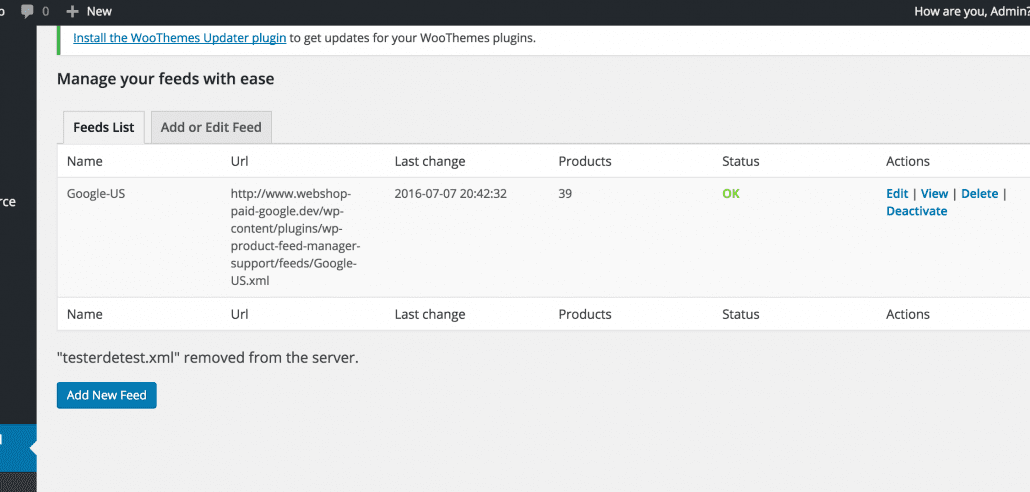
Next step is saving your feed and check the feed in the feed list. It will show you the feed url, how many products there are in the feed, the status of the feed and action links.

When you click the ‘View’ button you can view the feed in your browser. Note that every browser shows the feed different and you should get familiar how to see the xml code in your particular browser. For example the Chrome browser will display the xml feed without a problem but Firefox you will need to add ‘view-source:’ for the url in the adres bar.

Activate your feed

The last step is to activate your feed. This will make the plugin renew the feed with the earlier set Update schedule of the feed settings.

Watch the video to see creating a feed in action. There will be video’s with more advanced setup of the feed and will show you what you can do more with Woocommerce Google feed manager.

Please let us know if you have any question about using the plugin and get te best out of it.

Manage Channel templates

Add, remove and update channel templates

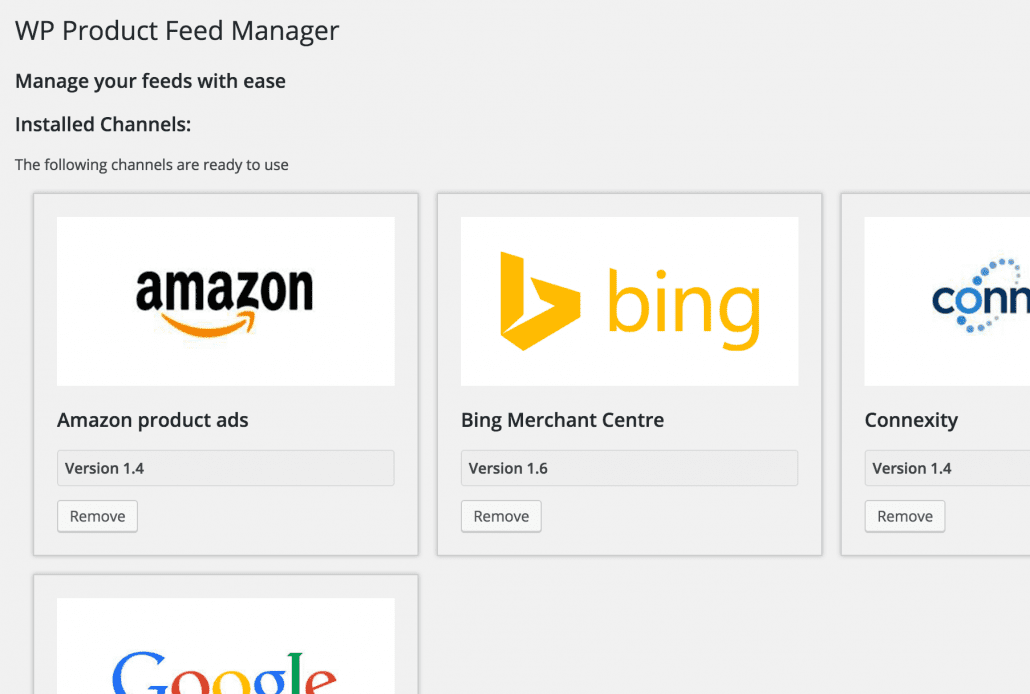
We have updated the google channel template and i wanted to to take this opportunity to show you how the “manage channel section” works ie installing, updating and removing channels.

First of all visit the “manage channels” section of the plugin.
You will find the installed and Uninstalled channel templates we support.

You will need to install a Channel template before you can use him in the Feed manager. So when you just started with our plugin the first thing you will have to do is to install the Channel of your choice.

Installing and Uninstalling is really easy Just Click on the install or Remove button to either install of remove the channel from the feed manager.

Updating Channels is important

Updating the channels is really important. We will always update channels as soon as the channel makes any changes in their feed requirements. By updating your Channel templates you are sure your feed will be approved by the Channel.

A channel will show a red version alert when there is a new update. Click the Update button to start the update. It is that easy.

Unsupported channel?

When your missing a template where you would like to show your product on. Please request the channel in our Feature request forum and we love to add the channel to our list of supported channel templates.

Exclude product from your feed

Advanced product filter

As off version 0.31.0 from our wp product feed manager and version 0.18.0 of the Woocommerce Google feed manager we have added advanced filter options. It will make it possible to exclude product from your product feeds.

Before, you could exclude and include products only by selecting the right category under “Category Mapping” This is not always right because you may have categories where you don’t want to include all product.

There are many situations where you would like to be able to exclude certain product from your feed. For instance you would like to exclude seasonal products, unprofitable products, products out of stock and not available.

Advance product filters, how to

Let’s take a look at the new filter options where to find them and how they work.

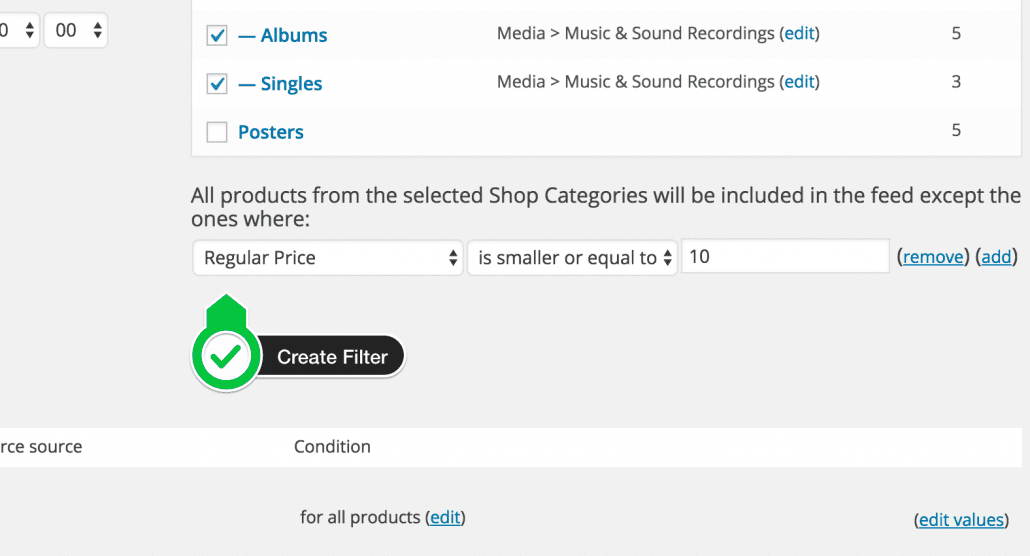
Let say we have products with low price in one category where CPA will exceed gross margin. So we want to exclude products under 10 bugs in the Music category.

Under the Category mapping we find a edit button next to the sentence “All products from the selected Shop Categories will be included in the feed”

advanced-product-filtering

When we click this button we get af familiar setup we also find under Condition with the attribute mapping.

How to use it

advanced-product-filter-create

We first select a source field “Regular price” next we select in the dropdown “is smaller than” and fill in 10. When we save the feed we will no longer have products in the feed with a regular price below $ 10,-

That’s how easy it is to use. Take an other look at the video for a walk through.

Google changes shopping feed specifications
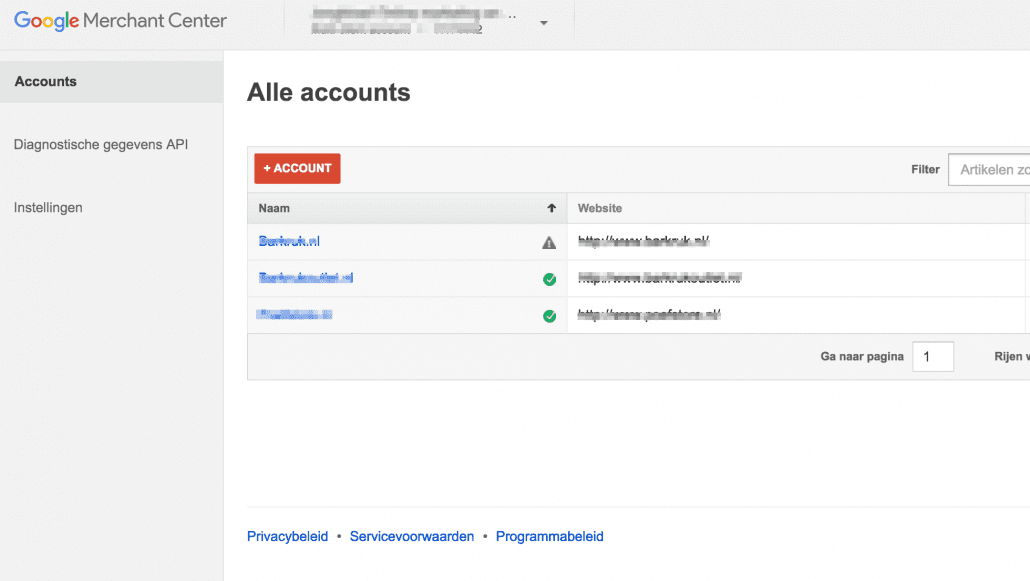
As of June 1, 2015 Google introduces new Google Shopping feed specification. However, the new requirements wil not be enforced instantly. Google will give merchants some time for adjustment.

Most of the required changes need to be implemented by September 15, 2015.
The idea behind the update is to create a richer experience for customer searching for products and simplify the feed specification.

The changes to the specification include:

  • GTINs: For AU, BR, CZ, FR, DE, IT, JP, NL, ES, CH, UK & US, you need to submit ‘gtin’ and ‘brand’ attributes for all products sold in ‘new’ condition from a designated brand. The list of designated brands will grow over time. The requirements remain the same for products that don’t meet these criteria.
  • ID Attribute: You need to submit valid and unique strings. For example trailing whitespaces or control characters will no longer be accepted. Invalid submissions will be disapproved.
  • Apparel and Variant attributes: For Brazil, the attributes ‘color’, ‘age group’ and ‘gender’ are now required for the ‘Apparel & Accessories’ category and the ‘size’ attribute is now required for the categories ‘Apparel & Accessories > Clothing’ and ‘Apparel & Accessories > Shoes’. These requirements are already in place in France, Germany, Japan, the UK, and the US.
  • Shipping: Will be required in Switzerland, the Czech Republic, the Netherlands, Italy, Spain, and Japan. Enforcement of this requirement begins February 1, 2016.
  • Units & Quantity Attributes can now also be submitted in the US to support products sold in bulk or by volume like tiles or floorboards.

From all the changes above the GTIN requirement can potentially have the biggest impact on merchants. Unless you already put GTIN in your Google Shopping feed, make sure that your products do not include designated brands. If they do, you will need to acquire GTIN from your supplier. Otherwise you Google Shopping feed will be disapproved mid-September.

We will notify our customers on any changes in feed specs they should be aware of. There for we send out a news mailinglist and put out an alert within the WordPress plugin.