
If you’re running Google Shopping campaigns, you’ve likely felt the frustration of generic product data limitations. You know that to truly stand out and achieve exceptional Return on Ad Spend (ROAS), your product feed needs to be more than just a list of items; it needs to be a dynamic, intelligent data source. But how do you bridge the gap between basic WooCommerce data and the granular optimization Google demands? This isn’t about simple fixes; it’s about mastering conditional logic to transform your product feed into a precision instrument that directly impacts your bottom line.
The Core Challenge: Why Standard WooCommerce & GMC Fall Short for ROAS Optimization
Most WooCommerce merchants encounter a critical bottleneck: the inherent rigidity of their product data. Your online store organizes products logically for your website, not necessarily for optimal performance on Google Shopping. This often means vital ROAS-driving data points like real-time profit margins, inventory age, or even competitor pricing aren’t readily available or easily manipulated within your core shop database.
Moreover, while Google Merchant Center (GMC) offers some attribute rules and basic “if/then” logic, these often lack the depth and multi-layered conditions required for truly advanced scenarios. They are designed for compliance, not aggressive ROAS optimization. This results in common ROAS-sinking issues:
- Wasted Ad Spend: Promoting low-margin, slow-moving inventory in high-visibility ad placements because you lack the means to distinguish its profitability from your bestsellers.
- Generic Titles Miss Opportunities: Missing out on search impressions and clicks because product titles are basic and don’t dynamically adapt to include high-converting keywords or promotional messaging. As Hashmeta highlights, “Product titles are the single most important feed attribute for Shopping performance.”
- Inefficient Bidding: Smart bidding strategies, while powerful, rely heavily on the quality and specificity of your feed data. If your custom labels or product categorizations are too broad, the AI can’t make the precise, nuanced bidding decisions needed for maximum ROAS.
- Poor User Experience: Displaying products with outdated pricing, incorrect availability, or irrelevant descriptions, leading to clicks that don’t convert and unnecessarily high ad costs.
To illustrate, consider a product that has been sitting in your warehouse for 90 days with a slim 15% profit margin, currently on clearance. Without advanced conditional logic, Google Shopping might treat it the same as a brand-new, high-margin bestseller. You need a system that allows you to dynamically identify and manage these nuances with surgical precision.
Decoding Conditional Logic for Google Shopping: The “If This, Then That” for ROAS
At its heart, conditional logic in product feeds is essentially an “if this, then that” system. You define a specific condition (the “if” part) and then specify an action to take if that condition is met (the “then that” part). But for Google Shopping, this concept transforms into a powerful mechanism for ROAS optimization.
Instead of passively accepting your WooCommerce product data, advanced conditional logic allows you to inspect and modify attributes dynamically before they are sent to Google Merchant Center. Attributes like product_type, price, stock, custom_labels, and even internal data points become the ‘conditions’ you can leverage. The ‘actions’ can range from rewriting titles and descriptions to excluding products entirely or dynamically assigning custom labels for targeted bidding.
For example, Google’s AI “uses AI to predict conversion value and adjust bids conditionally… optimizing for Shopping campaigns with sufficient data.” (Perplexity Search 1). Your ability to provide that “sufficient data,” especially via intelligent custom labels, is directly proportional to the sophistication of your conditional logic. The item_group_id is also critical here, enabling you to apply rules that manage how product variants are presented and optimized, affecting whether all sizes and colors of a popular dress are shown or if out-of-stock variations are intelligently paused.
Strategic Conditional Logic Tweaks to Boost ROAS
This is where the rubber meets the road. With the right tools, you can move beyond basic feed management to implement sophisticated strategies that significantly enhance your Google Shopping ROAS. Our plugin’s advanced filtering capabilities let you “tweak the content of every field,” giving you unparalleled control to override default WooCommerce data and meet the exact specifications for competitive SEO titles or precise categorization.
Dynamic Product Title & Description Overrides
Product titles are paramount. They influence search matching and user clicks. Instead of static titles, imagine dynamically adapting them:
- Example 1: Clearance & Profitability: You can prepend “Clearance – ” to product titles
IF (product_status = "on_sale" AND inventory_age > 60 days AND profit_margin < 25%). This immediately signals value to customers and helps move older stock, all while ensuring you run these ads only for items with specific financial needs. This dynamic adjustment directly impacts visibility and can lead to higher click-through rates from value-seeking customers. - Example 2: Keyword Injection: Inject specific, high-converting brand or material keywords into descriptions
IF (product_type = "running shoes" AND brand = "Nike" AND material = "gore-tex"). This enhances relevance for specialized searches, improving your product title optimization for Google Shopping.
Intelligent Product Exclusions for Waste Reduction
Not every product deserves ad spend. Protecting your ROAS means intelligently pausing or removing unprofitable items from your feed:
- Example 1: Low Profit, No Sale: Exclude products from the feed
IF (profit_margin < 5% OR product_age > 180 days without sale). This surgically cuts wasted ad spend on items unlikely to provide a good return. - Example 2: Out-of-Stock Variants: Exclude specific variants when their stock level reaches zero, while keeping the parent product active if other variants are available. This ensures you’re spending only on products customers can actually purchase, directly affecting conversion rates and ROAS.
Automated Custom Label Assignment for Smart Bidding
Custom labels are your best friend for segmenting products and applying varied bidding strategies. Conditional logic automates this complex process:
- Example 1: High-Value Segmentation: Assign
custom_label_0 = "High_ROAS_Target"IF (conversion_rate > X% AND AOV > $Y). This allows Google’s Smart Bidding to prioritize these proven performers with higher bids, directly aiming for increased ROAS. - Example 2: Seasonal Promotions: Assign
custom_label_1 = "End_of_Season_Clearance"IF (product_category = "Winter Apparel" AND current_month = "March"). This enables you to apply aggressive bidding for seasonal clearance items, moving inventory efficiently. “Custom labels enable conditional logic by categorizing products… for targeted bidding adjustments” (Perplexity Search 1).
Price Adjustment & Promotion Prioritization
Reacting to market dynamics or internal promotions in real-time is crucial for competitive advantage:
- Example 1: Competitor Matching: Modify
priceby -5%IF (competitor_price < our_price - 10% AND stock_level > 100). This sophisticated rule helps you stay competitive on pricing, which Perplexity Search 2 notes is a significant purchasing factor, while still protecting your margin and ensuring sufficient stock for the promotional effort. - Example 2: Automated Sales Pricing: Automatically set
sale_price_effective_datefor promotions based on an internal campaign flag or category, ensuring timely activation and deactivation of sales prices. “Products whose prices are lower than the market average generate the ‘lion’s share’ of traffic” (GoDataFeed), making dynamic pricing a powerful ROAS lever.
Optimizing Variant Handling
Managing product variations in Google Shopping can be cumbersome. Conditional logic helps streamline it:
- Example 1: Consolidated Titles: Aggregating child product data into parent titles
IF (item_group_id exists AND child_SKUs_colors contains "red, blue, green")allows you to create richer, more descriptive titles for products with multiple options. - Example 2: Intelligent Pausing: Pause all variants of a specific product
IF (most_popular_size_variant_stock < 1). This prevents promoting products that are effectively out of stock, improving customer experience, and reducing bounces.
Building Trust & Expertise: Beyond the UI – The Power Behind the Plugin
Implementing these advanced conditional logic rules requires a robust engine behind the scenes. Our WooCommerce Product Feed Manager isn’t just another plugin; it’s engineered for precision, experience, and partnership, handling complex logic and large datasets with efficiency. “Google’s AI automatically improves images, generates descriptions, categorizes products intelligently… Optimize feeds by structuring data… to maximize AI effectiveness, potentially increasing visibility 3-4x.” (Perplexity Search 2). Advanced filters ensure your data is always structured optimally.
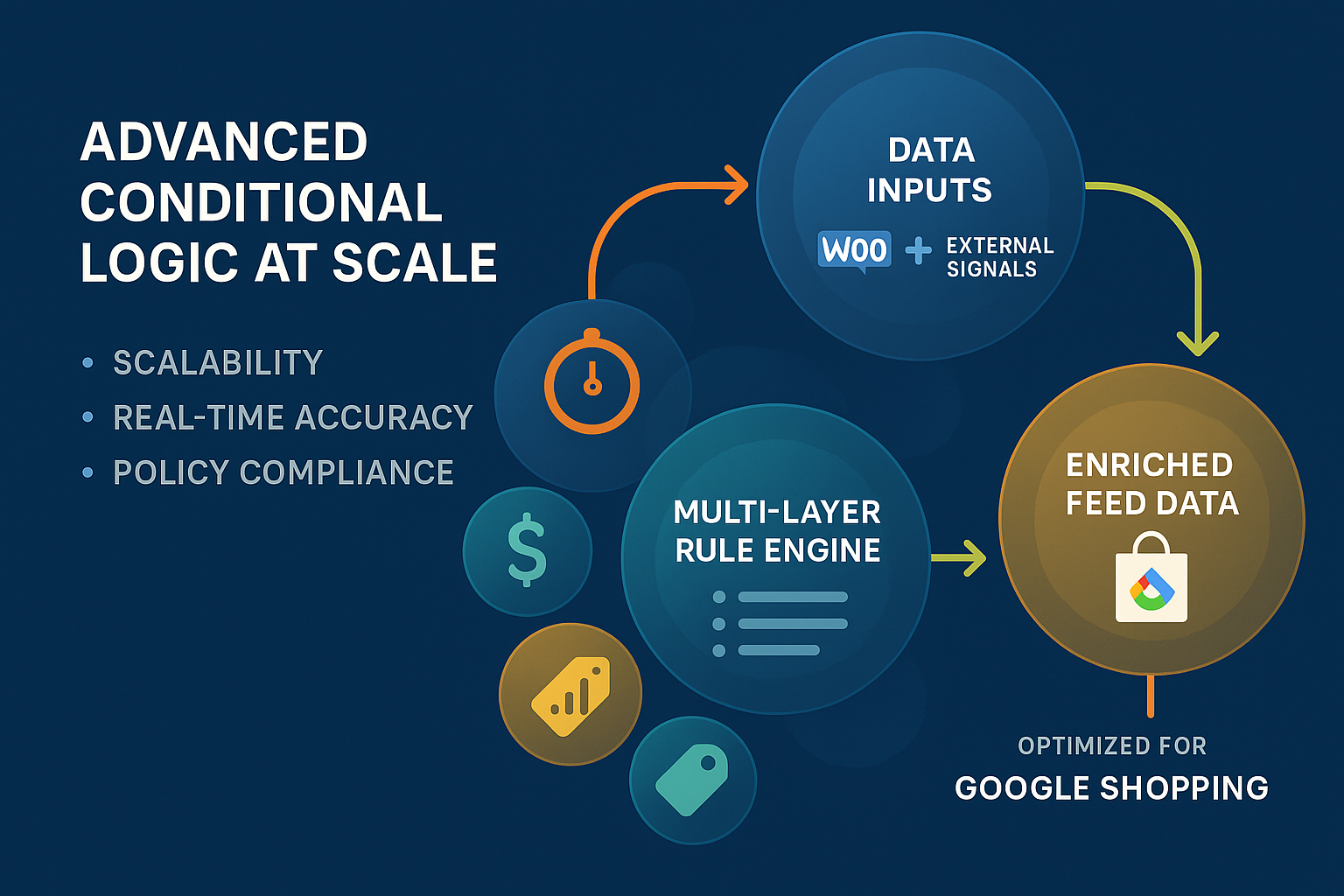
The real power lies in its ability to parse your WooCommerce data, assess multiple conditions simultaneously, and then tweak specific fields according to your predefined rules. This dynamic enrichment maintains data accuracy and ensures compliance with Google’s ever-evolving policies.
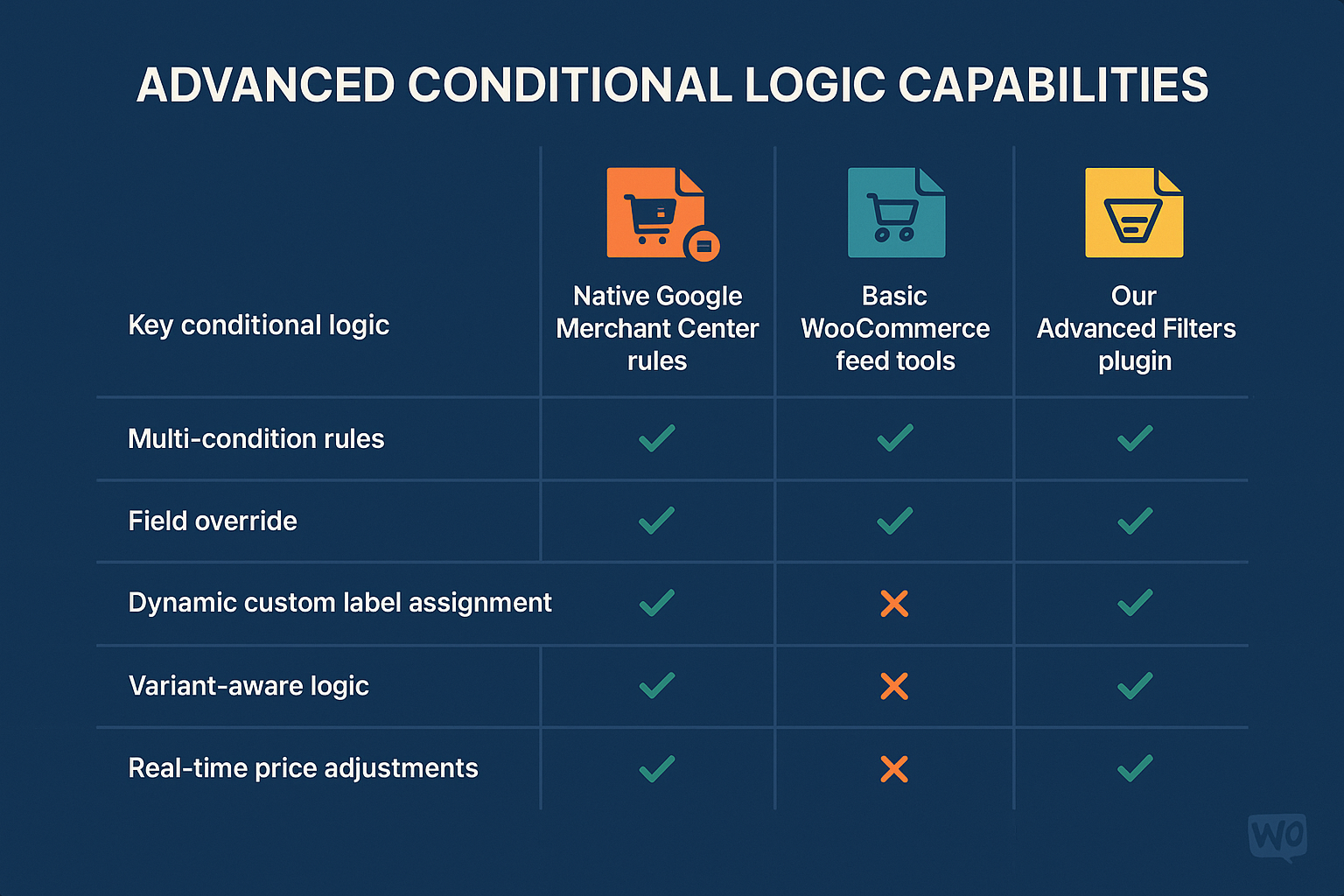
Unlike native GMC rules, which can be somewhat limited, or simpler feed tools, our plugin provides:
- Multi-layered Conditions: Combine multiple AND/OR statements for highly specific targeting.
- Data Enrichment without Coding: Modify, add, or transform data based on conditional logic without needing to dive into complex code.
- Scalability: Handle thousands of products and complex variations without performance degradation, crucial for dropshipping businesses or growing WooCommerce stores.
Case Studies/Scenarios: Tangible ROAS Impact Examples
Let’s look at illustrative scenarios where these conditional logic tweaks directly impacted ROAS:
- Scenario 1: Slow-Moving Inventory Clearance: An electronics retailer used conditional logic to identify products that had been in stock for over 120 days and had a profit margin below 20%. They then automatically prepended “Limited Stock! ” to the title and assigned a “Clearance” custom label. This led to a 28% increase in ROAS for these specific products, turning stagnant inventory into profitable sales.
- Scenario 2: Optimizing High-Value Categories: A fashion boutique utilized advanced filters to enrich product titles for their “Luxury Handbags” category with specific brand and material keywords, but only if the product’s price was above €500. This highly targeted approach resulted in a 15% increase in conversion rate and a 22% uplift in ROAS for those premium items, effectively focusing ad spend on their most profitable segments.
- Scenario 3: Eliminating Wasted Spend: A home goods merchant’s ad spend on low-margin accessories was eating into overall profits. They implemented a rule to exclude any product from the feed
IF (category = "Accessories" AND profit_margin < 10% AND average_monthly_sales < 5). Within a month, their overall ad spend decreased by 10%, while overall ROAS for remaining products improved by 20%, demonstrating effective waste reduction.
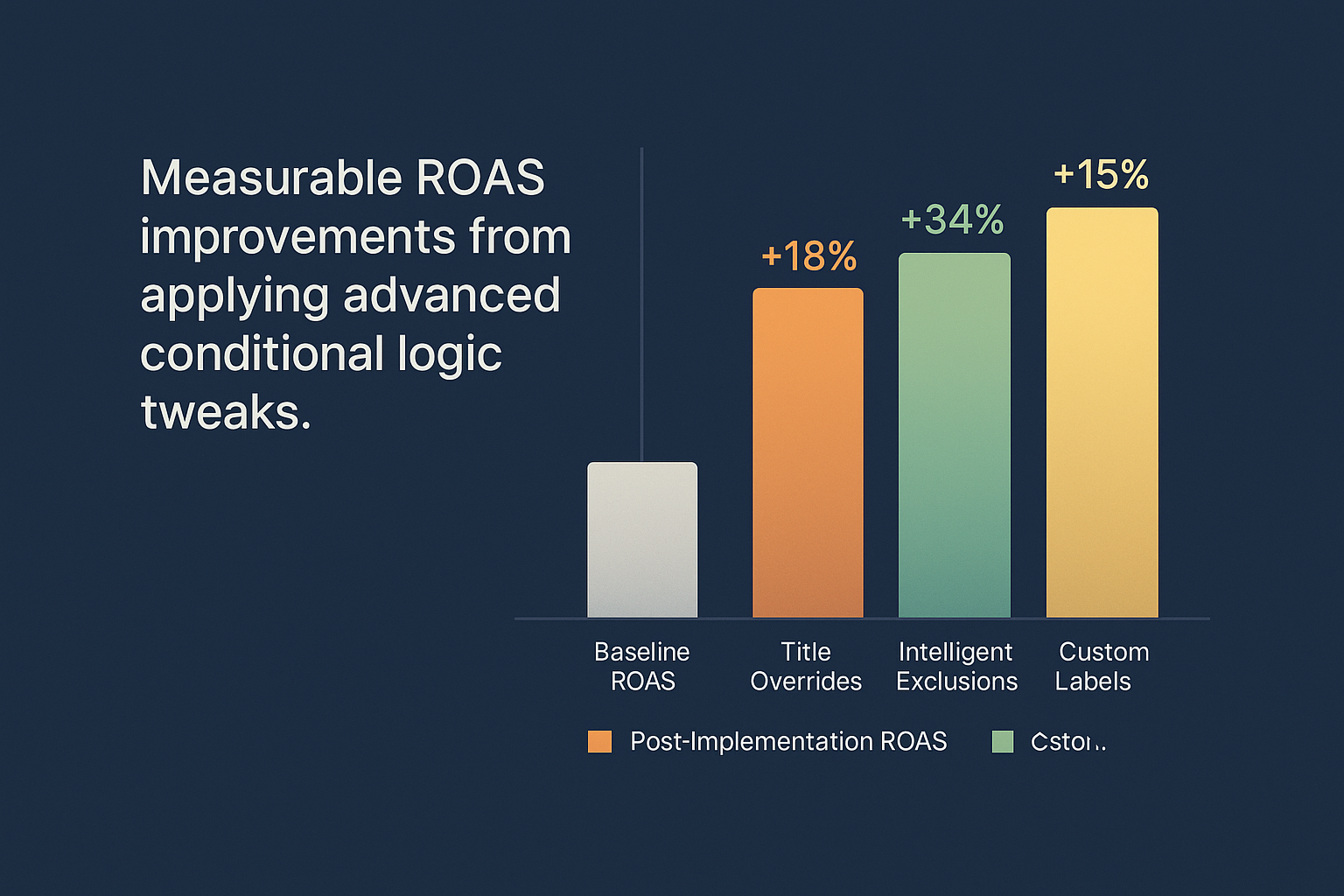
These examples underline that strategic conditional logic isn’t just about tweaking data; it’s about making data-driven business decisions that lead to quantifiable financial improvements. The “proof of performance” is clear: smarter feeds lead to smarter ad spend.
Implementation & Best Practices for Conditional Logic Mastery
Mastering conditional logic is an ongoing process, but with a structured approach, you can confidently implement, test, and refine your rules for maximum impact.
- Define Your Goal: Before crafting any rule, clearly understand what you want to achieve (e.g., increase ROAS for X product category, reduce wasted spend on Y products, promote Z items).
- Identify Your Data Points: Determine which fields (product title, price, stock, custom attributes, etc.) you need to influence and which conditions (margin, age, stock level, category) you’ll use to trigger the changes.
- Start Simple, Then Scale: Begin with one or two powerful rules, such as dynamic title overrides for clearance items or exclusions for out-of-stock products. Once you see the impact, gradually add more complex logic.
- Test Thoroughly: Always preview your feed and test your rules before pushing them live to Google Merchant Center. Use our plugin’s features to validate the output of your conditional logic.
- Monitor Performance: After implementing new rules, closely monitor your Google Shopping campaign performance. Look at metrics like impressions, clicks, CTR, conversions, and especially ROAS for the affected products.
- Iterate and Refine: The digital advertising landscape is fluid. Continuously review your rules and adjust them based on performance data, seasonal trends, and new business objectives. Treat feed optimization as an agile, iterative process.
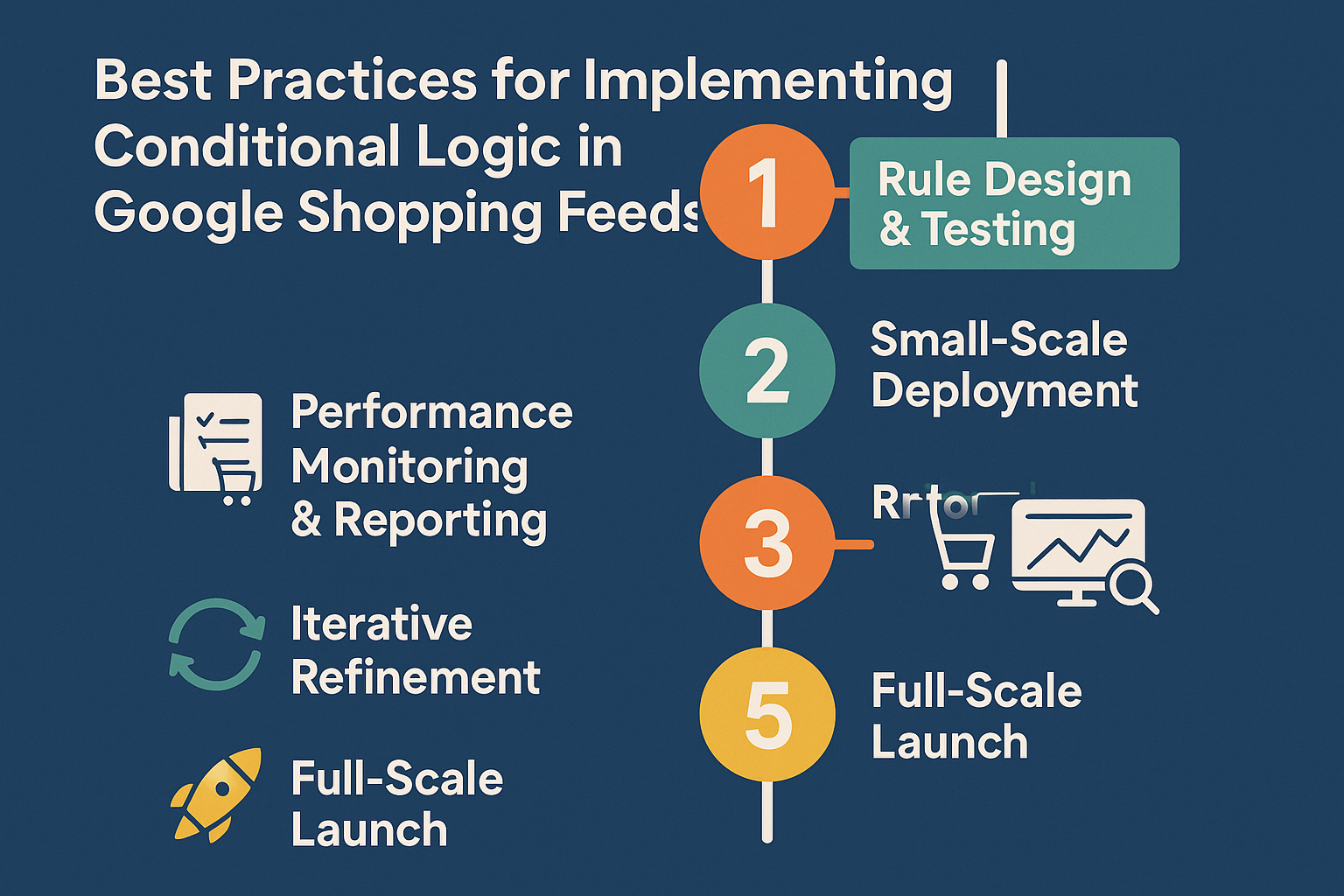
Following these best practices will ensure that your investment in advanced filtering translates into sustained, measurable improvements in your Google Shopping campaigns. For comprehensive guidance on using our advanced filters, consult our detailed documentation: [Advanced Filters Documentation].
FAQ: Your Advanced Filtering Questions Answered
Q: How is your plugin’s conditional logic different from basic Google Merchant Center rules?
A: While GMC offers some attribute rules, they are generally more basic and less flexible. Our plugin provides multi-layered conditional logic, allowing you to combine multiple “AND” and “OR” statements across various attributes, including custom WooCommerce fields. It lets you completely override existing WooCommerce data within the feed, which GMC rules often can’t do, giving you more granular control over your product data before it even reaches Google. Also, our rules can leverage data points that are not directly exposed or easily manipulated within GMC alone, such as calculated profit margins or unique meta-data from your WooCommerce store.
Q: Can your plugin help with optimizing for Google’s AI like Performance Max campaigns?
A: Absolutely. Google’s Performance Max campaigns and other AI-driven initiatives heavily rely on high-quality, richly attributed product data for optimal performance. By using advanced conditional logic to refine your titles, add relevant keywords to descriptions, and assign precise custom labels, you are essentially “feeding” Google’s AI with the best possible data. This enables the AI to better understand your products, target the right audiences, and maximize your campaign’s effectiveness, directly contributing to higher ROAS. As Perplexity notes, “Google’s AI automatically improves images, generates descriptions, categorizes products intelligently… Optimize feeds by structuring data (e.g., complete attributes like GTIN, MPN, brand) to maximize AI effectiveness.”
Q: What if I have complex product variations (like size, color, material)? Can conditional logic handle that?
A: Yes, sophisticated variant management is one of our plugin’s strengths. Our advanced filters allow you to apply conditional rules based on specific variant attributes. For example, you can alter the title of a product only if a certain size is in stock, or assign unique custom labels to specific color variants for tailored bidding strategies. This is crucial as managing variants optimally can significantly impact your search visibility and click-through rates. For more on this, check out our guide on “The Complete Guide to WooCommerce Product Feed Management”.
Q: Is it possible to use conditional logic to exclude products that are temporarily out of stock or have very low stock?
A: Absolutely. This is a common and highly effective use of conditional logic for ROAS. You can create a rule that says IF (stock_level = 0 OR stock_level < 5), then EXCLUDE_PRODUCT_FROM_FEED. This prevents you from wasting ad spend on products that can’t be purchased, immediately boosting your ROAS by ensuring every ad dollar goes towards convertible inventory.
Q: How difficult is it to set up these advanced conditional logic rules? Do I need to be a developer?
A: Our plugin is designed with a user-friendly interface that simplifies the creation of complex rules. While understanding the principles of conditional logic helps, you don’t need to be a developer. Our intuitive rule builder allows you to select conditions and actions from dropdowns and input fields. We also provide comprehensive documentation and expert support to guide you through the process, ensuring you can leverage these advanced features effectively. You can learn more about our features here.
Conclusion: Transform Your Google Shopping Campaigns with Advanced Filters
Generic product feeds are akin to fishing with a wide, untargeted net. In today’s competitive e-commerce landscape, that simply won’t yield the ROAS you need. Mastering advanced filters and conditional logic is no longer a luxury; it’s a necessity for any serious WooCommerce merchant using Google Shopping.
By empowering you to dynamically tweak every facet of your product data, from highly optimized titles to intelligent exclusions and precise custom labels, our WooCommerce Product Feed Manager transforms your feed from a static list into a powerful, responsive instrument. It unlocks the potential for targeted campaigns, reduced wasted ad spend, and ultimately, significantly improved ROAS.
Don’t just manage your feeds; master them. Ready to take your Google Shopping performance to the next level? Explore how our plugin can empower your store by diving into more detail on our product page or by considering one of our plans designed to supercharge your e-commerce efforts.