ChatGPT Product Discovery for WooCommerce: How It Works and How to Get Ready
A store owner in Austria emailed me last week with a question I have been hearing more often. He had filled in the application for the ACP plugin, but then read that in-chat purchasing is not available in the EU due to regulations. He had also heard something similar at OMR. “Is this also the case for buying via ChatGPT?”
It is a fair question, and the answer has two parts. For in-chat checkout: yes, that is currently not available in Europe, and the reasons go beyond a single regulation. For product discovery, meaning your products showing up in ChatGPT’s shopping results with a click-through to your own webshop: no, that works fine, and you can start preparing right now.
Those two things are often confused. This article explains the difference, how discovery actually works, and what you need to do depending on where you are.
Discovery vs. Checkout: Two Different Things
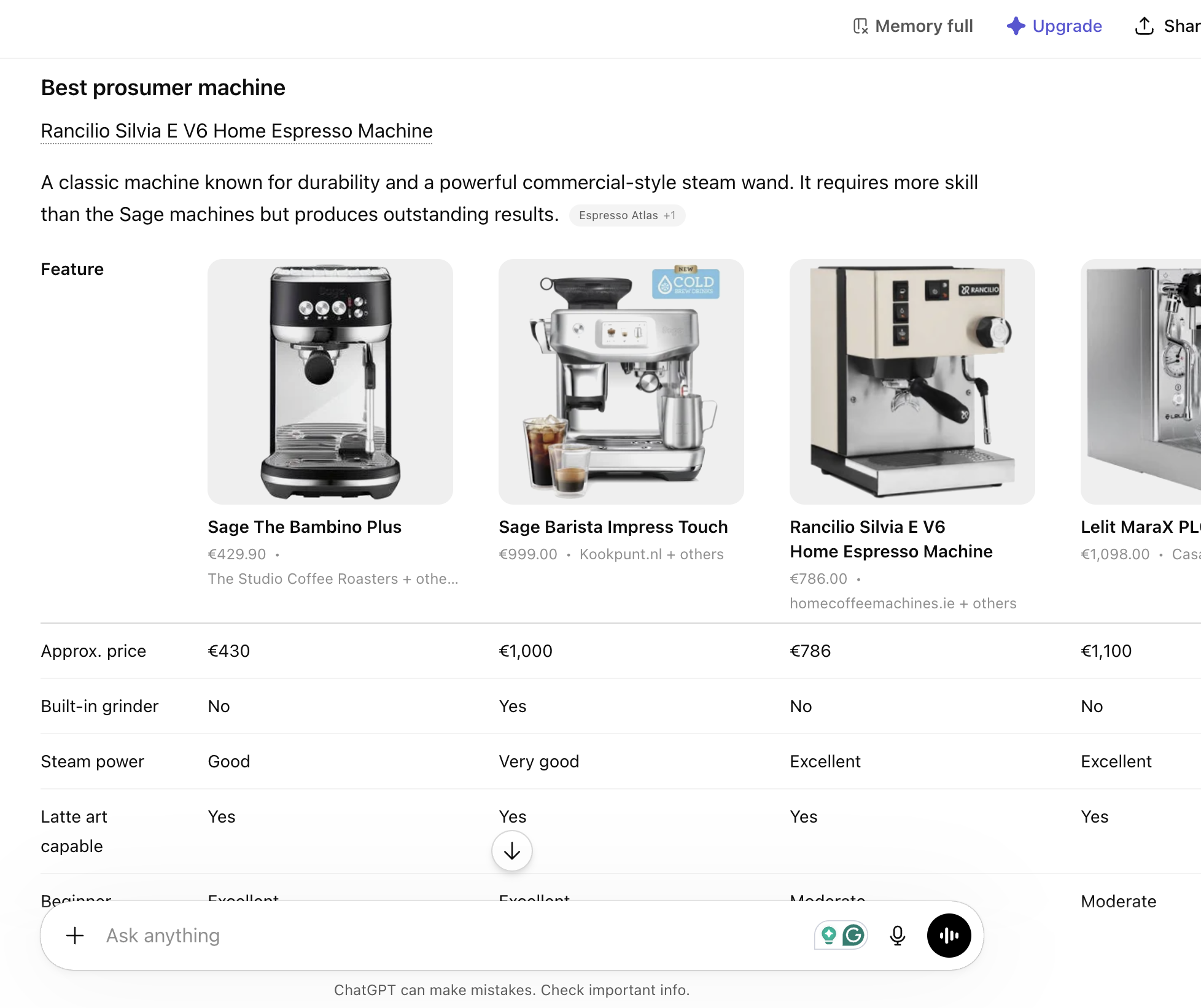
When someone types “best running shoes under €100” into ChatGPT, they may see a row of product cards with photos, prices, and a link to the store. That is product discovery. The user clicks, lands on your webshop, and buys there. No payment happens inside ChatGPT. No special checkout integration is needed.
OpenAI’s in-chat Instant Checkout, which is part of the Agentic Commerce Protocol (ACP), was a different feature: the user would complete the purchase without leaving the chat. OpenAI launched it in the US with a small group of Shopify merchants in September 2025. By March 2026, it was pulled back. OpenAI confirmed: “Instant checkout is transitioning to apps, where purchases can occur more seamlessly.” Only around twelve of Shopify’s millions of merchants ever went live before the feature was discontinued.
So when that store owner in Austria worried about EU regulations blocking him from getting started, he was conflating two separate things. The in-chat checkout has its own complexity in Europe, a stack of PSD2 authentication requirements, missing local payment methods like iDEAL, and no EU tax infrastructure at OpenAI. But none of that applies to product discovery.
Discovery is just this: your product data goes into ChatGPT’s index, and when a user asks a relevant question, your product can appear. The user clicks through to you. That is the model OpenAI is currently building on, and it works for merchants outside the US.
How ChatGPT Product Discovery Actually Works
ChatGPT does not discover your products by accident. It needs structured product data, delivered via a feed that follows OpenAI’s specification.
The core flow is straightforward. You provide a product feed with the required fields: product ID, title, description, price, availability, product URL, and image URL. OpenAI validates that feed, converts the data into vector representations, and indexes it for semantic search. When a user asks a shopping question, ChatGPT matches the query against the catalog and shows relevant products.
The keyword there is semantic. ChatGPT does not just match keywords. It tries to understand what the user actually means. A query like “gift for someone who loves cooking but doesn’t have a lot of kitchen space” can match a compact herb garden kit or a wall-mounted spice rack, even if those exact words never appear in the product title. That is why description quality matters more here than it does in Google Shopping, where keyword matching still dominates.
One important nuance: according to a Peec AI analysis of over 43,000 products in ChatGPT’s shopping carousel, 83% of the product data comes from existing Google Shopping feeds and direct crawling of product pages. If your Google Merchant Center feed is in good shape, you are already partially visible, or will be as indexing expands. The feed submission is not starting from zero; it is making sure your data is complete and deliberately submitted rather than leaving it to chance.
What You Can Do Right Now
Your situation depends on where you are located.
If you are outside the EU, or in a country where the Merchant Portal is already supported
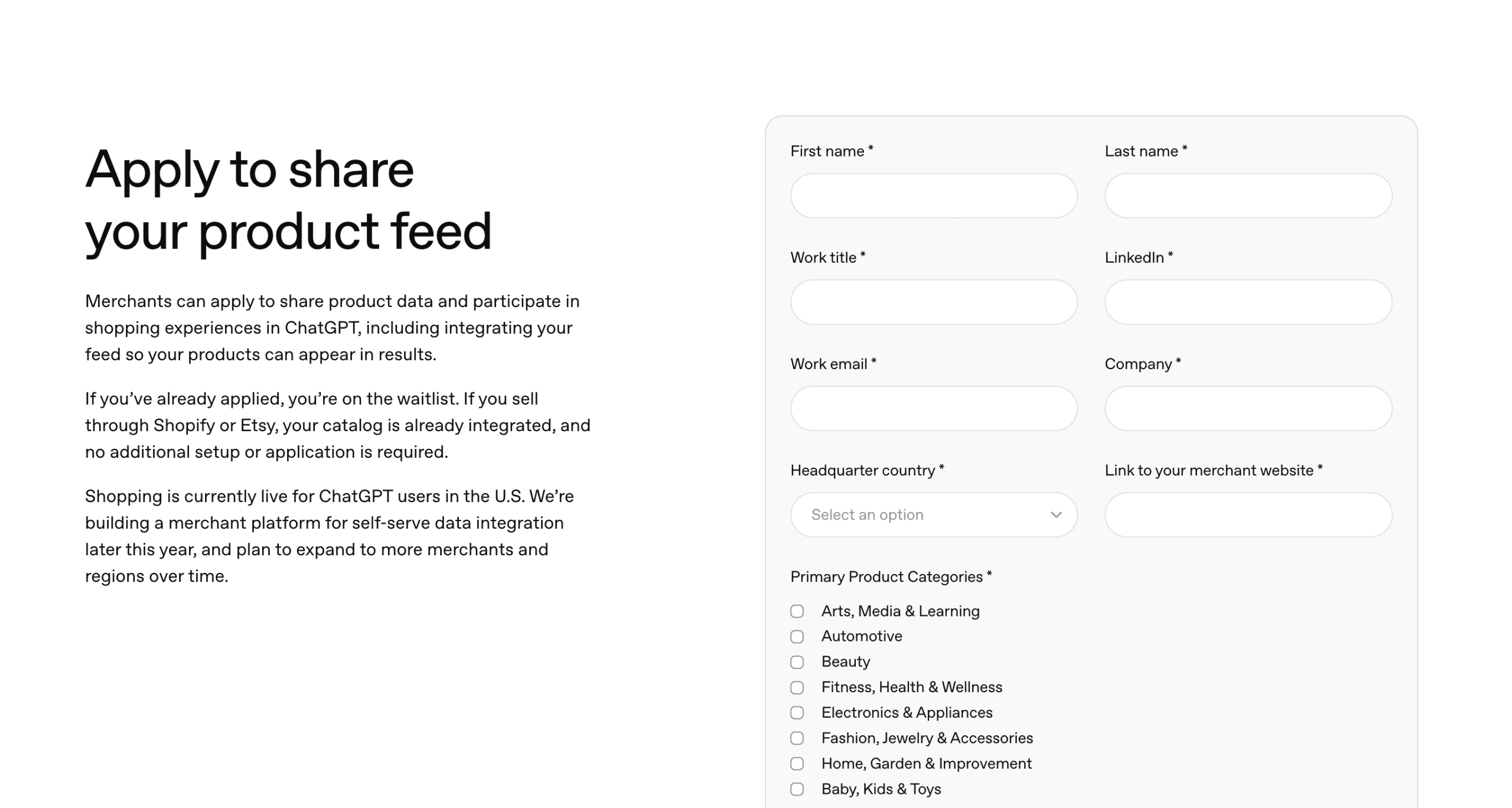
Go to chatgpt.com/merchants and submit an application. Once approved, you submit your product feed to OpenAI directly.
The most practical way to build that feed for WooCommerce is with WP Product Feed Manager. The plugin has a dedicated ChatGPT channel. You select that channel, configure which products to include, set your update frequency (every 15 minutes is supported if you have a dynamic catalog; daily is fine for most stores), and check the field mapping. WP Product Feed Manager maps your WooCommerce product data to OpenAI’s feed specification automatically, including title, description, price, availability, image, and product URL. You can review and adjust every field before publishing.
Once the feed is live, you copy the feed URL, submit it to OpenAI via the Merchant Portal, and resolve any validation errors they flag.
If you are an EU-based merchant
The self-serve Merchant Portal for independent merchants is currently in early access and being rolled out gradually. Full availability in Europe is expected later in 2026, based on current rollout signals, though OpenAI has not officially confirmed a date. You cannot submit a feed directly yet.
That does not mean there is nothing to do.
First, check your robots.txt. OpenAI uses two crawlers that respect robots.txt: OAI-SearchBot (which determines whether your products appear in Search results) and GPTBot (used for model training). Many WordPress sites block unknown crawlers by default. Check that neither of these is blocked. Note: ChatGPT-User is triggered by users during a session, not an automatic crawler, and does not affect Search indexing.
Second, make sure your Schema.org Product markup is server-side rendered. ChatGPT’s crawlers read structured data to understand your products. If that markup is loaded via client-side JavaScript, the crawlers may never see it. Check that your WooCommerce theme or schema plugin outputs Product markup in the page source, not just after JavaScript executes.
Third, add two fields that most stores skip. OpenAI’s feed specification includes hasMerchantReturnPolicy and shippingDetails. These are not technically required for basic indexing, but they are significant ranking signals. According to feed data analysis, over 90% of webshops do not include them. Filling them in is a concrete advantage when the portal opens.
Fourth, build your ChatGPT feed in WP Product Feed Manager now. The plugin has a dedicated ChatGPT channel. Select it, configure which products to include, set your update frequency, and review the field mapping. The feed is ready to submit the moment the Merchant Portal opens in your region. Creating it takes less than an hour, and you will not be scrambling when the rollout happens.
The Checkout Story: Where It Goes From Here
ACP as a protocol is not dead. OpenAI and Stripe are continuing to develop the standard, and agentic purchasing (where an AI completes a purchase on your behalf) is still on the roadmap. But the native in-chat checkout is gone for now. OpenAI confirmed it: “Instant checkout is transitioning to apps, where purchases can occur more seamlessly.”
For European merchants, even when checkout does arrive, it will require PSD2-compliant authentication, support for local payment methods, and OpenAI building out EU tax infrastructure. That is not a 2026 story.
Product discovery is the story for 2026. And it is the foundation for whatever comes after.
What to Focus On
Product discovery does not require a checkout integration, a US entity, or waiting for EU regulations to change. It requires a clean, complete product feed and a few technical checks that most stores can handle in an afternoon.
If you are outside the EU: sign up at chatgpt.com/merchants, build your feed in WP Product Feed Manager, and submit it.
If you are in the EU, make sure OAI-SearchBot GPTBot Are not blocked, check your Schema.org markup, add the return policy and shipping fields, and build your ChatGPT feed in WP Product Feed Manager now. When the Merchant Portal opens in Europe, you are ready on day one.
The stores that will be visible in ChatGPT shopping results six months from now are the ones that got this set up before it felt urgent.
Want to set up a ChatGPT product feed for your WooCommerce store? WP Product Feed Manager handles the feed generation, field mapping, and update scheduling so you can focus on your products, not the spec.