ChatGPT Product Feed
Enable your WooCommerce products on ChatGPT’s shopping features.

A ChatGPT product feed is a structured digital file containing detailed information about your WooCommerce products, optimized specifically for ChatGPT’s shopping capabilities and OpenAI’s agentic commerce platform. Unlike traditional product feeds that rely on keyword matching, a ChatGPT product feed is designed to work with conversational AI—enabling your products to appear when customers ask for recommendations directly within ChatGPT.
Current Status: Early Adoption Phase
As of December 2025, ChatGPT’s shopping integration is actively evolving. OpenAI initially launched Instant Checkout with Etsy (US) and has announced Shopify integration. WooCommerce merchants don’t yet have a direct, fully-documented integration path into ChatGPT’s merchant center. However, the foundation is clear: OpenAI is rapidly expanding its merchant network throughout 2025-2026. By preparing your ChatGPT product feed now with WP Marketing Robot, you’ll be ready to submit the moment OpenAI opens direct access to WooCommerce stores.
The growth of agentic commerce presents a genuine opportunity for forward-thinking WooCommerce merchants. Even though direct ChatGPT merchant access for WooCommerce isn’t yet available, now is the ideal time to prepare. Here’s why.
Be Ready When Access Opens
OpenAI is actively expanding merchant access. Etsy launched first, Shopify is coming soon, and WooCommerce integration is clearly coming. Merchants who wait until direct access opens will scramble to create feeds, troubleshoot formatting issues, and optimize performance. You can skip that chaos entirely by preparing now. When OpenAI announces WooCommerce merchant access, you’ll submit instantly—capturing early-adopter advantage while competitors catch up.
Capture Early-Adopter Market Share
AI-driven commerce grows 40%+ year-over-year, and adoption is accelerating. The merchants who establish a presence in ChatGPT shopping first will dominate before widespread competition emerges. They’ll accumulate customer reviews, performance data, and algorithmic credibility that later entrants won’t have. By preparing your feed now, you’re positioning for leadership in this emerging channel.
Improve Your Product Data Foundation
Creating a ChatGPT product feed forces you to evaluate and enhance your product information. Detailed titles, comprehensive descriptions, high-quality images, and accurate inventory data benefit not just ChatGPT—they improve performance across all sales channels. Better product data leads to higher conversion rates on Google Shopping, Facebook, and your own store. This preparation has immediate ROI.
Understand Your Catalog’s Readiness
Building a ChatGPT feed reveals which products need attention. Are your images high-quality? Do descriptions answer customer questions? Is inventory data accurate? Are you missing required fields? This diagnostic process helps you optimize your entire product database. Many merchants discover issues during feed preparation that they then fix across all channels.
Expand Beyond Traditional Shopping Channels
While Google Shopping remains important, relying solely on one channel is risky. A ChatGPT product feed diversifies your visibility across multiple platforms. Your WooCommerce store reaches customers through Google Shopping, Google Search ads, ChatGPT shopping features, and more—all from one centralized feed management system. Preparation now means easier scaling later.
Future-Proof Your E-Commerce Strategy
As AI continues to reshape how customers discover products, merchants who have already mastered agentic commerce will have a significant advantage. Understanding ChatGPT’s requirements, optimizing your product data, and being ready to submit positions your business as ahead of the curve and ready for the future of e-commerce.
Every product needs: Product ID (unique identifier), Title (60-100 characters), Description (natural language explaining what it is and who it’s for), Price (current and accurate), Availability (in stock/out of stock), Image URL (high-quality, publicly accessible), and Product Link (to your WooCommerce page).
Brand name, product category, materials, size/dimensions, color options, variant information, additional images, and customer reviews/ratings. These fields significantly improve how ChatGPT matches your products to customer requests.
Sale price, shipping information, warranty details, promotional messaging, sustainability attributes, and technical specifications. These enhance visibility but aren’t required.
Prices must match your actual store. Inventory status must be current. Images must be clear and accurate. Descriptions should be grammatically correct with no keyword stuffing. Categories must reflect product reality.
OpenAI uses a push-based system, not real-time queries. Your product data (CSV, JSON, XML, or TSV) pushes to OpenAI’s servers at regular intervals—as frequently as every 15 minutes. WP Marketing Robot automates this schedule, keeping ChatGPT current with your inventory and pricing while you maintain control over positioning.
ChatGPT merchant access is live. Sign up and submit today—don’t wait.
Go to chatgpt.com/merchants and create your merchant account.
In WP Marketing Robot, click “Create New Feed,” select “ChatGPT,” and name it. Your feed automatically formats to OpenAI’s specifications.
Select which products to include (all products, specific categories, or custom filters). Set your update schedule: 15-minute intervals for dynamic catalogs or daily for stable inventory.
WP Marketing Robot automatically maps most fields, but review each one. Verify titles, descriptions, prices, and image URLs are correct and properly formatted for conversational AI.
Use the preview tool to check for formatting issues, missing data, or incorrect mappings. Fix any problems before submission.
Export your feed and upload it through the ChatGPT merchant portal. OpenAI validates it within 24-48 hours.
Once approved, your products appear in ChatGPT shopping results. Track performance and update your feed regularly to keep pricing and inventory current (push updates as frequently as every 15 minutes).
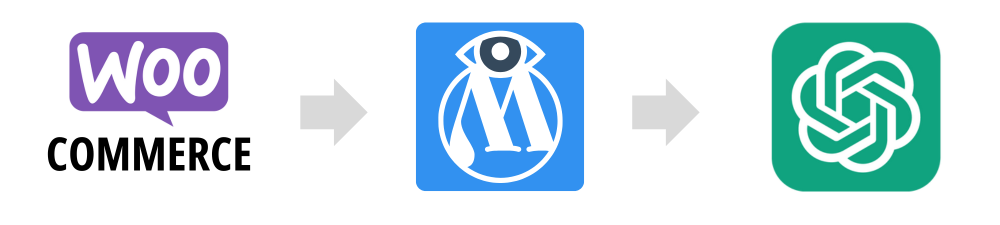
Simply submitting a ChatGPT product feed isn’t enough to maximize results. To truly succeed in agentic commerce, you need to optimize every element for how ChatGPT’s algorithms evaluate and recommend products.
ChatGPT’s algorithms understand natural language context in ways that keyword-matching systems don’t. Write product descriptions that answer questions customers actually ask in conversation. Instead of keyword-dense snippets, craft descriptions that explain what something is, who it’s for, what problems it solves, and what makes it special. For example, instead of “waterproof leather hiking boots size 8-12 tactical,” write something like “Premium hiking boots designed for serious trekkers. Waterproof leather construction keeps your feet dry on rugged trails, while cushioned insoles provide all-day comfort on challenging terrain. Available in sizes 8-12.” This conversational approach aligns with how users interact with ChatGPT shopping features and helps the algorithm understand your products better.
ChatGPT can analyze product images to understand what you’re selling. Invest in clear, well-lit product photography. Show your products from multiple angles and in use when possible. Poor image quality reduces confidence in both the AI system and the purchase decision. Ensure images are high-resolution, properly formatted, and accurately represent what customers will receive. Include multiple images when available—this gives ChatGPT better context for recommendations.
ChatGPT customers expect current information. Stale prices and incorrect inventory status don’t just hurt individual sales—they damage ChatGPT’s recommendation credibility, potentially affecting how often your products appear in the future. Configure automatic feed updates that sync with your WooCommerce store. When products go out of stock, remove them from recommendations. When prices change, update them immediately. This real-time accuracy builds trust with both customers and ChatGPT’s algorithm.
While not every field is required, comprehensive data improves ChatGPT’s ability to match products to customer needs. Include brand information, category details, materials, sizes, colors, and any relevant attributes that differentiate your products. Think about the customer questions ChatGPT might need to answer to recommend your product, then ensure you’ve provided that information in your feed.
In agentic commerce, clearly communicate what makes your products distinct. Are they eco-friendly? Locally sourced? Award-winning? Handmade? Include this information in your descriptions and feed fields. ChatGPT’s algorithms consider these differentiators when matching products to specific customer preferences and needs.
Think about how customers naturally describe what they’re looking for, not how they search on Google. When someone asks ChatGPT “I need a lightweight laptop for travel,” they’re not using exact keyword phrases. Structure your product information to align with conversational language. Use terms like “perfect for,” “ideal for,” and “great for” when describing use cases. This helps ChatGPT match your products to conversational requests more effectively.
Once your ChatGPT product feed is live, monitor performance regularly. Review which products receive recommendations and which don’t. Analyze the products that drive conversions and identify what makes them successful. Do they have better descriptions? Higher ratings? More complete information? Use these insights to optimize underperforming products. Continuous iteration based on real performance data is what separates successful merchants from those who set it and forget it.
Automated Compliance
WP Marketing Robot maintains templates matching ChatGPT’s exact specifications. When OpenAI updates requirements, we update automatically. No outdated configurations or approval delays.
Automatic Field Mapping
Your WooCommerce data flows automatically into ChatGPT-optimized format. No manual XML creation or technical complexity.
Real-Time Feed Updates
Push product data to OpenAI as frequently as every 15 minutes. Keep pricing, inventory, and product information current without backend integration.
Complete Control
Exclude specific products, adjust descriptions for conversational tone, and apply custom rules—all while automation handles the heavy lifting.
Multi-Channel Management
Manage Google Shopping, Facebook Catalogs, Bing feeds, and ChatGPT from one platform. Maintain consistency across channels with channel-specific optimizations.
Expert Support
Our Dutch-based team understands WooCommerce and emerging commerce channels. When ChatGPT specs change, we notify you immediately.
Scale Without Limits
Whether you have 100 or 50,000+ products, WP Marketing Robot handles feed generation, updates, and optimization effortlessly.
Proven Track Record
10,000+ WooCommerce stores trust us. Join successful e-commerce businesses reaching customers across every major shopping channel.
Tailor your product visibility with our sophisticated filtering, utilizing every WooCommerce source field.
Effortlessly include or exclude product variations in your feeds, giving you complete control.
Set your own schedule and let the tool do the rest, ensuring your feeds are always current and relevant.
Access unparalleled support anytime, with industry-leading experts ready to leverage their feed knowledge to help you reach your goals.

Don’t Miss Out: By not leveraging our WooCommerce Product Feed Manager, you risk falling behind in a highly competitive digital marketplace. Ineffective product feeds can lead to reduced visibility, missed sales opportunities, and a failure to connect with a global audience. Our tool is more than a plugin; it’s your partner in ensuring that your products stand out, attract, and convert.
WP Marketing Robot recommends the same system requirements as WordPress: PHP v.7+, MySQL v5.5+ and the latest version of WordPress