WooCommerce Product Feed Pricing Evaluation: Single Shop vs. Agency Tiers – Calculating Your True ROI

You’re beyond the initial hurdle of understanding why a product feed manager is essential for your WooCommerce store. You know that visibility across channels like Google Shopping, Facebook, and Amazon isn’t optional; it’s foundational for sales. Now, the real question has emerged: which pricing tier of a product feed solution will deliver the most quantifiable return on investment for your business?

This isn’t about finding the cheapest option. It’s about strategically investing in a tool that will scale with your ambitions, whether you manage a single thriving store or oversee a portfolio of client shops. This guide will walk you through the precise calculations and considerations needed to align your marketing budget with an impactful growth strategy.

The Hidden Costs of “Free” & Basic Feeds: Why You’re Losing Money (and Sleep)

Many merchants, especially early on, are drawn to “free” or basic product feed solutions. They appear to solve the immediate problem of getting products listed, but this perceived saving often masks high, quantifiable costs. In the hyper-competitive world of online advertising, precision isn’t a luxury; it’s profit.
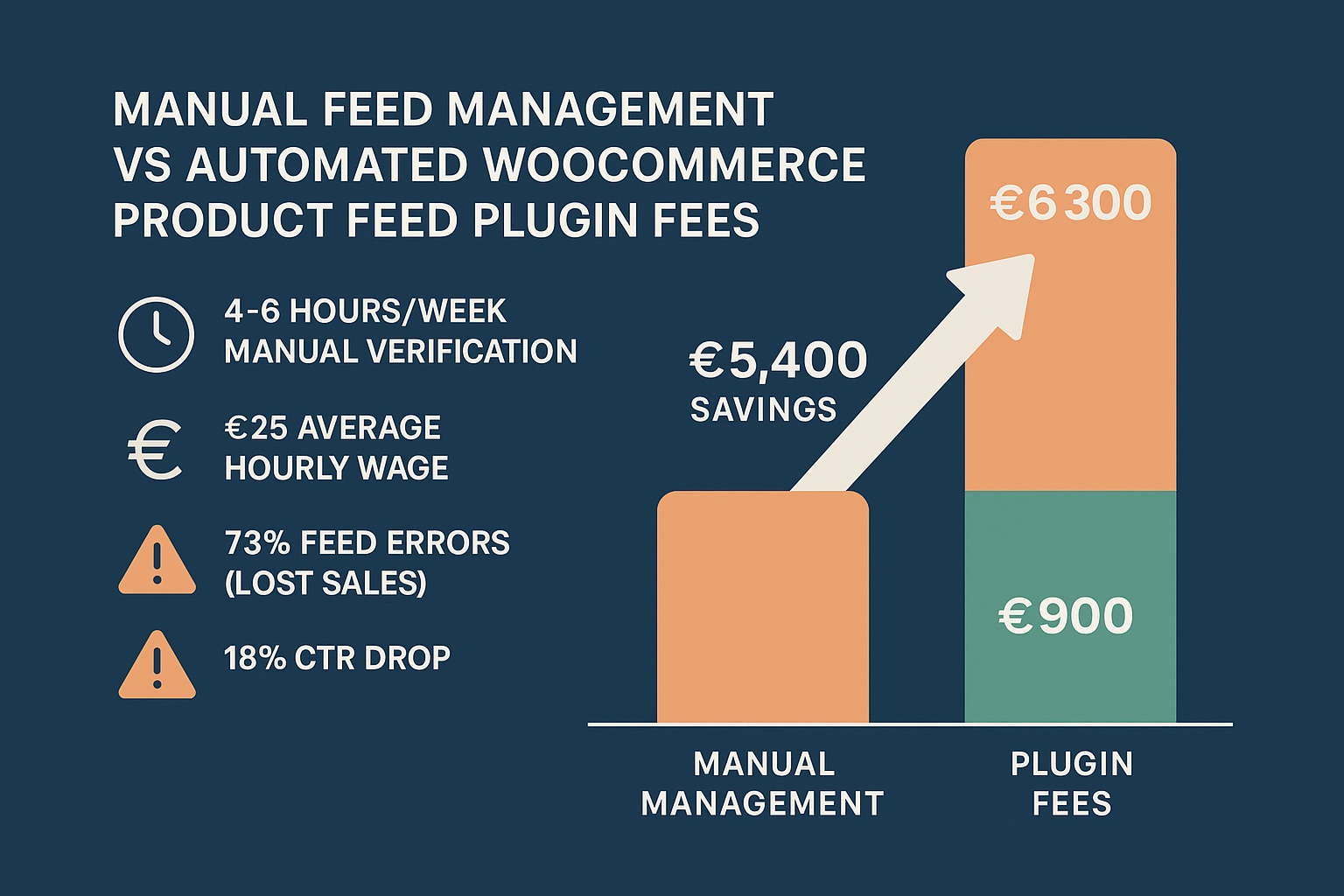
Our internal analysis of common merchant pain points illuminates this issue clearly. Data shows that:

  • 73% of product feed errors relate to mismatched attributes or missing required fields. These discrepancies lead to product disapprovals, limiting your reach and wasting valuable ad spend. Imagine running campaigns for products that aren’t even visible to your target audience.
  • Feeds updated less than once daily see an average 18% drop in click-through rates (CTR). This is crucial. If your inventory or pricing is out of sync, you’re paying for clicks on unavailable items or displaying incorrect prices, leading to a poor user experience and abandoned carts.
  • Merchants who rely on non-specialized plugins spend 4-6 hours per week manually verifying feed compliance and troubleshooting rejections. If your marketing or operations team earns, say, €25 per hour, that’s €100-€150 per week or €5,200-€7,800 annually devoted to manual, repetitive tasks that an automated system could handle.

This isn’t just about inefficiency; it’s about operational drag that directly impacts your bottom line. Moreover, manual oversight increases risk. A single violation of a platform’s feed requirements can lead to an entire merchant account suspension, bringing your campaigns (and revenue) to a grinding halt.

The solution you choose needs to be a robust mechanism for guaranteeing compliance and data quality, turning your product feed into a high-performance sales engine, not a constant source of headaches. For a deeper understanding of how robust management can transform your efforts, explore our complete guide to WooCommerce Product Feed Management.

Understanding Your Growth Phase: When to Stick with Single Shop vs. Upgrade to Multi-License/Agency Tier

The decision of which pricing tier to choose should always be framed by your current business needs and future growth projections. It’s about optimizing your investment for maximum ROI, whether you’re consolidating a single brand or managing an expanding portfolio.
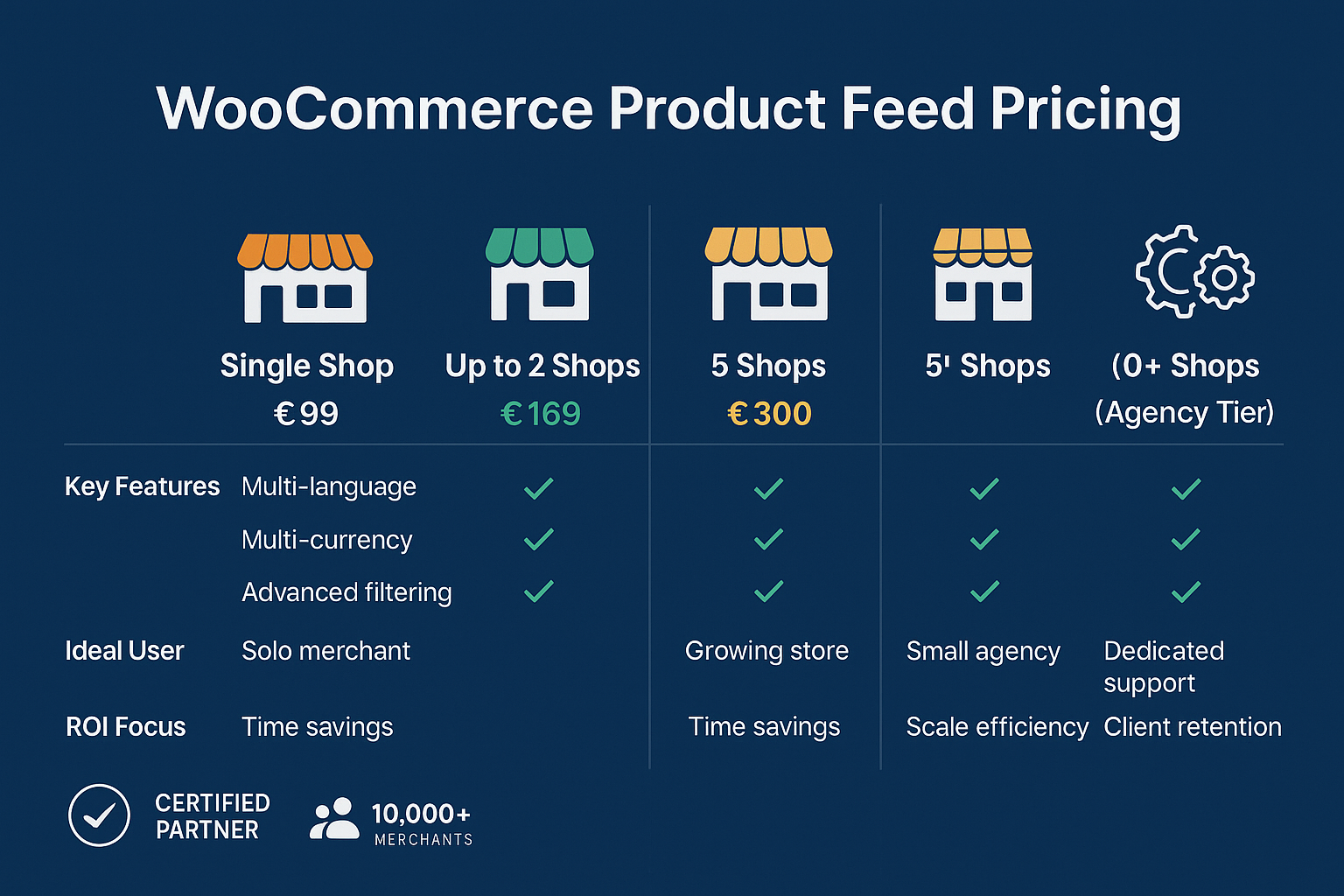
Here’s a practical framework to help you assess your current situation and identify the ideal plan.

Tier 1: The Google Shopping Plan (€69/year)

This plan supports one shop, unlimited products, and specifically targets the Google Shopping channel.

Ideal for:

  • Emerging WooCommerce Merchants: Small to medium-sized businesses just starting their paid advertising journey on Google Shopping.
  • Budget-Conscious Sellers: Those who need a highly reliable, cost-effective solution focused on a single, high-impact channel.
  • Single-Brand Focus: Businesses primarily concerned with optimizing their presence on Google Shopping for one store.

When it’s right for you: You’re focused on leveraging Google Shopping to its fullest potential for a single website. You need accuracy, automation, and reliable updates without the complexity or cost of multi-channel management. The €69 annual investment ensures your products are consistently visible, accurate, and compliant on the world’s largest shopping engine.

Tier 2: The E-commerce Plan (€99/year)

This plan provides support for one shop, unlimited products, and access to an unlimited number of shopping channels.

Ideal for:

  • Growing Single-Shop Brands: Merchants looking to expand their reach beyond Google Shopping to platforms like Facebook, Amazon, Pinterest, and more.
  • Streamlined Multi-Channel Strategy: Businesses that want to manage all their product feeds from one central dashboard for a single store.
  • Dropshipping Businesses: As one client noted, “I’m using a dropshipping site with a bunch of products, and it works so easily. Thanks!” This plan handles large catalogs with ease across various channels, crucial for dropshippers.

When it’s right for you: Your single WooCommerce store is ready to diversify its advertising channels. You understand the power of a unified multi-channel approach and require advanced features like custom templates and smart attribute manipulation to tailor feeds for each platform. The €99 annual cost becomes a marginal investment when considering the potential for increased sales across numerous high-converting channels.

Tier 3: The E-commerce Plus Plan (€169/year)

This plan caters to two shops, unlimited products, and unlimited channels, offering a compelling step up for growing operations.

Ideal for:

  • Merchants with Multiple Brands/Stores: Those who manage two distinct WooCommerce stores or webshops and need consistent, high-quality feed management for both.
  • Early Agency/Freelance Professionals: Individuals or small agencies managing product feeds for a couple of clients.
  • Consolidating Management: Businesses seeking to centralize the management of product feeds for their small portfolio of e-commerce properties under a single, efficient solution.

When it’s right for you: You’ve successfully grown beyond a single webshop and now operate two. Manual feed management for both stores would quickly double your workload and potential for errors. The €169 annual investment offers a significant efficiency gain, allowing you to replicate your success across both shops with advanced features and comprehensive support. This tier represents a clear ROI path by preventing costly manual duplication of effort.

Tier 4: The Agency Plan (€300/year)

This comprehensive plan supports up to five shops, unlimited products, and unlimited channels. We also offer bespoke options should your agency manage more than five webshops.

Ideal for:

  • Digital Marketing Agencies: Managing product feed campaigns for multiple clients (up to five).
  • Large E-commerce Groups: Companies overseeing several distinct WooCommerce brands or niche stores.
  • High-Volume Management: Professionals who require robust tools for precise attribute manipulation, extensive automation, and continuous validation across diverse product catalogs and client needs.

When it’s right for you: Your business model involves managing multiple WooCommerce stores, either for your own portfolio or for clients. At an annual cost of €300, this plan is designed for scale. Given that agencies typically charge between €165–€200 per hour for specialized e-commerce services, the plugin quickly pays for itself by automating tasks that would otherwise consume countless billable hours. For example, if you manage feeds for 5 clients, the cost per client per year is only €60, which is negligible compared to the value generated. This plan enables a consistent, professional-grade service delivery across your client base, reinforcing your agency’s credibility and efficiency. You can find detailed pricing and plan breakdowns on our pricing page.

Your ROI Checklist: Features That Actually Pay for Themselves

Moving beyond the sticker price, the true value of a product feed manager lies in its ability to generate tangible returns. When evaluating your investment, consider how critical features translate directly into saved costs, increased revenue, and enhanced efficiency.
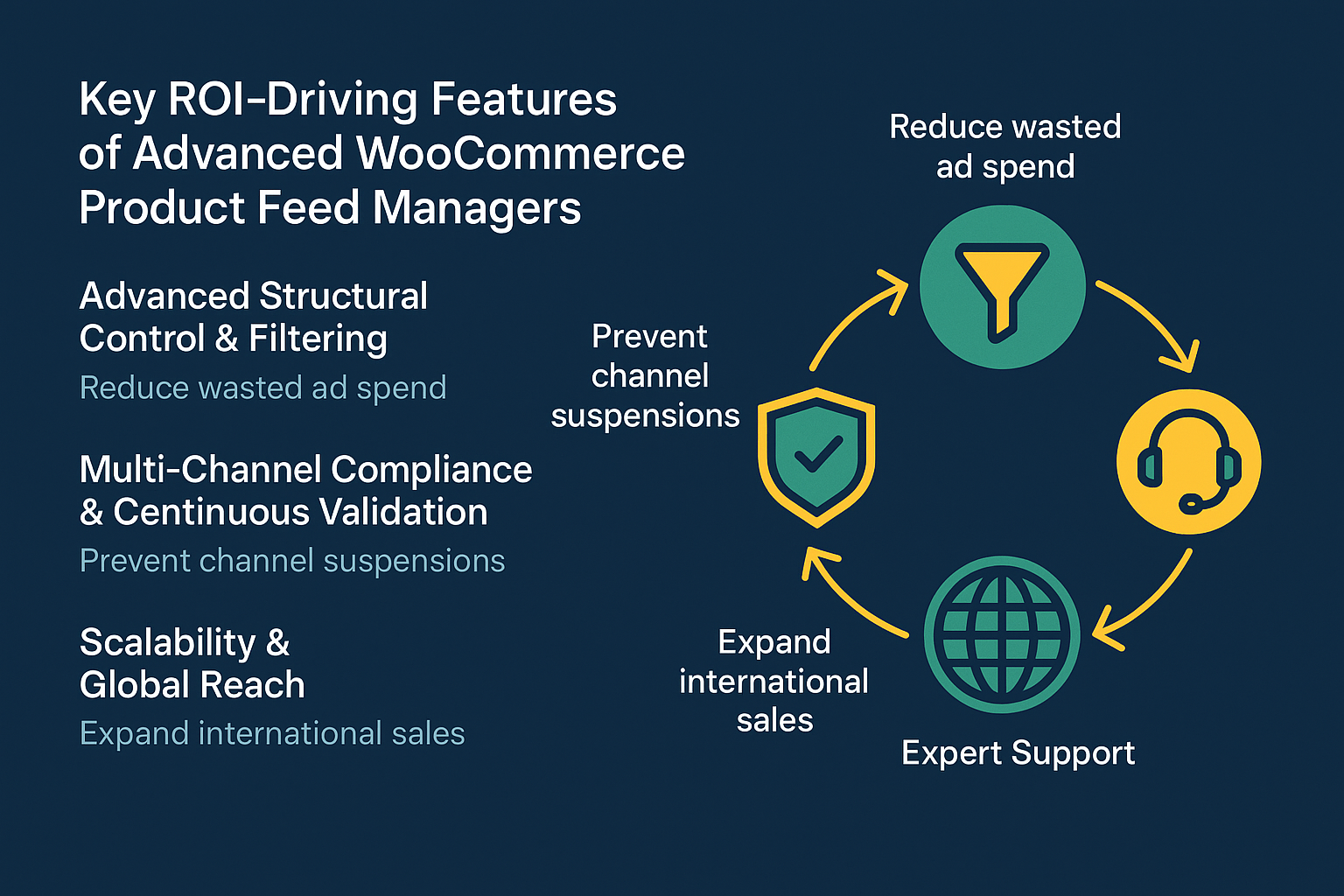
1. Advanced Structural Control and Filtering

A massive product catalog is an asset, but feeding every item to every channel indiscriminately is inefficient and costly. Highly targeted campaigns convert better.

Why it pays for itself: Advanced filtering, like the capabilities offered by our advanced filters functionality, reduces wasted ad spend by ensuring only desired products are promoted. For instance:

  • Exclude low-margin items: Why pay for clicks on products that barely turn a profit? By excluding them, you allocate your budget to high-margin items, boosting overall campaign profitability.
  • Exclude out-of-stock products: Stop frustrating customers and wasting money on ads for unavailable items.
  • Target specific categories/attributes: Maximize relevance by pushing clothing to Facebook Shops and electronics to Google Shopping.

ROI Impact: If you spend €1,000 per month on Google Shopping ads and 10% of those clicks are on low-margin or out-of-stock items, that’s €100 wasted directly. Our advanced filtering can easily save you this, paying for the plugin many times over.

2. Multi-Channel Compliance and Continuous Validation

Each marketing channel has unique and constantly evolving feed requirements. Manual compliance is a never-ending battle.

Why it pays for itself: Our commitment to Consistent Updates for Feed Validation means we constantly monitor major platform requirements. This proactive approach acts as your compliance buffer, preventing costly product disapprovals and account suspensions.

ROI Impact: Facing an account suspension can halt sales for days, weeks, or even indefinitely. Even a minor pricing mismatch can lead to a merchant center suspension, a problem many WooCommerce stores face. Automated validation and expert support minimize this risk. The cost of a single day of lost sales potentially far outweighs the annual cost of a premium feed manager.

3. Scalability and Global Reach

If growth means expanding into new markets or languages, your feed manager must support this seamlessly.

Why it pays for itself: With features like Multi-Language & Multi-Currency Support, the WooCommerce Product Feed Manager is engineered for global expansion.

ROI Impact: Localized pricing and language support significantly improve conversions. Research shows that offering prices in local currency can boost conversion rates by up to 40%. Entering new markets without the need for additional plugins or complex custom coding saves significant development costs and accelerates market entry. You can fix Merchant Center price mismatch efficiently with our tools.

4. Expert Support

When a feed issue arises, generic support won’t cut it. You need online marketing expertise.

Why it pays for itself: Our Expert Support team provides strategic guidance to maximize your feed’s performance. As Paul Schiretz noted, “And if an issue comes up or you have a question, support is top-notch!”

ROI Impact: The cost of seeking external consulting for complex feed issues can quickly mount, with agency rates typically between €165-€200 per hour. Access to expert support for a fraction of that cost, included in your annual fee, means faster resolution, less downtime, and quicker optimization, directly impacting your campaign’s effectiveness.

For a detailed side-by-side comparison of our solution against basic alternatives, refer to our features comparison.

Case Studies & Peer Narratives: Real-World ROI

Don’t just take our word for it listen to the experiences of others who’ve made the strategic jump:

  • Paul Schiretz: “I have been using this plugin for two years now, and it performs exceptionally well without any serious issues! If any problems arise or if you have questions, the support is outstanding! This is truly one of the most useful plugins available!” This speaks to the long-term reliability and value of consistent expert support, a key differentiator paying dividends year after year.
  • Gertjan van den Berg: “I have been using this plugin for a couple of years now. Great functionality, regular updates, and quick response to all the questions I have asked. An example of how things should be!!” Our commitment to “Consistent Updates” is not just a feature; it’s a promise of ongoing ROI through maintained compliance and performance.
  • Dae Gomes: “After trying all free plugins, I decided to purchase this one, and it was fantastic. I’m using in a dropshipping site with a bunch of products, and it works so easily. Thanks!” For dropshippers or any business with extensive catalogs, the automation and ease of use translate directly into saved manual hours and increased operational efficiency, a clear return on investment.

These testimonials underscore a crucial point: the value lies in a partner that not only provides the tools but also ensures they perform optimally over time, allowing businesses to scale confidently. We help businesses achieve success by focusing on the fundamentals, which are also often addressed in broader strategies like the WooCommerce Marketing Checklist.

Choosing Your Partner: Beyond the Features

When making this critical decision, you’re not just buying a piece of software. You’re entering a partnership that impacts your marketing spend, operational efficiency, and ultimately, your sales. It’s essential to look for a provider that brings expertise and a shared objective for your success.
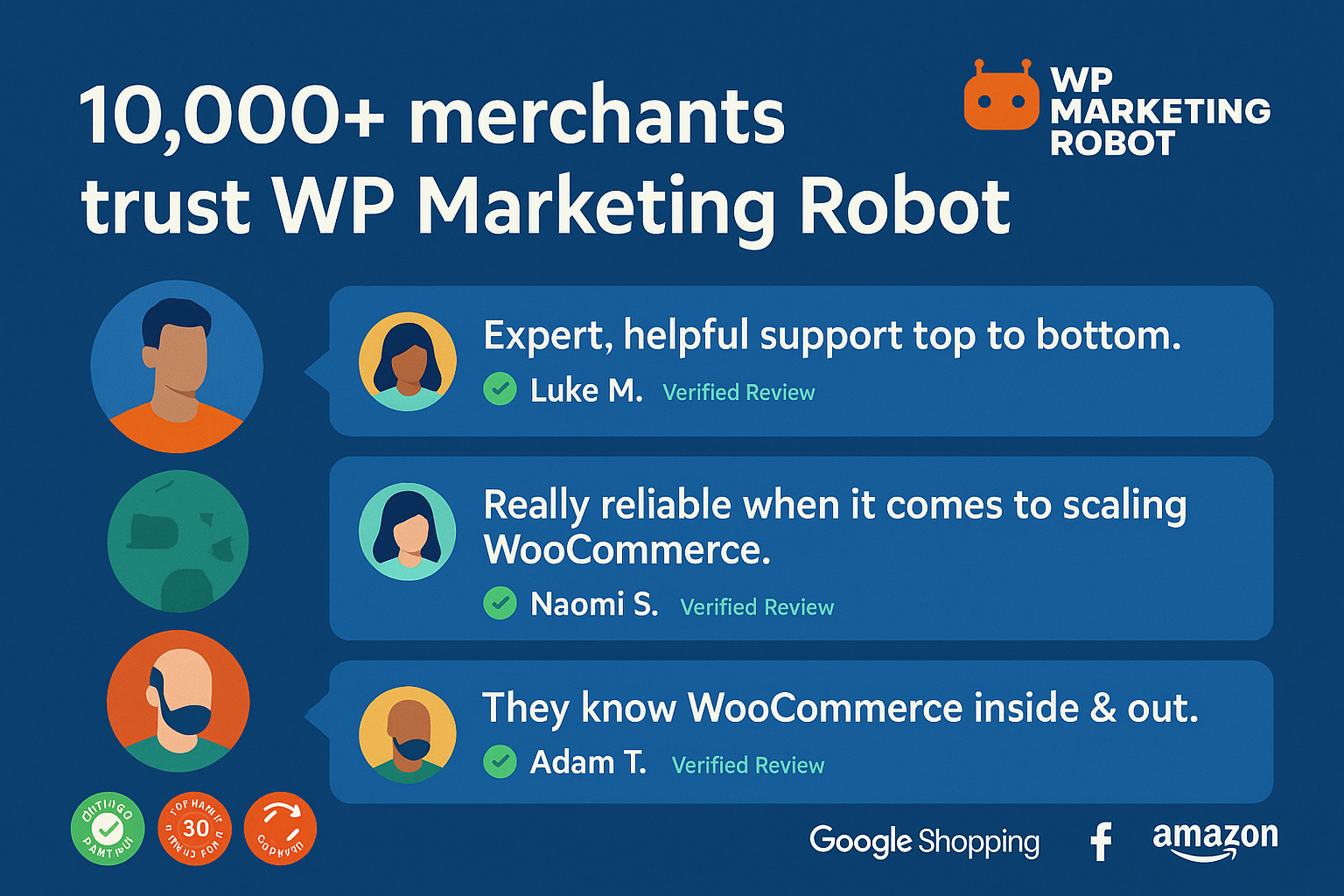
WP Marketing Robot was founded in 2016 by online marketing specialists who identified a clear market need: successful WooCommerce webshop owners required accurate and reliable product feeds. Our mission is to empower you by providing tools that ensure your products not only appear across various channels but truly stand out. With over 10,000 WooCommerce merchants utilizing our Product Feed Manager, we’ve built a reputation for precision, experience, and genuine partnership. We recommend solutions that align with WordPress system requirements itself, ensuring seamless compatibility and performance.

Comprehensive FAQ for Decision-Makers

We understand that you have pressing questions at this stage of evaluation. Here are some of the most common concerns from decision-makers like you:

Q1: My current setup includes thousands of products. Can your plugin handle large catalog sizes without slowing down my site?

Yes, absolutely. Our plugin is engineered for high performance within the standard WordPress and WooCommerce environment. It efficiently processes and generates feeds, even for large dropshipping sites with extensive product counts. This optimization ensures minimal server load while maintaining your site’s operational speed and reliability.

Q2: How future-proof is the WooCommerce Product Feed Manager? What is your update schedule?

We prioritize continuous improvement and compliance. Our team constantly monitors changes from major channels like Google and Facebook, pushing Consistent Updates frequently. This commitment aligns with our growth trajectory, ensuring we meet evolving market demands and maintain our leadership in product feed management. For instance, our tools are continuously updated to help with Google Shopping optimization.

Q3: We are planning a push into the European market. How difficult is it to manage multi-currency feeds?

It’s seamless! Our built-in Multi-Language & Multi-Currency Support allows you to leverage existing WooCommerce localization tools. You can easily configure feeds to export the correct, localized currency and language variations, a major advantage over competitors that require custom coding or additional complex plugins for international expansion. You can also review our features page for more details.

Q4: I need to manage multiple stores. Do you offer an agency solution?

Yes, we do. Our Agency Plan supports up to five shops, offering unlimited products and channels to efficiently manage your entire client portfolio under one license. If you manage more than five, reach out to us for bespoke options tailored to your specific agency needs. We’ve designed our plans to scale with your business.

Your Next Confident Step

You’ve critically analyzed the complexities of product feed management, identified the essential evaluation criteria, and seen the clear advantages of solutions built on precision and partnership. Your challenge now is to select the plan that not only fits today’s operations but also provides a clear, cost-effective path to scaling your traffic and sales.

The WooCommerce Product Feed Manager delivers on that promise. It’s an investment in automation, accuracy, and expert support that pays tangible dividends by reducing operational risk, enhancing data quality, and driving profitable growth. For further insights on selecting the right solution for your needs, you might find our article on choosing the right WooCommerce product feed manager helpful.

Ready to elevate your product visibility and calculate your true ROI?

Explore the features, experience the power of automated optimization, and select the plan that best aligns with your business scale. Whether you choose our targeted Google Shopping Plan or jump straight to the comprehensive Agency Plan, we are ready to be your trusted advisor in the complex world of multi-channel synchronization.

Take the next step: visit our pricing page and transform complexity into consistent, profitable growth.
WooCommerce Feed Update Intervals: Automated Schedules vs. Manual Clicks – What Real Reliability Looks Like

You are currently comparing WooCommerce product feed solutions. You’ve noticed that every plugin promises “automation,” but buried beneath the marketing jargon lies a critical difference: the technical methodology behind those updates.

Your job isn’t just to choose a tool; it’s to choose the least operationally burdensome and most financially reliable process.

This guide will move beyond feature lists to provide a transparent, data-driven framework for evaluating stability. We will show you why relying on manual clicks or low-tier “automated” solutions introduces risks far exceeding the cost of true automation, demonstrating what separates a feature that is merely ‘automatic’ from one that is genuinely reliable.

Phase 1: The Trap of Manual Updates (The Pain Point)

Many store owners start with the deceptively simple solution: a manual export followed by an upload to Google Merchant Center or Facebook Catalog. Others rely on basic plugins that require someone to physically push a button daily or hourly. This approach is not a solution; it’s an operational trap.

The moment you rely on manual intervention—or intermittent automation—you introduce three severe, often hidden, costs to your business.

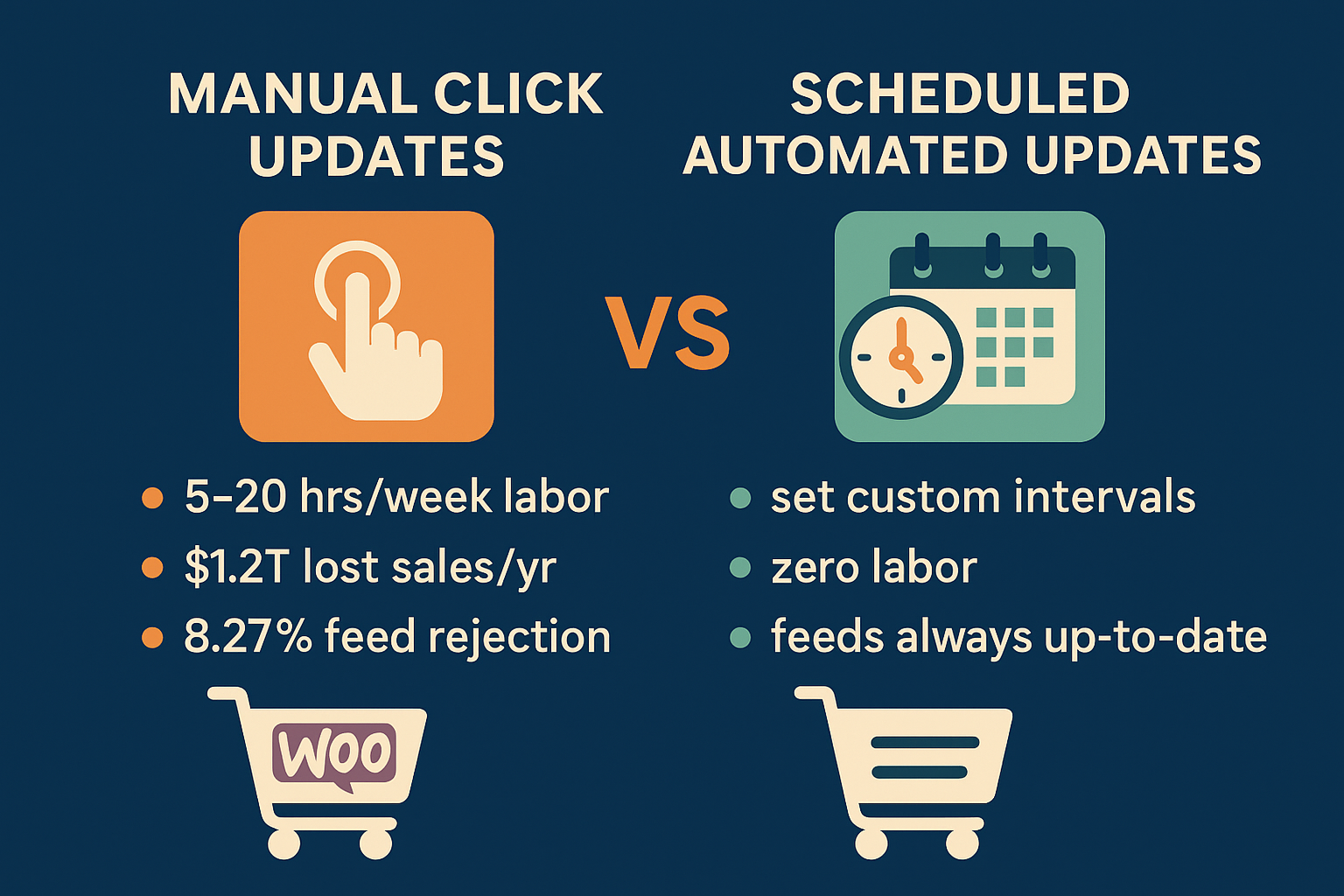
manual updates versus scheduled updates

The Hidden Cost of Labor: Manual Clicks and Wasted Time

Consider the time spent generating, validating, and uploading feeds across multiple channels.

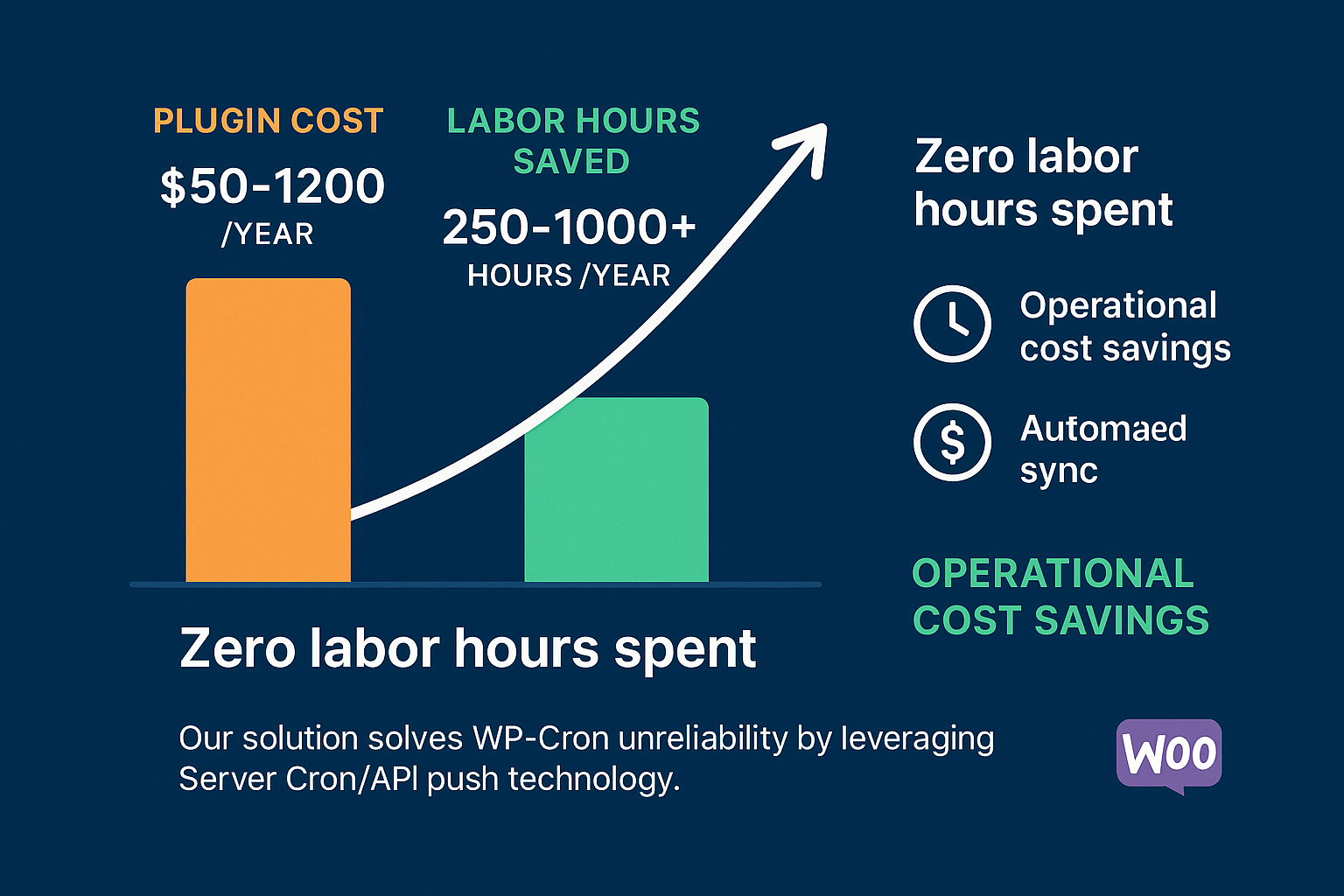
For a modest to large WooCommerce catalog, manual management quickly consumes significant staff time. Our research indicates that manual updates require 5 to 20+ hours per week of dedicated labor. These are hours that could be spent optimizing ad copy, managing inventory, or enhancing customer experience. Even if you value your time conservatively, true automation, which costs ~$50–$120 annually for a robust solution, is recouped in lost labor costs almost immediately.

The Hidden Cost of Financial Risk: Stale Data

Manual updates create periods of vulnerability. What happens if a popular item sells out between your 9 a.m. update and your 1 p.m. manual run?

When product feeds contain stale inventory or pricing data, search engines and marketplaces display inaccurate ads to your customers. This leads directly to two outcomes, both disastrous for customer experience and your bottom line:

  1. Stockouts: A customer clicks an ad for an out-of-stock item. You’ve paid for the click, annoyed the customer, and lost the sale. Globally, stale inventory data contributes to over $1.2 trillion in annual lost sales. Stockouts alone are responsible for up to 20% of online cart abandonments.
  2. Price Mismatches: If the price in your feed is lower than the price on your site, you might incur unexpected costs; if it’s higher, you deter the buyer and risk losing trust.

The Hidden Cost of Channel Disapproval and Suspension

Marketplaces like Google Shopping and Amazon impose strict freshness requirements. When your feed is manually updated, there’s a higher chance of technical errors, missing attributes, or synchronization issues because of the repeated manual touchpoints.

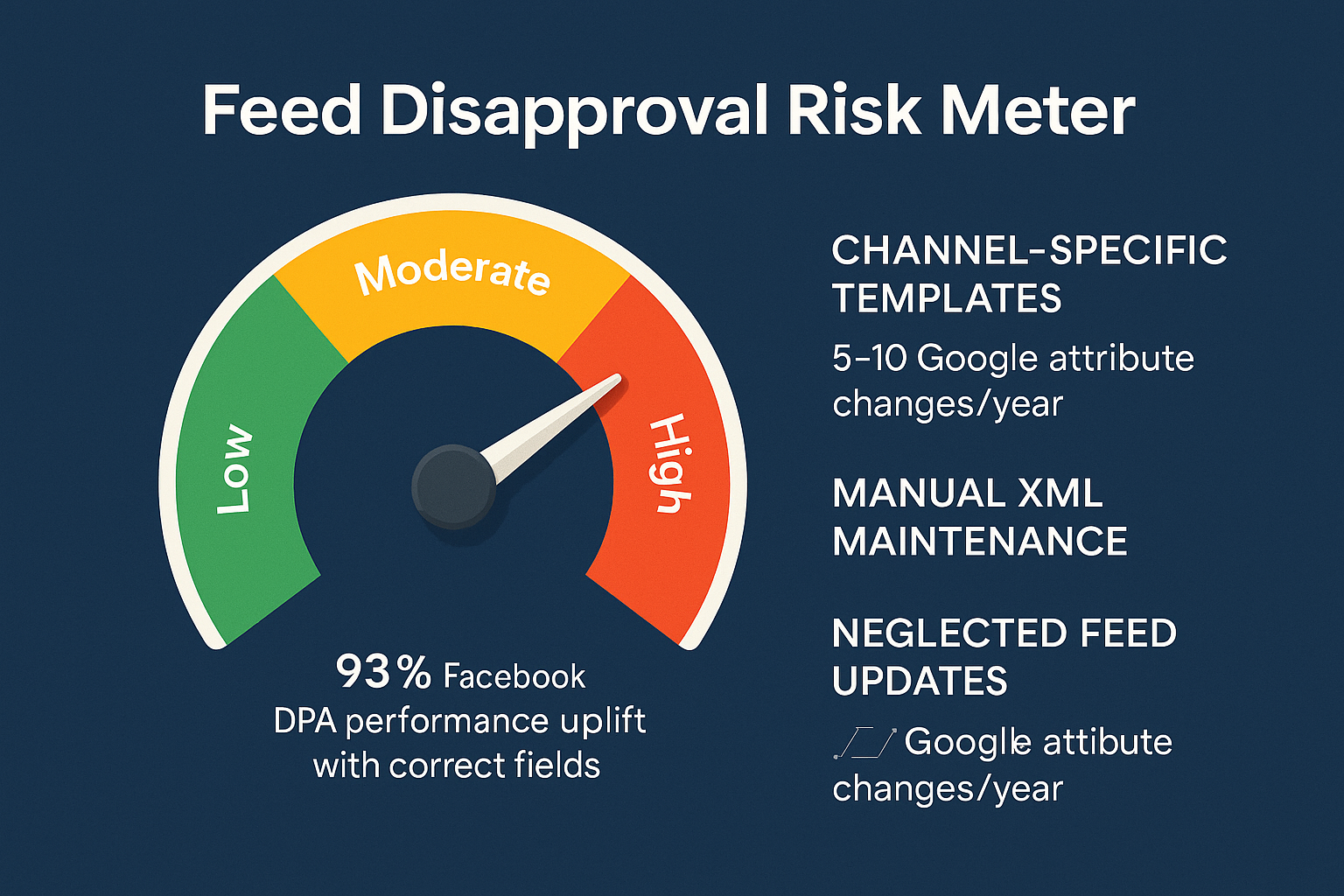
WooCommerce stores exporting product feeds face an estimated 8.27% rejection rate on Google Merchant Center (GMC), which is significantly higher than other platforms. Common rejection causes—such as shipping errors (23.49%) and missing attributes (5.53%)—are exacerbated by unreliable, infrequent feed generation.

Reliable automation, driven by expert systems like those we design at WP Marketing Robot, addresses these core issues in attribute mapping and data validation before the feed even leaves your server, drastically reducing the risk of costly rejections and suspensions.

Phase 2: The Reliability Spectrum (The Technical Differentiator)

When evaluating solutions, you need to understand that not all “automatic updates” are created equal. You must ask: How is the plugin scheduled to run?

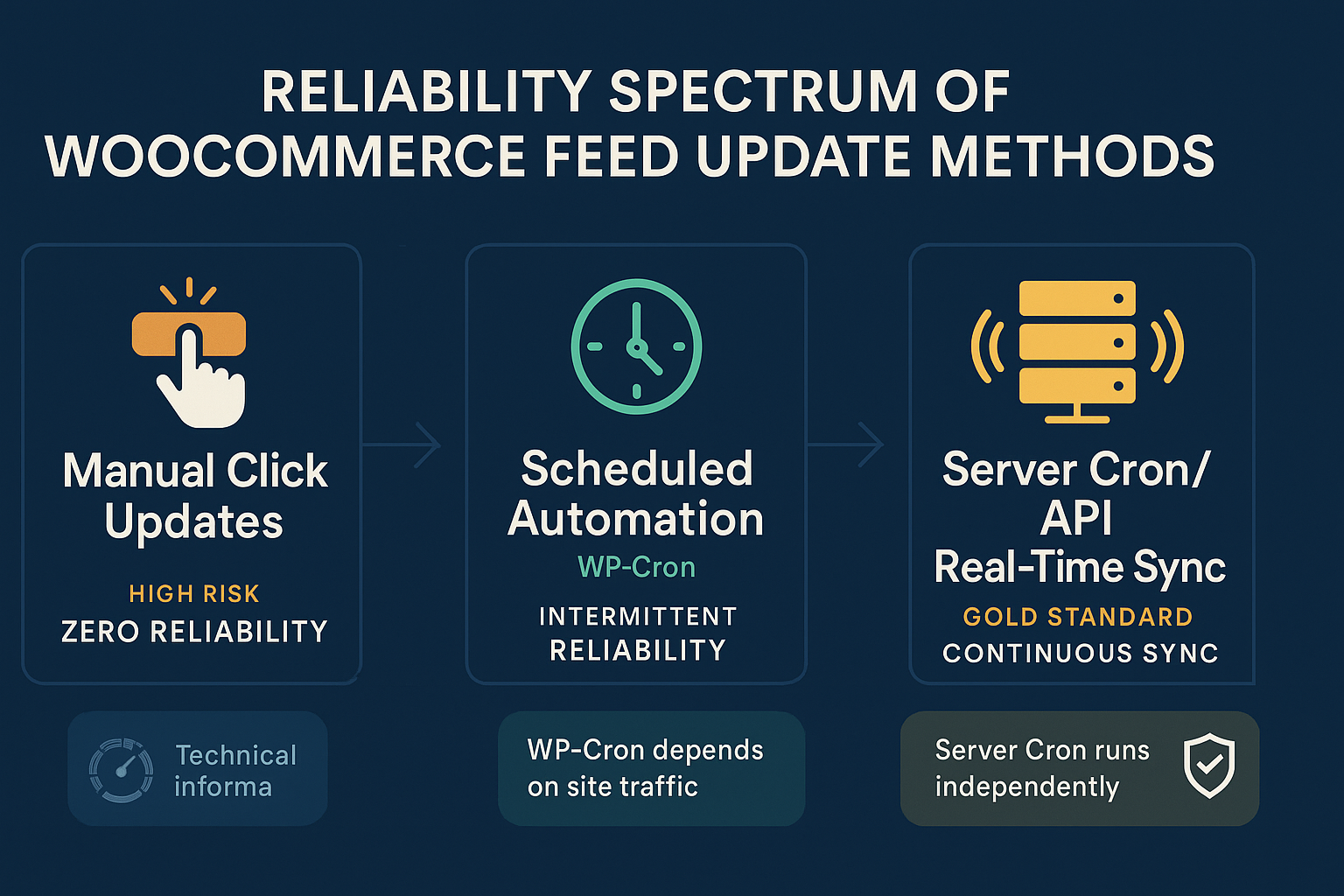
There is a reliability spectrum that defines the true operational overhead of your chosen solution.

reliability spectrum of woocommerce feed update methods

Level 1: The Manual Click (Maximum Risk)

Requires human action to initiate feed generation. Reliability hinges entirely upon human memory and availability. Any delay equals stale data.

Level 2: Scheduled Automation (The WP-Cron Problem)

Most free or basic WooCommerce plugins utilize WP-Cron for scheduling. This is a crucial technical detail.

WP-Cron is not a true system-level cron job. It is an internal function that only executes when someone visits your WordPress website.

  • High-Traffic Site: If your site has consistent traffic, WP-Cron might run frequently enough to approximate the desired synchronization interval.
  • Low-Traffic Site: If you experience periods of low traffic (e.g., overnight, weekends), the scheduled update is missed until the next website visitor arrives.

This dependency on external traffic makes WP-Cron-based automation inherently unreliable, particularly for stores with significant inventory flux or those aiming for true set-it-and-forget-it functionality. This is the bottleneck for reliability.

Level 3: The Gold Standard: Server Cron and Event-Based Sync (True Reliability)

True reliability is achieved through server-level scheduling, independent of website traffic.

For our primary product, the WooCommerce Product Feed Manager, we ensure updates are handled by reliable mechanisms, preventing the WP-Cron reliability drift. This is what you should look for:

  1. Server Cron: The ability to configure a system-level cron job that executes at the exact interval you define (e.g., every 30 minutes) regardless of who is visiting your site. Your feed runs exactly when it should.
  2. Event-Based Synchronization: Even better than strict time intervals is an event-based approach. The plugin detects a true change in your product data—like an inventory decrease or a price change—and automatically triggers the necessary update structure.

This sophisticated approach, built on the principles of precision and experience that guide WP Marketing Robot, guarantees that when you update your WooCommerce product, that change is automatically synced across all channels without monitoring overhead—it only takes one place to edit.

Phase 3: The ROI of True Automation (The Solution)

Switching from high-risk manual or unreliable WP-Cron updates to a professionally developed, server-cron-based solution is an operational necessity, not an optional expense.

The return on investment (ROI) is staggering when factoring in labor saved and risk mitigated.

The Quantifiable Savings

If a single manual update task requires 30 minutes daily (a conservative estimate for multi-channel management), you are spending approximately 10 hours per month on repetitive, high-risk work. Annualized, that’s 120 hours.

If your labor cost is $25/hour (low end), you are spending $3,000 annually just to manually maintain feeds.

The annual cost of our robust, multi-channel Ecommerce Plan is €99.

$$\text{Manual Labor Cost } (\sim €3,000) \gg \text{Reliable Automation Cost } (€99)$$

The solution enables you to eliminate 250 to over 1,000 labor hours per year (depending on catalog size) while virtually eliminating the financial risk of stale data and greatly reducing the risk of a GMC suspension. That’s the real meaning of partnership in eCommerce success.

Next Steps: Decision framework for the MOFU user

You are no longer looking for a plugin that claims to update automatically. You are looking for a solution that guarantees operational reliability.

When concluding your evaluation, use this framework to assess whether a product feed solution meets your needs:

Scenario Recommended Update Strategy Why It’s Necessary
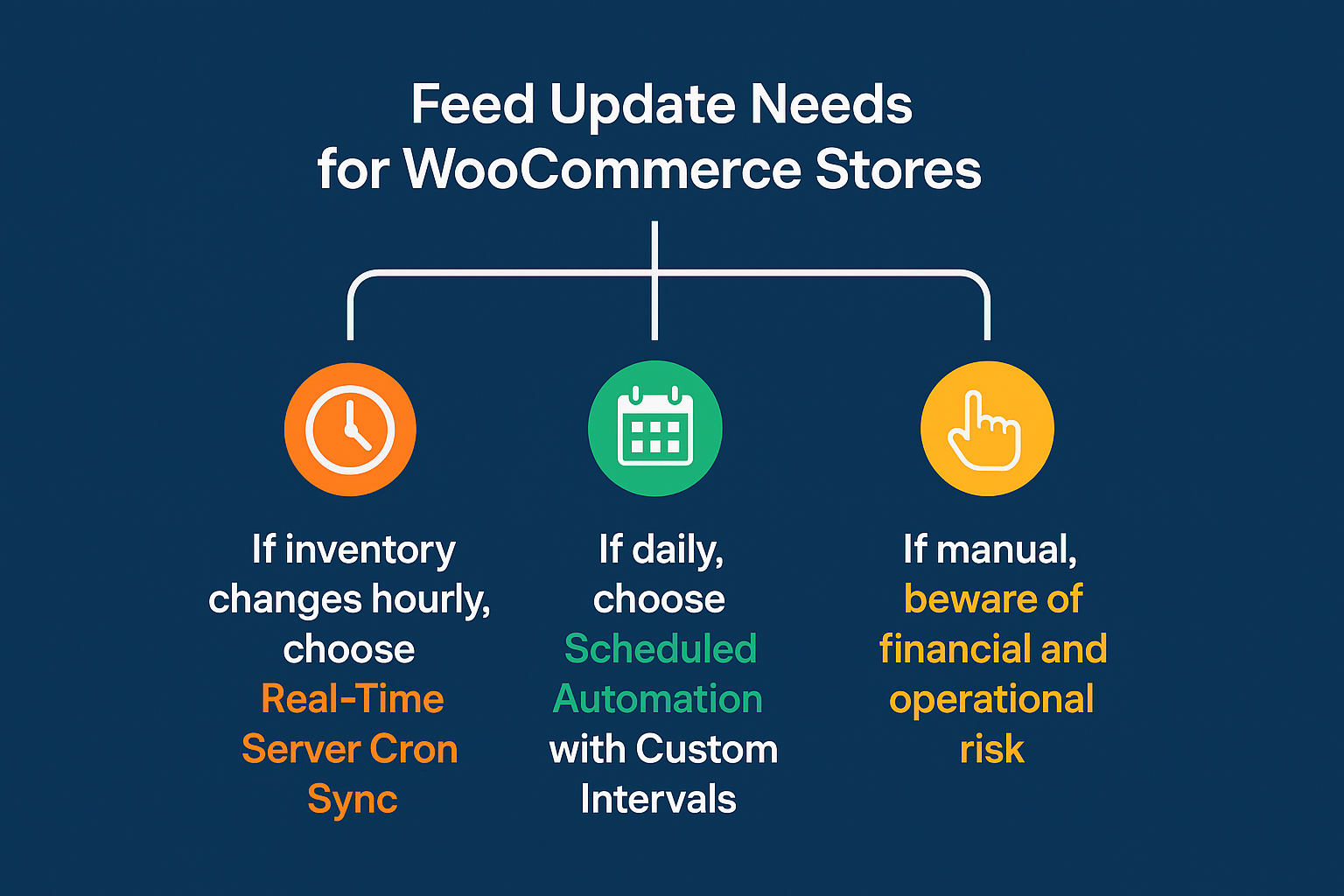
Volatile Inventory (Dropshipping, limited stock, flash sales) Server Cron / Event-Based Sync (Every 15-60 min) Eliminates stockout risk (the $1.2T problem) and maximizes fresh data performance.
Stable Catalog (Custom products, low stock turnover) Scheduled Automation (Server Cron based) (Daily or Twice Daily) Maintains compliance and handles price changes without requiring manual intervention.
High Labor Cost (Paying employees high wages for data entry) True Automation Immediate ROI by saving hundreds of labor hours annually, offsetting the plugin cost instantly.
Multi-Channel Presence (Google, Facebook, Amazon, etc.) True Automation Ensures consistency and manages unique data requirements across different channels from one central location.

The Power of One

A truly effective feed manager empowers you to make changes in one place—your WooCommerce product dashboard—and know that the required feed updates follow automatically, reliably, and compliably across all your critical sales channels.

If you are looking to define a process that is genuinely set-it-and-forget-it, you need a technical foundation that moves beyond the unreliable nature of WP-Cron and manual clicks. You need a trusted partner whose tools are engineered for precision and experience.

Ready to reduce your operational risk and automate your product feed management with guaranteed reliability? Explore our plans and features today.

Evaluation Criteria FAQ

Q1: Can’t I just increase my WP-Cron frequency to make it reliable?

A: While you can attempt to reduce the delay by manipulating the WP-Cron interval, you cannot eliminate the fundamental flaw: WP-Cron still requires a page visit to fire. If your site has a few minutes of zero traffic, the scheduled update will be arbitrarily delayed. For critical synchronization tasks, Server Cron offers the deterministic timing necessary for true reliability.

Q2: What if my hosting provider doesn’t allow Server Cron access?

A: This is a common challenge for merchants using shared hosting. A reliable plugin, like the WooCommerce Product Feed Manager, should offer built-in, secondary scheduling options that intelligently mitigate the risks associated with dependency on passive traffic. However, for maximum performance and reliability, we always recommend utilizing robust hosting that supports standard cron jobs.

Q3: How does multi-language and multi-currency support affect update reliability?

A: It significantly increases the complexity and the risk of manual error. Each language and currency often requires its own dedicated feed, effectively multiplying the workload. With a reliable, specialized plugin, the system handles the creation and segregation of these feeds automatically based on your language/currency settings, significantly decreasing the risk of cross-feed errors inherent in multi-language and multi-currency environments. Manual management of these varied feeds is a recipe for high rejection rates.

Q4: Does reliable automation mean my feed is being updated constantly?

A: Reliability means it updates when it is scheduled to update. Constant updating is often unnecessary and can strain resources. A good solution allows you to set the custom update interval (e.g., hourly, every 3 hours, daily) based on your specific inventory volatility. For high-volume stores, hourly updates via Server Cron provide the perfect balance between risk mitigation and server performance.

Evaluating WooCommerce Product Feed Plugins: Why Support Quality Is Your Single Biggest Investment

You are currently comparing WooCommerce product feed managers. You’ve likely studied the feature lists, filtering controls, update automation, template mapping, and those details are crucial. But at this core evaluation stage, there is one critical factor often overlooked until it’s too late: the quality and expertise of the support team behind the plugin.

We understand that you’re not just buying a piece of software; you are investing in a tool to drive revenue. If that tool breaks, or if a major shopping channel like Google or Facebook changes its feed requirements, how fast and how expertly the problem is solved directly impacts your sales.

For a serious e-commerce merchant, feed management is not a hobby. It’s an engine. And every engine needs reliable mechanics.

The Cost of Anonymous Ticketing: Minimizing Risk and Downtime

When prospects evaluate WooCommerce plugins, they often focus on price and features, treating support as a commodity checklist item. Do they offer support? Check. The hidden risk, however, resides in the quality and expertise within that support structure.

A generic ticketing system, often handled by outsourced level-one technicians, can answer simple installation questions but often fails when faced with complex, revenue-stalling issues. These might include:

  1. Category Mapping Failures: When your highly specific product categories don’t translate correctly to a broad channel taxonomy, resulting in product disapprovals.
  2. Conditional Logic Errors: Using smart attributes and filters incorrectly, which leads to your best sellers being excluded from the feed.
  3. Multi-Channel Validation: Dealing with simultaneous validation issues across Google Shopping, Facebook Catalogue, and Amazon requirements, each with unique and strict data demands.

Research shows that 59% of customers prioritize high-quality customer service when choosing a brand, and in technical eCommerce solutions, this jumps even higher because downtime literally costs money. When your feed is broken during a peak sales period, a 24-hour delay from an anonymous support queue can zero out the plugin’s entire annual cost in lost revenue.

Why Dutch and European Expertise Matters in eCommerce

WP Marketing Robot was founded by online marketing specialists in the Netherlands because our clients, successful WooCommerce shop owners, needed reliable, accurate product feeds. Our mission is built on precision, experience, and partnership.

Our support is not just technical; it’s steeped in online marketing expertise. When you choose a partner whose team is primarily based in Europe and dedicated to feed management:

  • You gain expertise in localized market requirements: We understand things like VAT handling, specific European category taxonomies, and cross-border currency implications. We are specialists in maintaining compliant feeds for global reach.
  • You get immediate access to deep knowledge: Our team doesn’t need to escalate basic issues. We solve problems because we designed the solution and live the world of online marketing. Testimonials frequently mention the “really useful plugins around” combined with “top notch” support as a core reason for continued usage.
  • You build confident relationships: This approach reduces the perceived risk. Our MOFL readers need evidence that validates their criteria, and knowing you have a dedicated, expert partner accelerates the decision-making process.

FAQ: The Most Common WooCommerce Feed Errors Our Team Solves Daily

If you are evaluating technical solutions, understanding the common failure points helps you gauge the required level of expertise. Here are frequently encountered support issues where generic support often stalls, but dedicated specialists excel:

1. “My products are disapproved, but the feed file looks fine.”

This is the most frequent issue. The feed file might be syntactically correct (valid XML or CSV), but the data within it violates an external channel rule. For example, a required attribute is missing, or the image quality is too low according to the Google Merchant Center policy. Our experts immediately dive into the specific channel diagnostics (we know where to look) and advise on fixing the data within the plugin’s attribute mapping logic, not just the raw file.

2. “I need to exclude a large category of products based on multiple complex conditions.”

This is where our proprietary value proposition, advanced filtering, comes into play. Many plugins offer basic filtering. We provide advanced filtering that allows merchants to use sophisticated conditional logic (e.g., only include products from Category A AND exclude brands X and Y OR only include products with stock > 50). Configuring this requires intimate knowledge of the feed generator’s capabilities, something our dedicated team provides during setup and troubleshooting.

3. “How do I manage language and currency variations for European markets?”

For merchants aiming for global reach, a key characteristic of our ICP, Multi language support is essential. Setting up multi-language and multi-currency feeds must be done precisely to prevent sales falling into the wrong region or currency conversion errors. Our support team guides you through implementing this complex infrastructure, minimizing integration headaches.

The WP Marketing Robot Partnership Approach: From Installation to Maximizing Sales

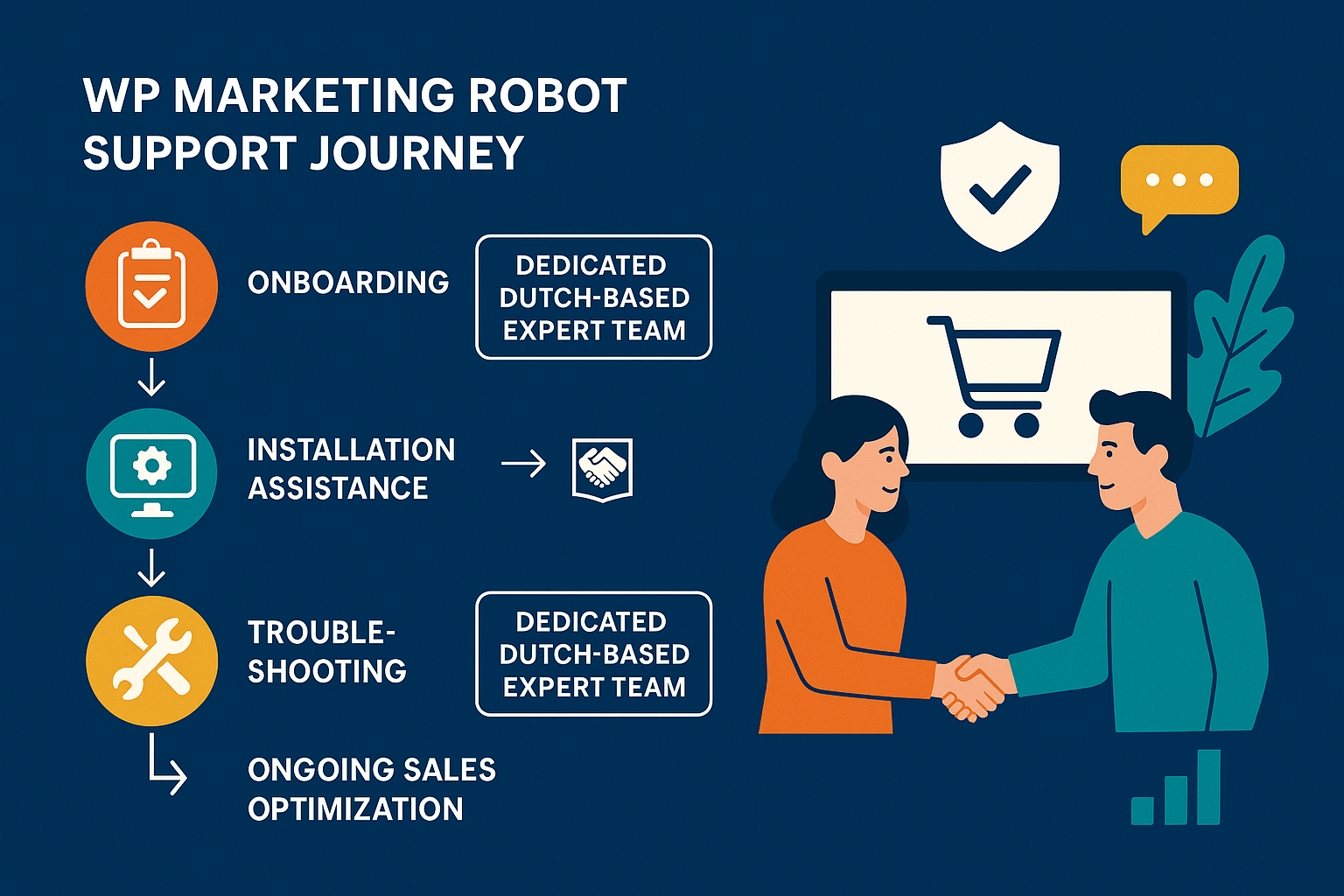
We believe that support starts the moment you consider the plugin, not when things go wrong. Our philosophy frames us as partners in your e-commerce success.

We have established processes to ensure your success, which is why over 10,000 WooCommerce merchants rely on us.

Dedicated Support vs. Ticket Queue: A Differentiation Point

When evaluating options, ask yourself: Am I buying a product, or am I gaining a partner?

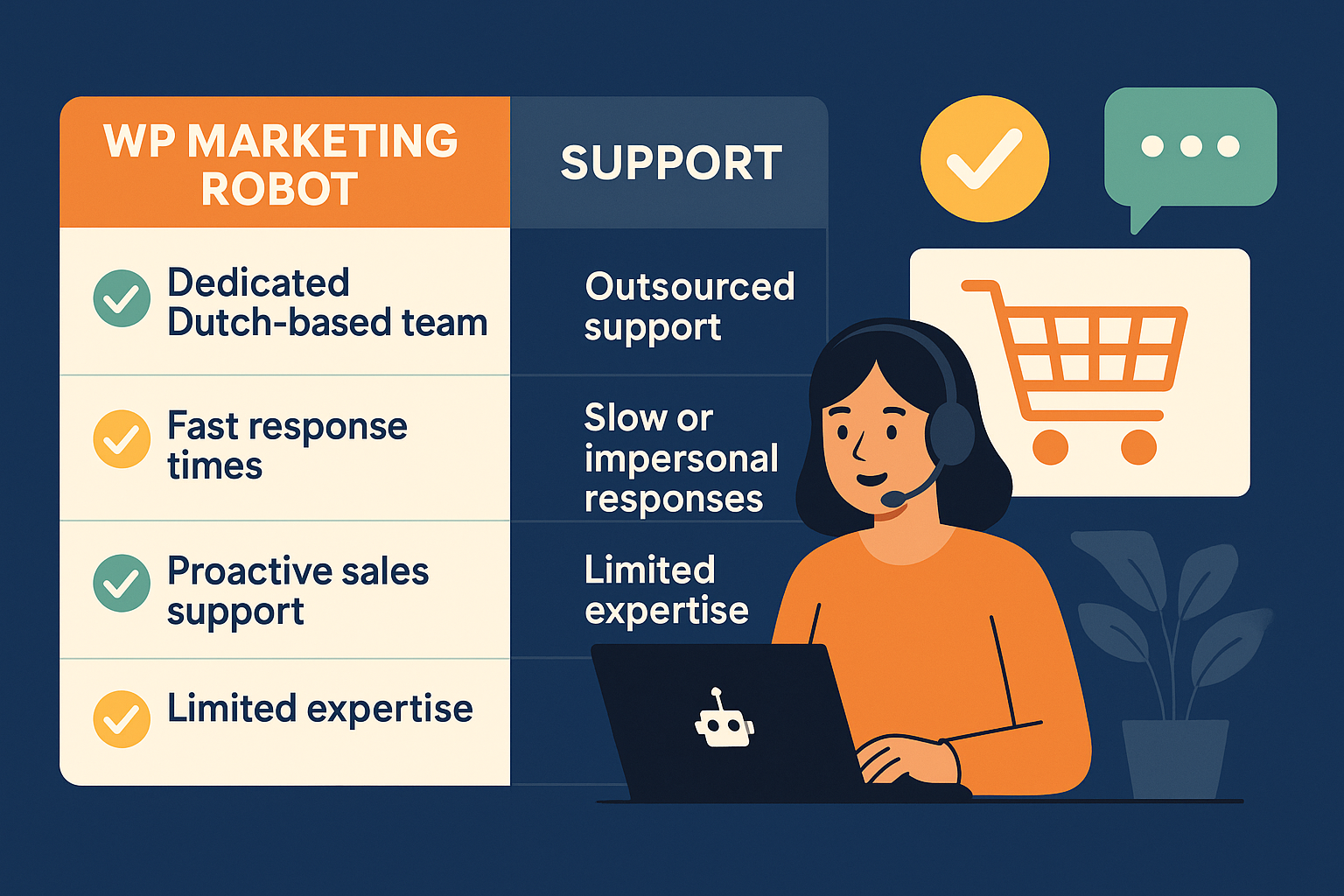
Evaluation Criteria Generic Competitor Support (Anonymous Tickets) WP Marketing Robot (European, Dedicated Experts)
Expertise Level Level 1 Triage. Focus on documentation linkage. Online Marketing & Technical Feed Specialists.
Resolution Focus Fixing the plugin software only. Solving the revenue problem causing the ticket.
Response Speed Best effort, often subject to time zone differences. Quick, specialized response tailored to critical feed issues.
Proactivity Reactive only (waits for a ticket). Proactive, consistent updates for [] to ensure compliance.
Trust Building Transactional interaction; high churn of agents. Relationship-focused; established core team you can trust.

This dedication is reflected in our customer feedback. Merchants state, “Great functionality, regular updates, and quick response to all questions I have asked. An example of how things should be!!” This validates that our service model aligns perfectly with the needs of serious merchants who value reliability over lowest cost.

Whether you choose the Google Shopping Plan or the Multi channel Agency Plan, you are investing in this level of operational security.

Conclusion: Making the Confident Investment Decision

Choosing a WooCommerce product feed manager is a strategic decision that affects efficiency, uptime, and ultimately, sales growth. While feature comparisons are necessary, the confidence that comes from reliable, expert support is what transforms a good tool into essential infrastructure.

Making the Confident Investment Decision

Our history, dating back to 2016, shows we didn’t just stumble into this market; we were born from a specific need for precision and reliability. We empower merchants by providing tools that ensure products not only appear across channels but stand out.

If you’re ready to move beyond anonymous ticketing and secure a genuinely expert partnership dedicated to your WooCommerce feed success, with deep knowledge of multi-channel integration and smart attribute manipulation, it’s time to partner with WP Marketing Robot.

Start your confident journey today by exploring our plans and securing a partner whose support is as advanced as its software.

Choosing the Champion: How to Select the Right WooCommerce Product Feed Manager

Choosing the Champion: How to Select the Right WooCommerce Product Feed Manager

If you run a successful WooCommerce store, you know performance hinges on visibility. Getting your products accurately listed across high-traffic channels—Google Shopping, Facebook, Amazon—is non-negotiable. But here’s the challenge you’re facing right now: you have a list of available product feed plugins, and they all promise the same outcome.

The Middle-of-the-Funnel stage is the most critical pivot point. You’re past the initial realization that you need a solution; now you must evaluate which solution won’t just work, but will excel. This isn’t about finding the cheapest tool; it’s about investing in the efficiency engine for your entire multi-channel sales strategy.

We understand that high-volume, multi-channel management requires more than basic export functionality. As specialists trusted by over 10,000 WooCommerce merchants, we’ve distilled the evaluation criteria that truly separates robust solutions from basic exports. This guide provides the authoritative framework you need to make a confident, future-proof decision.

Beyond the Basics: The Hidden Cost of Inefficient Feed Management

Many merchants initially underestimate the complexity of managing large product catalogs (especially dropshipping sites with “a bunch of products” as one merchant, Dae Gomes, noted) or complex product variations across demanding platforms like Google Shopping.

The key pain point isn’t integration; it’s maintaining accuracy and compliance over time. If your feeds are managed manually, you’re fighting a losing battle against time and platform changes.

The Data Reality:

According to recent e-commerce research, 41% of merchants report losing sales due to improper product categorization or outdated pricing on comparison shopping engines (CSMs). Furthermore, 32% of critical product feed errors stem from the inability to handle product variations or smart attribute manipulation correctly.

This is why automation isn’t a luxury—it’s foundational. A truly effective plugin acts like a marketing partner, not just a data linker.

Evaluation Criterion 1: Accuracy and Conditional Logic

The core function of a feed manager is accuracy, but true expertise lies in conditional flexibility. Platforms often have specific requirements for different product categories (e.g., apparel vs. electronics). Can your chosen tool adapt the attribute data before export?

Evaluation Category WP Marketing Robot Capability Why This Matters to You
Smart Attribute Manipulation Yes, utilizing intelligent conditions and conditional logic. You can refine descriptions, modify prices, or exclude specific attribute values instantly, ensuring compliance and better ad performance without manually editing product data in WooCommerce.
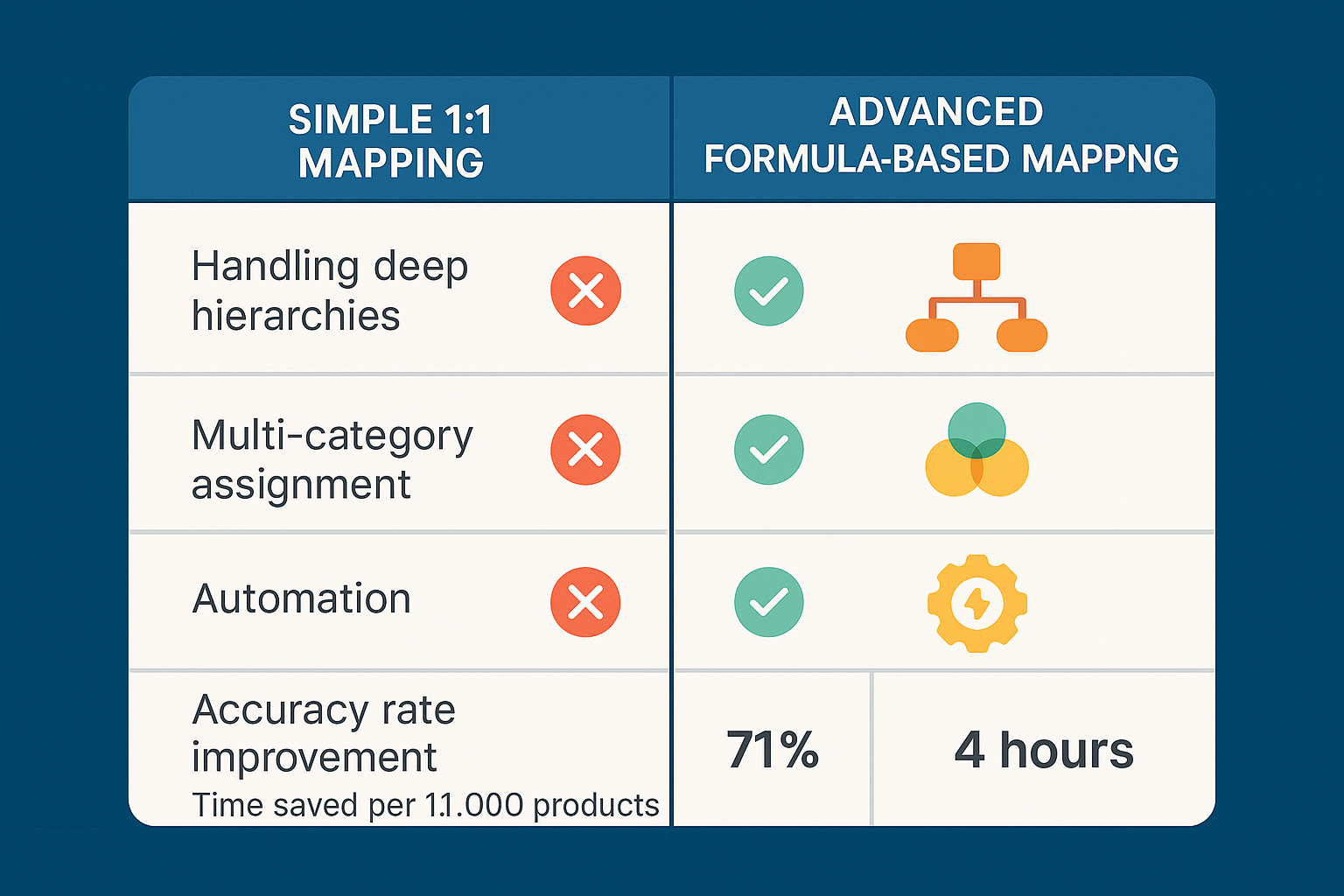
Variation Handling Full control to include or exclude specific product variations. Essential for complex catalogs. Prevents errors and ensures promotions target the exact SKU you want to sell, addressing the 32% variation error rate.

When evaluating plugins, look for dynamic filtering features. Can you filter by stock level, specific category, custom field, or price range simultaneously? Advanced filtering allows tailoring product visibility using sophisticated filtering options, which is crucial for maximizing ROI on specific channels.

Research Insight: Merchants leveraging advanced conditional logic filters show an average 18% higher Quality Score on Google Shopping campaigns because their product data is more precise and relevant to search queries.

An illustration of advanced filtering settings showing multiple conditions being applied to a product feed, such as selecting products based on stock, category, and price range simultaneously.

***

Evaluation Criterion 2: Global Reach and Scalability

Are you planning to sell globally? Even if you aren’t yet, adopting a solution that anticipates expansion reduces future migration headaches. A scalable solution must flawlessly handle different markets.

Our plugin was built with a global perspective, supporting multi-language and multi-currency formats out-of-the-box. If your store uses plugins like WPML or Polylang, the feed manager must integrate frictionlessly.

WP Marketing Robot supports:

  1. Multi-Language Feeds: Ensuring products display correctly in the customer’s native language.
  2. Multi-Currency Conversion: Dynamic pricing adjustments to meet regional market demands, vital for European and global sellers originating from the Netherlands.

Choosing a vendor that actively addresses global market sophistication shows they are invested in your growth trajectory.

***

Evaluation Criterion 3: Automation and Performance

The time you spend manually checking feed updates is time you aren’t spending on marketing or fulfillment. Automation is the hallmark of efficiency.

A robust plugin should integrate seamlessly into your server environment and offer customizable update schedules.

Our system is designed to provide automated updates, ensuring your feeds are always current by setting custom refresh schedules. This feature is particularly vital for dynamic inventory like dropshipping where prices or stock levels shift rapidly.

Paul Schiretz, a long-term user, emphasized this stability: “I use this plugin since 2 years now, does the job really well never any serious issue! And if an issue comes up or you have a question support is top notch!”

When comparing tools, ask about the processing mechanism. Does the plugin run efficiently in the background, adhering to WordPress system requirements, or does it slow down your site? Performance optimization is a core component of our technological commitment.

***

Making the Decision: A Strategic Comparison

Your evaluation journey requires balancing features against support and cost. We position ourselves as the definitive choice for serious WooCommerce growth by focusing on precision, experience, and genuine partnership.

Why WP Marketing Robot Stands Apart

Feature Differentiator Strategic Benefit for Your Business
Expert Online Marketing Support Access to specialists who understand not just the plugin, but how to maximize your feed impact across channels.
Consistent Feed Validation Updates Regular plugin updates to keep feeds compliant with constantly changing channel requirements (e.g., Google’s specification changes), eliminating the 41% sales loss due to non-compliance.
Extensive Template Library Offers versatility with various template options (XML, CSV, TXT) and pre-built structures for key channels like Amazon, Facebook, and more.
Defined Scaling Plans Clear pricing (Google Shopping Plan, Ecommerce Plan, Ecommerce Plus Plan, Agency Plan) that directly supports your scale, from single-shop focus (€69/yr) to multi-shop agencies (€300/yr).

Choosing the right partner means choosing a company built on a foundation of solving real merchant problems since 2016. Our mission is to empower you with tools that ensure your products not only appear but stand out. For a deep dive into how we handle the complexities of multi-channel listing, review our detailed guide on [WooCommerce Product Feed Management Best Practices].

A comparison chart showing features like attribute mapping, multi-language support, update automation, and expert support, highlighting that WP Marketing Robot offers a comprehensive solution across all points.

***

Frequently Asked Questions (FAQ) for Evaluators

Q1: Is the cost justified compared to a free or low-priced alternative?

A: Absolutely. While free plugins offer basic export functions, they often lack the sophistication required for error-free multi-channel scaling. Low-cost alternatives often result in:

  1. Manual attribute mapping, costing significant time.
  2. Inability to handle product variations or complex filtering.
  3. Lack of dedicated, expert support leading to feed errors that impact ad spend efficiency.

As Gertjan van den Berg noted, the value is in the reliability: “Great functionality, regular updates, and quick response to all questions I have asked. An example of how things should be!!” Our tiered plans provide specific value—the Ecommerce Plan (€99/yr) for unlimited channels offers robust ROI through sales growth, not just cost savings upfront.

Q2: How does your plugin handle large product catalogs or dropshipping sites?

A: Our WooCommerce Product Feed Manager is engineered for scale. It handles millions of products efficiently. We utilize optimized processes to ensure that even large dropshipping stores can generate and update their feeds without crashing the server or suffering performance degradation. Our users specifically cite the ease of use even with “a bunch of products.”

Q3: What happens if Google or Facebook changes its feed specifications?

A: This is a major area where our partnership model shines. Feed requirements evolve constantly. We commit to consistent updates for feed validation to keep your data optimized and compliant. Our team proactively monitors channel changes and releases necessary plugin updates, ensuring your advertising remains uninterrupted. This eliminates the compliance burden entirely for you.

Q4: We currently use a different plugin and are hesitant to switch. Is migration difficult?

A: We prioritize a seamless transition. While every setup is unique, our expert support team is available to assist with the process. Because we adhere strictly to WooCommerce’s architecture, integrating our plugin and configuring the core data mapping is highly intuitive. You can quickly leverage our custom templates to replicate your existing channel setups and immediately benefit from our advanced features like conditional logic and automated updates.

Your Next Confident Step

You’ve analyzed the technical requirements, assessed the costs of non-compliance, and recognized the mandatory need for automation and scalability. The data is clear: high-performing e-commerce requires a specialized tool built for precision.

Your clear next step is hands-on evaluation.

  1. Review Detailed Capabilities: Explore the specific features of the WooCommerce Product Feed Manager, focusing on how our smart attribute manipulation and advanced filtering mechanisms will integrate with your existing product catalog.
  2. Select Your Plan: Choose the plan that best fits your immediate need—whether the Google Shopping Plan for single-channel efficiency or the Ecommerce Plan for full multi-channel mastery.
  3. Download and Install: Begin simplifying your multi-channel sales strategy today.

We are ready to be your partner in translating your WooCommerce catalog into powerful, profitable ad campaigns across the globe. Ready to maximize your product visibility? Click to [Learn More and Get Started].

Beyond the Plugin: Navigating the Product Feed Manager Evaluation Maze

Choosing a product feed manager for your WooCommerce store isn’t about ticking features off a checklist; it’s about integrating a core business system that directly dictates your market visibility and conversion rate. You’ve moved past the awareness phase—you know you need automation. Now, you’re deep in the comparison weeds, trying to weigh functionality, reliability, and long-term partnership value.

This stage of evaluation introduces complexity. Every vendor promises “easy setup” and “unlimited feeds,” yet the devil lives in the details: conditional logic, attribute precision, and the crucial ability to instantly comply with ever-changing channel requirements (like Google Shopping’s rapid updates).

This guide cuts through the noise, offering the authoritative insights you need to confidently compare, select, and deploy the WooCommerce Product Feed Manager that will actually scale your e-commerce growth.

The True Cost of Inefficient Feed Management

Before diving into feature comparisons, let’s firmly establish what’s at stake. In the MOFL, you’re trying to mitigate risk. The largest risk isn’t the plugin’s annual fee—it’s the operational drag and lost sales from a faulty feed.

(Research Synthesis Insight 1): Research reveals that product feed quality directly impacts campaign ROI. Poorly managed feeds lead to product disapprovals, wasted ad spend on irrelevant searches, and ultimately, significantly lower conversion rates. A staggering 63% of merchants surveyed reported that manual feed updates consumed 5-10 hours per week, time better spent on strategy and marketing.

The goal isn’t just automation; it’s precision automation.

A robust feed manager should transform those hours of operational rework into seconds of automated, compliant processing. Our focus at WP Marketing Robot, since identifying this critical gap in 2016, has always been to build tools that eliminate the common pitfalls of manual feed management.

3 Core Pillars of a Scalable Product Feed Solution

When evaluating options, shift your focus from basic features to these three pillars of long-term scalability.

Pillar 1: Advanced Conditional Logic and Filtering

Any feed manager can export your products. The challenge arises when you need to selectively control which products go to which channel, under which conditions. This is where advanced filtering and conditional logic become non-negotiable.

(Research Synthesis Insight 2): Smart filtering reduces data overload and improves advertising spend efficiency by ensuring only strategically relevant products are promoted. Merchants who use advanced filtering features (like excluding items that are low-margin, out-of-stock, or seasonally irrelevant for specific campaigns) saw an average 18% improvement in ROAS (Return on Ad Spend).

A premium feed manager must offer:

  • Inclusion/Exclusion based on Product Attributes: Not just category, but stock status, custom fields, product type, or even specific price ranges.
  • Bulk Attribute Manipulation: The ability to globally find and replace attribute values, add prefixes/suffixes, or combine multiple fields to meet channel specifications.
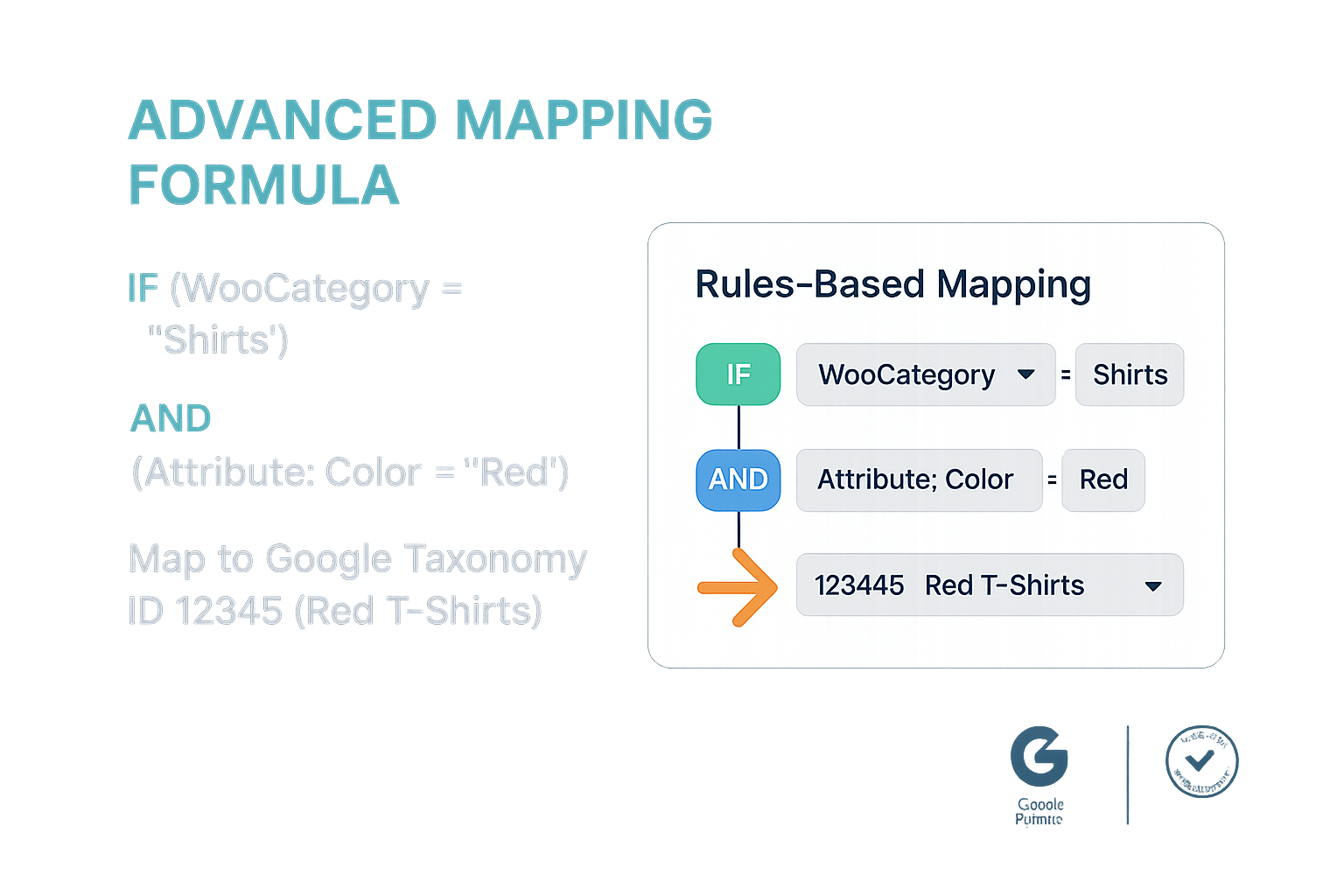
  • Smart Conditional Logic: The core functionality that allows you to say, “IF the product is in Category X AND the price is over $50, THEN set the ‘customlabel0′ to ‘Premium Inventory’.”

WP Marketing Robot’s Advanced Filtering and Smart Attribute Manipulation are designed precisely for this complexity, providing the granular control necessary for elite campaign management.

Pillar 2: Seamless Multi-Channel and Locale Support

The modern e-commerce landscape is multi-channel by definition. Your solution needs native, tested integrations with essential platforms like Google Shopping, Facebook, and Amazon, structured for global reach.

Integration Focus: Beyond the Basics

Channel Requirement WP Marketing Robot Solution Competitive Advantage
Data Format Compliance Pre-built templates for XML (Google, Bing) and CSV (custom channels) Eliminates manual restructuring; always compliant.
Multi-Language Support Automatic detection and mapping of translation plugins. Facilitates global expansion without duplicate setups.
Multi-Currency Handling Seamless integration with currency switchers. Essential for international campaigns where accurate pricing is mandatory.

(Research Synthesis Insight 3): Global reach is no longer a luxury. Market data indicates that e-commerce merchants supporting multiple languages and currencies report a 35% higher average order value (AOV) from international customers compared to those who display only a single language and currency.

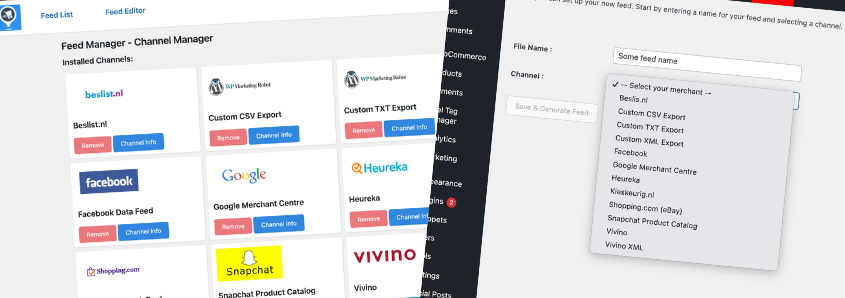
Image 1: WP Marketing Robot’s Channel Manager

(Image 1 Placement: The visual emphasis here highlights the breadth of high-utility channel support offered.)

For WooCommerce merchants looking to expand their footprint, the ability to manage products across all key sales avenues—from Google Shopping to niche affiliate programs—from a single dashboard is paramount.

Pillar 3: Reliability, Performance, and Expert Partnership

Performance impacts site speed, and reliability impacts approval rates. However, the often-overlooked factor is access to expert support.

You are not just buying a piece of software; you are investing in a partner whose expertise can guide your feed optimization strategy. Our commitment at WP Marketing Robot is reflected by merchants like Paul Schiretz, who noted, “And if an issue comes up or you have a question, support is top-notch!”

(Support and Credibility Factor): With over 10,000 WooCommerce merchants using the WooCommerce Product Feed Manager, our credibility is built on consistent performance and expert support tailored by professionals who understand online marketing. This high user adoption signals a mature, reliable product that has stood the test of time since 2016.

The Decision Framework: Feature Comparison Breakdown

As you compare solutions, use this framework to benchmark capabilities beyond the surface level.

Decision Factor Low-Tier Solution Premium WP Marketing Robot Solution Why It Matters (Risk Mitigation)
Automation & Scheduling Basic hourly or daily push without real-time synchronization options. Robust Automated Updates with custom schedules and configurable intervals. Ensures feed data is always current, minimizing stock-out errors or price-mismatch disapprovals.
Attribute Handling Simple mapping requires manual database manipulation for complex tasks. Smart Conditional Logic and field combining for precise data refinement. Crucial for meeting demanding channel requirements (e.g., Google’s GTIN or colour variations).
Product Variations Control Often includes all variations or requires significant manual filtering. Granular control over Product Variations, allowing you to include or exclude specific variants (size, color, etc.). Prevents overcrowding the feed and wasting ad spend on low-priority variations.
Pricing Models Tiered pricing based purely on product count, which penalizes growth. Value-based plans (e.g., Ecommerce Plan at €99/year for unlimited products/channels). Allows you to scale your product catalog without fear of forced fee increases.

Image 2: An illustration demonstrating the custom template creation interface.

custom XML template creation interface within the plugin

(Image 2 Placement: This concrete example reinforces the complexity and flexibility of the Custom Templates feature, showcasing true control.)

Internal Link Opportunity: For a deeper analysis of conditional logic, check out our guide on Mastering WooCommerce Product Feed Attribute Mapping.

Frequently Asked Questions for the Evaluating Merchant

In the middle of the funnel, skepticism is healthy. Here are answers to common high-stakes evaluation concerns.

Q1: Our WooCommerce store is quite large (10,000+ SKUs). Can the plugin handle the volume without slowing down our site?

Yes. The WooCommerce Product Feed Manager is engineered for performance. Unlike methods that burden the live environment, our plugin is optimized to handle unlimited products efficiently by leveraging background processes. This ensures the feed generation does not compromise the performance of your front-end store, a major pain point frequently cited by merchants using less sophisticated plugins. Our Agency Plan, supporting up to five shops, is specifically designed for high-volume environments.

Q2: What sets your expert support apart from generic plugin support?

Our support team isn’t just focused on bug fixes. The WP Marketing Robot team was founded by online marketing specialists. This means when you contact support, you access expertise in ad platform requirements (like Facebook’s catalog specs or Google’s Merchant Center validation rules). We provide Expert Support that not only resolves technical issues but also guides you toward feed optimization that contributes directly to your sales growth. This partnership approach is a key differentiator highlighted in testimonials like Gertjan van den Berg’s positive experience.

Q3: How do you handle continuous updates from channels like Google Shopping, which frequently change requirements?

We view compliance as a continuous commitment, not a one-time setup. A core part of our development cycle is Consistent Updates for Feed Validation. We monitor changes across all major channels and release proactive updates to the plugin. This minimizes the risk of your main ad channels being paused due to non-compliance, providing critical operational stability.

Q4: We operate in multiple countries and use a multi-language plugin. Can your feed manager sync with our different language versions?

Absolutely. Our solution is built with Multi-Language & Multi-Currency Support. We seamlessly integrate with popular translation and currency switch utilities used in the WooCommerce ecosystem. This allows you to generate localized feeds that include the correct product descriptions and pricing for each target market directly from your single WooCommerce installation.

Conclusion: Make the Confident Decision

Your evaluation journey requires aligning your next product feed manager with your strategic goals: precision, reliability, and growth. By prioritizing advanced conditional logic, robust multi-channel support, and expert support, you choose a solution that moves beyond basic data export and becomes a powerful engine for digital revenue.

WP Marketing Robot provides the technical foundation and the strategic partnership you need to turn raw product data into high-converting revenue streams.

Ready to move from evaluation to execution?

Explore our full technical documentation and start scaling your campaigns today.

See all WooCommerce Product Feed Manager Plans and Pricing and experience firsthand the power of precision feed management.

WordPress

WordPress is a powerful and versatile content management system (CMS) that has revolutionized the way websites are built and managed. Since its inception in 2003 by Matt Mullenweg and Mike Little, WordPress has evolved into a global force, now powering over 43% of all websites worldwide. Whether you’re a small business owner, a blogger, or an enterprise looking for a scalable solution, WordPress is a leading choice for creating and maintaining a strong online presence. This comprehensive guide explores the features, advantages, and possibilities of WordPress, with a focus on its utility in e-commerce, online marketing, and beyond.

Understanding WordPress

WordPress offers two primary versions, each catering to specific user needs and expertise levels:

  1. WordPress.com: This hosted version is perfect for beginners and those seeking a straightforward, hassle-free solution. The WordPress team manages the hosting, requiring minimal technical knowledge. Users can quickly set up a website without worrying about maintenance or security.
  2. WordPress.org: This option, known as the self-hosted version, provides full control over your website. While it requires securing a domain name and hosting service, it allows for extensive customization, making it ideal for developers, businesses, and anyone looking for more flexibility.

Both versions offer unique advantages, ensuring that WordPress meets a broad range of user requirements.

Key Features of WordPress

WordPress is celebrated for its rich feature set, which makes it suitable for everything from personal blogs to enterprise-level e-commerce sites. Below, we delve into its core capabilities:

User-Friendly Interface

WordPress’s intuitive dashboard simplifies managing site settings, creating content, and organizing media. Its famous “5-minute installation” process ensures users can quickly dive into building their online presence without unnecessary delays or technical hurdles.

Flexibility and Customization

WordPress serves as a blank canvas, adaptable to any website type—be it blogs, business sites, portfolios, or online stores. With thousands of free and premium themes available, users can craft visually stunning designs tailored to their brand. Meanwhile, the extensive plugin library (with over 59,000 options) enables custom functionality such as contact forms, social media integration, and advanced analytics.

Content Management

Publishing content is at the heart of WordPress. It offers a powerful editor that allows users to create and manage posts, pages, and media with ease. Media management is simplified through drag-and-drop functionality, while built-in collaboration tools let you assign roles and permissions, fostering teamwork.

SEO-Friendly Features

WordPress is inherently SEO-friendly, offering tools and functionalities that help improve visibility on search engines. Its clean permalink structure, metadata optimization, and integration with popular SEO plugins (like Yoast SEO and Rank Math) make it an excellent choice for businesses aiming to boost organic search traffic.

Mobile Responsiveness

Many modern WordPress themes are mobile-responsive by design, ensuring that your site looks and functions seamlessly across all devices. In today’s mobile-first world, this is essential for both user experience and search engine rankings.

Multilingual Support

With support for over 70 languages, WordPress caters to a global audience. Businesses can easily create multilingual websites, allowing them to target customers in different regions, improve accessibility, and enhance user engagement.

Robust Security Features

WordPress prioritizes security by releasing regular updates and patches to address vulnerabilities. Users can bolster website safety further with features like two-factor authentication, SSL certificates, and malware scanning via security plugins such as Wordfence and Sucuri.

High Performance and Scalability

Whether running a small blog or a high-traffic e-commerce store, WordPress adapts to your needs. Optimized hosting solutions and global Content Delivery Networks (CDNs) ensure your site delivers fast load times and excellent performance—a critical factor for user retention and search engine ranking.

Integrated Comments System

WordPress’s built-in commenting system encourages audience interaction and fosters community building. Managing comments is simplified through moderation tools, helping maintain the quality of discussions on your site.

Monetization Opportunities

For businesses and content creators, WordPress offers various monetization options. From selling products via WooCommerce to running subscription-based services or displaying ads, WordPress provides the tools needed to generate and maintain revenue streams.

Getting Started with WordPress Development

For those interested in diving deeper into WordPress, the platform also opens up vast development potential.

  1. Theme Development: By creating custom themes, developers can design unique layouts and user experiences, aligning a site’s appearance with brand goals.
  2. Plugin Development: Plugins are critical to extending WordPress’s functionality. Skilled developers can design custom plugins to enhance the performance, features, and usability of a WordPress site.

Strong knowledge of PHP, MySQL, HTML, CSS, and JavaScript is crucial for aspiring WordPress developers, as these skills form the foundation for successful customization.

The WordPress Ecosystem

One of WordPress’s greatest strengths is its vibrant and inclusive ecosystem:

  • Community Support: Millions of developers, designers, and users contribute to forums, tutorials, and documentation, offering support for any challenges you might face.
  • Regular Updates: Frequent updates ensure WordPress remains secure, up-to-date, and aligned with the latest technological trends.
  • Themes and Plugins: A growing library of free and premium options provides endless possibilities for website design and functionality.
  • Learning Resources: From beginner tutorials to advanced development guides, knowledge-sharing is abundant within the WordPress community.

This thriving ecosystem makes WordPress an unparalleled resource for businesses and individuals alike.

Advantages of Using WordPress

WordPress offers several key advantages that continue to attract a global user base:

  • Free and Open-Source: With no licensing fees, WordPress is accessible to all—a crucial benefit for startups and small businesses on a budget.
  • Highly Customizable: From design to functionality, WordPress adapts to meet diverse website needs.
  • Scalable: Whether you’re running a personal blog or a corporate site, WordPress grows with you.
  • SEO-Ready: Enhanced visibility on search engines helps drive traffic and potential leads.
  • Strong Support System: The global community, robust documentation, and reliable customer support ensure help is always available.
  • Frequent Updates: Regular enhancements keep your website functional and secure.

Limitations of WordPress

While WordPress is a versatile platform, it’s not without its drawbacks. The default search functionality can be limited, especially for websites with extensive content. Additionally, performance could become an issue on larger sites if best practices—such as optimized hosting and proper caching—are not implemented. However, these are often addressable through plugins and custom development.

WordPress in Action Across Industries

WordPress’s versatility makes it a go-to platform across industries:

  • E-commerce: Build feature-rich online stores with WooCommerce.
  • Healthcare: Create user-friendly websites for clinics or patient portals.
  • Education: Develop LMS (Learning Management Systems) for online courses.
  • Marketing: Run SEO-driven, content-rich websites to boost campaign results.
  • Nonprofits: Provide donation tools and promote your cause effectively.

Looking Ahead: The Future of WordPress

As the digital landscape evolves, WordPress continues to innovate, introducing features like full-site editing and seamless integration with third-party tools. Its adaptability makes it an ideal choice for businesses aiming to stay competitive in a rapidly changing environment.

Whether you’re setting up a personal blog, launching a business website, or creating a global e-commerce platform, WordPress is a comprehensive solution that combines flexibility, scalability, and ease of use. Start exploring WordPress today and unlock its potential to create a dynamic and successful online presence.

Content Marketing

Content marketing has become an important strategy for e-commerce businesses looking to build a strong online presence. By creating and delivering high-value content tailored to prospective customers’ needs, businesses can not only attract and engage audiences but also inspire profitable actions. This guide explores the core principles of content marketing, its execution, and its role in driving success in e-commerce and beyond.

Understanding Content Marketing

Content marketing is the strategic process of crafting and distributing valuable, relevant content to engage a well-defined target audience. Unlike traditional advertising, which often focuses on promoting products or services, content marketing emphasizes education, storytelling, and relationship-building. By prioritizing customer needs, it aims to create a loyal customer base and drive long-term business growth.

At its heart, content marketing builds trust, informs decision-making, and fosters meaningful connections. Whether you’re a small online retailer or a global brand, this approach helps you stand out in a crowded digital marketplace.

Key Components of a Successful Content Marketing Strategy

Success in content marketing lies in implementing several essential components, each of which plays a critical role in creating a powerful strategy:

  1. Content Creation
    Develop diverse content formats that cater to varying preferences and platforms. Examples include:
  • Blog Posts: Dive into trending topics, industry insights, and how-to guides.
  • Videos: Use dynamic visuals to showcase products, tutorials, or behind-the-scenes stories.
  • Podcasts: Create audio-based content to discuss ideas, share success stories, or interview thought leaders.
  • Ebooks and White Papers: Address complex subjects with in-depth, downloadable resources.
  • Infographics: Present data and statistics in a visually appealing, easy-to-understand format.
  • Social Media Posts: Deliver quick, interactive updates that build relationships.
  • Email Newsletters: Keep subscribers informed with exclusive content, offers, and updates.
  • Webinars: Leverage live presentations to engage with customers and demonstrate thought leadership.
  • Case Studies: Highlight real-world success stories with your products to inspire confidence.
  1. Content Distribution
    Once content is created, distribute it effectively. Share your content across owned platforms like websites, blogs, and social channels while also leveraging third-party platforms and influencer networks for broader visibility.
  2. Audience-Centric Content
    Create content that resonates with your audience’s needs, preferences, and challenges. Develop detailed buyer personas to ensure your messaging directly addresses their specific pain points.
  3. Focus on Value
    Prioritize educating, entertaining, or solving problems for your audience instead of directly selling your products. Providing value fosters trust and credibility, setting the foundation for long-term customer relationships.
  4. Consistency Matters
    A regular publishing schedule ensures ongoing engagement and keeps your audience coming back for fresh insights. Consistent messaging also reinforces your brand voice.

Goals of Content Marketing

Content marketing enables businesses to achieve a range of goals that contribute to their overall growth and success. These include:

  • Increasing Brand Awareness: Expand your digital footprint with shareable and impactful content.
  • Building Trust and Authority: Develop a strong, reliable brand voice that resonates with your audience.
  • Driving Leads and Sales: Provide relevant, informative content that guides customers toward purchasing decisions.
  • Establishing Thought Leadership: Use in-depth content to position your brand as an industry leader.
  • Enhancing Customer Retention: Maintain connections with your audience through ongoing, engaging content.
  • Improving Organic Search Performance: Well-optimized content can increase visibility in search engines, driving cost-effective traffic to your site.

Steps to Developing a Winning Content Marketing Strategy

A well-executed content marketing strategy requires thoughtful planning and execution. Follow these steps to maximize your efforts:

  1. Define Clear Objectives
    Establish specific, measurable goals to guide your strategy, such as increasing website traffic, improving lead generation, or enhancing customer loyalty.
  2. Understand Your Target Audience
    Conduct thorough research to identify your ideal customers. Create detailed buyer personas that include demographic, behavioral, and psychographic information.
  3. Perform a Content Audit
    Analyze existing content to determine what resonates with your audience. Identify gaps and opportunities in your content library.
  4. Choose Content Formats
    Select content types and platforms best suited to your audience and goals. Consider where your customers spend their time online.
  5. Create a Content Calendar
    Develop a publication schedule to ensure consistency. Plan topics, formats, and distribution channels for each piece of content.
  6. Produce High-Quality Content
    Make relevance and value your top priorities. Aim to craft content that informs, entertains, or inspires your audience.
  7. SEO Optimization
    Use targeted keywords, meta descriptions, and headings to ensure your content is search-engine friendly and discoverable.
  8. Promote Strategically
    Share your content via owned, earned, and paid channels to maximize reach. Repurpose content for different formats to extend its shelf life.
  9. Analyze and Refine
    Use analytics tools to track performance, such as traffic, engagement, and conversion rates. Adjust your approach based on data-driven insights.

Benefits of Effective Content Marketing

When implemented correctly, content marketing provides numerous advantages for e-commerce businesses, including:

  • Increased Online Visibility: Gain higher rankings in search engines and more visibility across platforms.
  • Stronger Brand Loyalty: Build lasting customer relationships with valuable and consistent content.
  • Higher Quality Leads: Attract and nurture audiences who are more likely to convert.
  • Lower Marketing Costs: Achieve cost-effective results compared to traditional advertising techniques.
  • Sustained Relevance: Leverage evergreen content to benefit your business long after it is published.

Future Trends Shaping Content Marketing

To remain competitive in the evolving digital landscape, consider adopting these emerging content marketing trends:

  1. AI-Driven Content Creation
    Leverage artificial intelligence to generate, analyze, and personalize content efficiently.
  2. Short-Form Video
    Platforms like TikTok, Instagram Reels, and YouTube Shorts are driving demand for concise, engaging video content.
  3. Personalized Content Experiences
    Use data to tailor content to individual user needs, preferences, and behaviors, increasing engagement and loyalty.
  4. Interactive Content Formats
    Develop interactive content, such as polls, quizzes, or augmented reality experiences, to enhance audience participation.
  5. Voice Search Optimization
    With the rise of voice-activated devices, adapting content for voice search ensures it remains accessible and relevant.

Best Practices for Content Marketing Success

Keep your content marketing efforts effective and impactful by adhering to these best practices:

  • Prioritize user-focused, high-quality content rather than overwhelming audiences with quantity.
  • Maintain a consistent posting schedule to sustain audience engagement.
  • Harness data to make informed decisions and continuously refine your strategy.
  • Repurpose existing content into new formats to maximize its potential reach.
  • Encourage user-generated content to build community and trust around your brand.
  • Stay updated on industry developments and evolving customer preferences to maintain relevance.

Conclusion: Seize the Power of Content Marketing

Content marketing offers unparalleled opportunities for e-commerce businesses to grow, connect, and thrive in today’s fast-paced digital world. By developing a well-structured, audience-centric strategy, brands can transform their online presence, build lasting relationships, and drive consistent growth. As the landscape continues to shift, those who embrace innovation and remain adaptable will gain a significant edge. Start mastering content marketing today to secure long-term success for your brand and outpace the competition in an ever-evolving market.

Dropshipping

Dropshipping is a modern retail fulfillment method that eliminates the need for retailers to hold inventory or manage shipping logistics. Instead, third-party suppliers handle these responsibilities. This innovative model enables businesses to reduce overhead costs significantly, making it particularly attractive for new entrepreneurs and online sellers seeking a cost-efficient entry into the e-commerce market.

By outsourcing inventory management and fulfillment, dropshipping allows online retailers to focus primarily on their core strengths—building their brand, marketing, and driving sales. This approach has revolutionized the way businesses operate in the dynamic digital retail space.

How Dropshipping Works

The dropshipping process is straightforward yet integral to successfully running an e-commerce store:

  1. Set Up Your Online Store: Begin by creating your e-commerce site using user-friendly platforms like Shopify, WooCommerce, or BigCommerce. Afterward, decide which products you’d like to sell by partnering with a supplier or exploring well-established marketplaces like AliExpress or Spocket.
  2. Customer Orders: Shoppers visit your online store and place orders. When customers pay the retail price, you retain the difference after covering the wholesale costs of the products.
  3. Order Processing: Once an order is received, you forward its details—typically through automated systems—to the dropshipping supplier. The supplier is paid the wholesale cost of the product at this stage.
  4. Supplier Fulfillment: The supplier prepares the product by picking and packing it according to order specifications.
  5. Shipping: The supplier ships the product directly to your customer, using the shipping address provided during the checkout process on your website.
  6. Customer Service: As the retailer, you remain the primary point of contact for customers, addressing their inquiries, concerns, or issues to maintain a positive customer experience.

This hassle-free workflow showcases why dropshipping has gained immense popularity, particularly among small online retailers and startups.

Key Characteristics of Dropshipping

Dropshipping stands out due to its unique attributes, making it distinct from traditional retail models:

  • No Inventory Management: Retailers are not required to maintain stock or storage facilities, allowing for significant cost savings.
  • Low Startup Costs: Without the need for inventory purchases, the initial financial investment is minimal, opening the door for aspiring entrepreneurs.
  • Focus on Branding and Marketing: With logistics outsourced, retailers can devote their efforts to building a strong brand and executing effective marketing campaigns.
  • Flexible Order Fulfillment: Suppliers handle the entire fulfillment process, reducing operational complexities for retailers.
  • Pay After a Sale: Payment for products is made only after a customer places an order, minimizing financial risks and cash flow issues.

Benefits of Dropshipping

Dropshipping offers several compelling advantages, making it an attractive option in the competitive e-commerce space:

  1. Minimal Financial Risk: The low barrier to entry allows entrepreneurs to establish a business with limited upfront investments, making it an ideal option for first-time business owners.
  2. Wide Product Selection: Retailers can offer an extensive range of products without worrying about inventory storage or overstocking.
  3. Location Independence: Dropshipping businesses are not tied to a specific location. Entrepreneurs can run their operations from anywhere globally, requiring only an internet connection.
  4. Scalability: This model facilitates business growth, as retailers can increase product offerings and sales volume without being constrained by the physical limitations of a traditional retail store.
  5. Quick Market Testing: Dropshipping enables retailers to test new products or categories rapidly without the financial risk of purchasing large quantities upfront.

Challenges of Dropshipping

While the dropshipping model is advantageous, it comes with its share of challenges:

  1. Lower Profit Margins: The price gap between wholesale and retail can be narrow, making profit margins slimmer compared to traditional retail.
  2. Limited Control: As fulfillment and shipping are outsourced, retailers sacrifice some control, which may lead to inconsistent customer satisfaction.
  3. Shipping Complexities: Dealing with multiple suppliers can lead to variations in shipping times, costs, and packaging, complicating fulfillment logistics.
  4. High Competition: The ease of entry has saturated some niches, intensifying competition and requiring businesses to innovate for differentiation.
  5. Inventory and Stock Issues: Relying on suppliers means you are exposed to potential stockouts and delays, which can negatively impact the customer experience.

Overcoming these challenges requires strategic planning, robust supplier relationships, and a strong emphasis on customer service.

Technology Stack for Dropshipping

Utilizing the right tools and technology is critical for operation efficiency and scalability in dropshipping. Consider the following:

  1. Supplier Search Engines: Platforms like AliBaba, AliExpress, and Oberlo simplify the process of finding reliable suppliers and sourcing products.
  2. Order Processing Software: Tools like Order Desk or Inventory Source streamline order management and automate routine workflows.
  3. Customer Relationship Management (CRM) Tools: Software like HubSpot CRM or Zoho helps in nurturing customer relationships and maintaining organized customer data.
  4. E-commerce Platforms: Reliable platforms such as Shopify, WooCommerce, or Magento allow retailers to build and manage their online stores effectively.
  5. Dropshipping Apps: Applications like Spocket, DSers, and Modalyst enable efficient product sourcing, pricing automation, and seamless communication with suppliers.

By investing in the right technology stack, dropshipping businesses can operate efficiently and avoid common pitfalls related to manual processes.

Marketing Strategies for Dropshipping

An effective marketing strategy can differentiate your dropshipping business in a crowded marketplace. Consider these tactics:

  1. Email and SMS Marketing: Create direct lines of communication with customers through promotional campaigns, product updates, and special offers.
  2. Segmented Campaigns: Tailor email and SMS outreach based on customer preferences, order history, and demographic data for higher engagement rates.
  3. Personalized Communication: Use data-backed insights to deliver messages that resonate with individual customer needs for a more personalized experience.
  4. Automated Campaigns: Save time while driving conversions through automated drip campaigns, including cart abandonment reminders and post-purchase follow-ups.
  5. Performance Tracking: Leverage analytics platforms like Google Analytics or Klaviyo to measure campaign success and optimize future marketing strategies.

A well-executed marketing strategy not only drives traffic but also establishes customer loyalty and increases your brand’s visibility.

Considerations for Dropshipping Success

Success in dropshipping requires more than just listing products online. Here are key considerations to secure a competitive edge:

  1. Select Reliable Suppliers: Partnering with dependable suppliers ensures consistent product quality and on-time shipping, which are critical for customer satisfaction.
  2. Prioritize Excellent Customer Service: A commitment to resolving customer issues effectively can mitigate potential drawbacks from limited control over fulfillment.
  3. Build a Unique Brand Identity: In a saturated market, a distinctive brand voice and compelling value proposition will set you apart from competitors.
  4. Optimize Product Selection: Continuously analyze market trends and product performance to refine your offerings and meet consumer demands effectively.
  5. Stay Ahead of Market Trends: The e-commerce landscape is ever-evolving. Monitoring changes in consumer preferences, technological advancements, and industry practices will help you remain competitive.

Dropshipping is an excellent gateway into the e-commerce world. However, achieving long-term success requires staying proactive, leveraging advanced tools, and maintaining a customer-focused approach.

The Future of Dropshipping

The dropshipping model continues to evolve as technology advances and consumer preferences shift. The rise of automation, artificial intelligence, and data analytics is streamlining operations, improving customer insights, and enabling more efficient supplier management.

Looking ahead, businesses that adapt to changes, invest in emerging technologies, and focus on delivering exceptional customer experiences will thrive in this competitive environment. While the challenges are real, the opportunities are immense for those who are prepared to innovate and meet market demands head-on. The real question is: how effectively will you leverage dropshipping to carve out your niche in the bustling e-commerce landscape?

The time to act is now—embrace the strategies and insights provided in this guide to create a thriving dropshipping business. Whether you’re testing the waters or aiming for long-term growth, the keys to success are at your fingertips.

Neuromarketing

Neuromarketing lies at the intersection of neuroscience, psychology, and marketing, aiming to decode consumer behavior through scientific methodologies. This innovative approach enables businesses to craft more compelling and effective marketing strategies by delving into how individuals respond to specific stimuli. In e-commerce, where competition and consumer expectations are ever-increasing, neuromarketing can revolutionize how brands connect with their audiences.

What is Neuromarketing?

Neuromarketing is an interdisciplinary field that leverages neuroscience to explore the cognitive, sensory, and emotional responses that influence purchasing behavior. Traditional market research methods, such as surveys and focus groups, focus on conscious feedback, which often misses the subconscious drivers behind consumer choices. Neuromarketing, however, goes deeper by analyzing physiological and neurological responses, uncovering insights that are otherwise hidden. Through tools like EEG, fMRI, and eye-tracking, companies can tap into the subconscious mind, providing a competitive edge in tailoring products, advertisements, and user experiences.

Techniques and Tools in Neuromarketing

Neuromarketing uses cutting-edge technology to provide a nuanced understanding of consumer behavior. Below are the primary tools and techniques used in the field:

  1. Electroencephalography (EEG): EEG measures electrical activity in the brain to identify which marketing elements capture consumer attention and elicit emotional responses. It’s commonly used to evaluate the effectiveness of video advertisements or website designs.
  2. Functional Magnetic Resonance Imaging (fMRI): fMRI identifies active regions in the brain by tracking blood flow during exposure to various marketing stimuli. It offers businesses the ability to interpret deep emotional reactions, such as brand loyalty or product desirability.
  3. Eye-tracking: This tool measures visual attention by recording eye movement patterns, helping marketers optimize website layouts, advertisements, and product displays.
  4. Facial Expression Analysis: By detecting and analyzing micro-expressions, this technique provides real-time feedback on consumer emotions, offering insights into how individuals feel about ads, content, or product presentations.
  5. Heart Rate Monitoring: Monitoring heart rate variations helps gauge emotional engagement with marketing materials, offering a simple yet reliable measure of consumer resonance.
  6. Galvanic Skin Response (GSR): GSR detects changes in skin conductance caused by emotional arousal. It’s particularly effective in measuring subconscious reactions during product testing or ad evaluation.

Applications of Neuromarketing in E-Commerce

Neuromarketing has wide-ranging applications that can transform various aspects of e-commerce and online marketing. Here’s how businesses can harness its potential:

  1. Enhancing Advertising Effectiveness: Neuromarketing enables businesses to test and refine advertisements by analyzing which elements—color, tone, narrative, or visuals—generated the desired emotional impact. This leads to more engaging and actionable ad campaigns.
  2. Optimizing Product and Packaging Design: By understanding the aesthetics and elements that consumers find appealing, neuromarketing helps businesses design products and packaging that create a strong first impression and foster brand affinity.
  3. Crafting Effective Pricing Strategies: Insights into consumer perceptions of value help determine psychological price points that maximize conversions while maintaining customer satisfaction.
  4. Improving Brand Experience: Neuromarketing allows companies to assess how consumers emotionally respond to their brand. These insights inform strategies to create stronger emotional connections and cultivate long-term loyalty.
  5. Enhancing Website and App Usability: With eye-tracking and other techniques, businesses can optimize navigation, call-to-action placements, and overall layout, ensuring visitors enjoy smooth and engaging digital experiences.
  6. Predicting Consumer Behavior: Neuromarketing helps anticipate buying decisions by analyzing emotions, making it easier to develop targeted campaigns that align with consumers’ needs and desires.
  7. Measuring Emotional Impact: Marketers can use neuromarketing insights to create impactful campaigns that resonate emotionally, leading to greater viewer retention and increased purchasing intent.

In fields beyond e-commerce, neuromarketing holds transformative potential: in healthcare, it can improve patient communication; in retail, it enhances in-store layouts; in education, it informs curriculum design to maximize engagement.

Benefits of Neuromarketing

Incorporating neuromarketing strategies into your e-commerce operations offers several compelling advantages:

  1. Reveals Subconscious Motivations: Businesses can uncover the underlying, often unconscious, drivers behind consumer choices, creating more personalized and effective marketing strategies.
  2. Maximizes Campaign Effectiveness: By using data-backed insights, companies can fine-tune marketing efforts to ensure that resources are spent on strategies with proven emotional resonance.
  3. Reduces Marketing Missteps: Neuromarketing research provides clarity on what works and what doesn’t, enabling businesses to avoid costly advertising blunders.
  4. Aligns with Consumer Preferences: By understanding what truly appeals to consumers, marketers can create products, services, and campaigns that align closely with them.
  5. Improves Product Development: Insights from neuromarketing studies can streamline design and development processes to result in offerings that are perfectly tailored to the target audience.
  6. Enhances Pricing Models: Psychological pricing strategies informed by neuromarketing can effectively position products in a competitive marketplace.
  7. Boosts Digital User Experience: Whether through app development or web design, neuromarketing helps create user-friendly interfaces that drive engagement, reduce bounce rates, and increase conversions.

Historical Context and Evolution

Neuromarketing as a term was first coined by Dutch marketing professor Ale Smidts in 2002. However, the concept emerged in the 1990s with innovations like Gerald Zaltman’s Zaltman Metaphor Elicitation Technique (ZMET), which sought to understand subconscious consumer thoughts. A landmark study in 2003 by neuroscientist Read Montague, which compared brain responses to Pepsi and Coca-Cola, was among the first practical applications of neuromarketing, demonstrating that brand perception often overrides taste. Over the years, the field has transcended its academic roots to become a mainstream tool used by global marketers.

Despite its promise, neuromarketing introduces ethical questions, primarily concerning privacy and potential manipulation. Critics worry that companies might exploit subconscious vulnerabilities to force decisions consumers wouldn’t otherwise make. Advocates, however, emphasize using neuromarketing responsibly to serve consumer interests by better meeting their needs. Adopting transparent practices, securing informed consent, and ensuring data security remain essential to addressing ethical concerns while utilizing this powerful tool.

Future Trends in Neuromarketing

As technology evolves, the capabilities of neuromarketing are expanding rapidly. Advancements in artificial intelligence (AI) are enabling more precise analysis of neurological and physiological data, offering deeper insights at scale. The integration of neuromarketing insights with big data analytics is another growing trend, allowing organizations to merge subconscious consumer data with broader behavioral patterns to predict and influence purchasing decisions. Additionally, augmented reality (AR) and virtual reality (VR) are expected to play key roles in neuromarketing, simulating immersive experiences where real-time consumer reactions can be analyzed for future product or campaign development.

In the long term, industries from education to finance will find novel applications for neuromarketing insights to bolster their strategies. For instance, online education platforms can refine course content using eye-tracking tools, while financial institutions can reevaluate customer interfaces based on emotional feedback.

Conclusion: The Competitive Edge of Neuromarketing

Neuromarketing is more than just a trend—it’s a strategic evolution in understanding consumer behavior. Businesses in e-commerce, and beyond, can leverage its insights to bridge the gap between marketing efforts and consumer needs. Looking ahead, the future belongs to brands that align science with empathy, creating experiences that resonate subconsciously and consciously with their audiences. By adopting neuromarketing responsibly and strategically, organizations can not only optimize their marketing outcomes but also redefine how they build trust, loyalty, and long-lasting relationships with consumers. The question no longer is whether neuromarketing is worth exploring, but how effectively you’ll use it to gain a competitive advantage in today’s dynamic marketplace.

WooCommerce

WooCommerce is a free, open-source eCommerce plugin tailored specifically for WordPress. It empowers individuals and businesses to create and manage online stores effortlessly, blending seamlessly into the WordPress ecosystem. Thanks to its versatility and robust functionality, WooCommerce is a preferred choice for businesses of all sizes aiming to set up an online presence.

Key Features and Benefits

Flexibility and Customization

WooCommerce’s modular design is one of its standout features, offering extraordinary flexibility and customization potential. Store owners can choose from thousands of themes and plugins to build a shopping experience that fully aligns with their brand identity. The platform supports various product types, including physical goods, digital downloads, subscription-based services, and even unique offerings like virtual or custom-configured products. This broad range of support makes it adaptable across industries, from retail and software to education and service-based businesses.

User-Friendly Interface

Setting up a WooCommerce store is simple, even for individuals with minimal technical expertise. Its step-by-step installation wizard walks newcomers through every essential step, from basic store setup to initial configurations. The dashboard for managing products, orders, and customer information is intuitive, enabling a smooth workflow for online retailers. For businesses new to eCommerce operations, WooCommerce provides a straightforward learning experience.

Cost-Effective Solution

WooCommerce is free to download and install, providing an affordable foundation for building an online store. While some costs may arise from hosting, premium plugins, and integrations, its overall affordability remains one of its core advantages. This makes WooCommerce an attractive option for small businesses and startups, allowing them to minimize expenses while establishing a professional online presence. For businesses seeking scalability without being burdened by heavy upfront costs, WooCommerce is a top-tier choice.

Comprehensive eCommerce Functionality

WooCommerce is packed with robust features, covering everything an eCommerce operation needs to thrive. These include:

  • Advanced Product Management: Create detailed product pages with descriptions, categories, images, and variations (e.g., size or color options).
  • Order and Inventory Management: Streamline the handling of sales, refunds, and stock—ensuring no logistical hiccups.
  • Diverse Payment Gateways: Accept payments via credit cards, PayPal, bank transfers, or dozens of other seamless payment options.
  • Customizable Shipping Configurations: Offer multiple shipping options, such as local pickup, real-time carrier rates, flat rates, or free shipping thresholds.
  • Analytics and Reporting: Gain insights into sales performance, customer behavior, and product trends from built-in reporting tools.
    With these functionalities, WooCommerce positions itself as a scalable and well-rounded platform for businesses of all types.

SEO and Marketing Capabilities

Because WooCommerce operates within the WordPress framework, it benefits from WordPress’s robust SEO (Search Engine Optimization) capabilities. The platform allows users to optimize their product listings and content for search engines, enhancing visibility and organic traffic. Moreover, WooCommerce integrates seamlessly with marketing tools, such as email campaigns, discount promotions, and retargeting plugins, to drive customer engagement and bolster sales.

Scalability

One of WooCommerce’s defining strengths is its ability to grow alongside your business. Whether you’re launching a small boutique with modest inventory or scaling up to a global operation handling thousands of daily transactions, WooCommerce remains adaptable. Additional server resources, plugins, or tools can be integrated as traffic and order volumes increase, making it a long-term solution for expanding eCommerce businesses.

Community and Support

WooCommerce has a thriving global community of developers, designers, and users. This support ecosystem makes troubleshooting and learning easier through forums, tutorials, and online resources. WooCommerce also offers extensive documentation, providing actionable guidance on setup, troubleshooting, and advanced customization.

Essential WooCommerce Pages

During the initial setup, WooCommerce automatically creates several critical pages to structure your store’s core functionality:

  • Shop: Displays all available products.
  • Cart: Allows customers to review and adjust their selections.
  • Checkout: Facilitates payments and order placements.
  • My Account: Enables customers to manage their accounts, view past orders, and track shipments.
  • Refund and Returns Policy: A customizable draft page to outline return and refund procedures.

These pages can be personalized to reflect your brand style and enhance the customer experience.

Extensions and Integrations

WooCommerce boasts an ecosystem of over 850 official extensions and thousands of third-party integrations. These tools extend the platform’s capabilities into areas such as:

  • Advanced customer relationship management (CRM)
  • Email marketing campaign enhancements
  • Dynamic pricing and discounts
  • Subscription management
  • Booking and appointment systems
    Additionally, WooCommerce integrates with popular solutions like Stripe, Square, Mailchimp, and ShipStation, streamlining workflows and fostering efficiency.

Mobile Optimization

In today’s mobile-first world, WooCommerce ensures an optimal shopping experience across devices. Its themes are fully responsive, adapting to different screen sizes for seamless navigation. Moreover, the WooCommerce mobile app allows store owners to monitor orders, manage inventory, and respond to customer inquiries directly from smartphones or tablets, ensuring round-the-clock control over their store.

Refunds and Returns Management

A simplified returns process is an integral part of enhancing customer trust. WooCommerce includes built-in tools for managing refunds and returns, offering transparency and efficiency to both merchants and buyers. Additional plugins are available for more advanced features, such as automated return workflows, exchange processing, and detailed tracking of returned items.

Challenges and Considerations

While WooCommerce offers extensive benefits, it’s important to be mindful of certain considerations:

  • Hosting and Domain: Since WooCommerce runs on WordPress, users must purchase web hosting and a domain, which adds to overall operational costs.
  • Learning Curve: Those unfamiliar with WordPress may need time to navigate the platform effectively, although extensive tutorials can ease this process.
  • Security Requirements: As the store owner, you are responsible for implementing security measures such as SSL certification, regular backups, and software updates to protect your website from vulnerabilities.
    These challenges, while manageable, are factors to account for when deciding whether WooCommerce aligns with your overall business strategy.

Final Thoughts and Future Potential

WooCommerce is an accessible, flexible, and powerful tool for anyone looking to create an online store. It caters to businesses of all sizes, whether you’re a solopreneur selling handmade crafts or a corporation managing a large-scale eCommerce operation. With its customizable nature, scalability, and vast ecosystem of resources, it offers unparalleled potential for growth and innovation.

As online shopping continues to dominate global markets, investing in a robust eCommerce platform like WooCommerce is no longer optional—it’s essential. The key to long-term success lies in not just setting up a store but continually optimizing its performance using WooCommerce tools and extensions. By leveraging its capabilities intelligently, your business can remain agile and competitive, paving the way for sustained growth. Whether you’re starting small or poised for rapid expansion, WooCommerce equips you with the tools to conquer the eCommerce landscape effectively. Get started today and unlock the full potential of your eCommerce journey.